My first-semester final exams ended and summer break began, but between club activities and events, I have not had time to write articles. My apologies for the silence.
In my previous review, I mentioned I would follow up after a month of using the Lenovo Watch 9. Here are my observations.
The Appeal of Hybrid Smartwatches
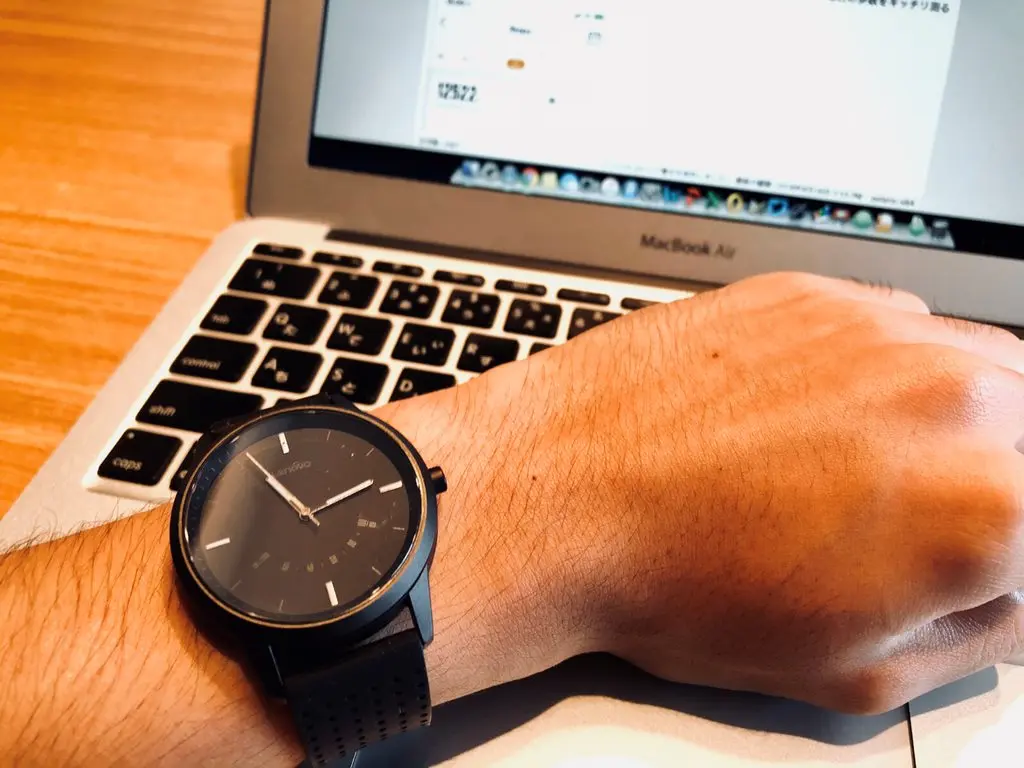
The Lenovo Watch 9 is a rare type of smartwatch that has no screen.
I normally use an Apple Watch Series 3 GPS+LTE model, which has a display. When resting my arm on a desk while working, the Apple Watch frequently mistakes the motion for a wrist raise and lights up. It is unavoidable but slightly distracting — not just for me, but for anyone sitting nearby.
(This is similar to why Apple introduced Theater Mode in watchOS 3.2, after complaints about screens lighting up in movie theaters.)
The Lenovo Watch 9, having no screen at all, functions as a completely normal-looking watch. It is a subtle advantage, but an incredibly welcome one.
That said, the lack of a screen does have its downsides. As you might guess, when the watch vibrates for a notification, you have no idea what the notification is about.
Having used screen-equipped smartwatches for years, I instinctively glance at my wrist thinking “what notification was that?” — only to remember there is no screen. Then I reluctantly pull out my iPhone from my pocket.
If the notification shows on the iPhone lock screen, that is fine. But occasionally nothing is displayed, and I am left wondering what it was.
The absence of a screen is both the greatest strength and the greatest weakness of a hybrid smartwatch. Consider whether you just need to know a notification arrived, or whether you need to see its content, before buying.
Freedom from Charging Every Two Days
Another hybrid smartwatch perk: no charging required. This has been a lifesaver.
I used the original Apple Watch for about two years, and the daily charging was a real hassle. After updating to watchOS 4, battery life became even worse — it often could not last a full day. Upgrading to the Series 3, which could go 2-3 days on a charge, felt like a revelation.
Still, forgetting to charge or having the charger come loose meant a dead watch, which was very frustrating.
The Lenovo Watch 9 needs no charging at all. It runs on a coin cell battery that only needs occasional replacement. The complete absence of charging is genuinely convenient. (So convenient I am saying it twice.)
Surprisingly Good Design for the Price
Since I usually wear an Apple Watch, people around me often ask “what happened?” when they see the Lenovo Watch 9. Most say things like “that looks cool for the price” or “nice design.” Some even want one for themselves, so the design is definitely a strong point.
At the very least, it does not look like a sub-0 watch.
Fitness Tracking Accuracy
Bottom line: treat the tracking features as a bonus.
Step counting is reasonably accurate. I manually counted steps to check the margin of error:
Actual steps walked: 100
Apple Watch Series 3: 103 steps
Lenovo Watch 9: 86 steps
There is a noticeable discrepancy. While individual walking style and band tightness affect accuracy, the gap is significant. If you are looking for precise daily step tracking, the Lenovo Watch 9 is not ideal.
Sleep tracking is even less reliable — it once marked me as sleeping while I was just sitting down. If you need accurate sleep or REM/non-REM tracking, this is not the right device.
For casual, occasional tracking though, it is perfectly fine.
Crown Button Step Goal Indicator
Pressing the crown once causes the hands to move — this indicates your daily step goal progress as set in the app. It took me a while to figure out, but the hands point to the percentage markers on the dial face.
Since this is a follow-up review, that covers most of what I wanted to say.
Overall, the Lenovo Watch 9 is a surprisingly decent smartwatch. I would personally recommend a Mi Band-style device in the same price range, but the Mi Band design can be polarizing, so the Lenovo Watch 9 is a solid alternative.
That said, since I own an Apple Watch Series 3, it will not become my daily driver. I plan to use it as a backup for days when I forget to charge my Apple Watch.
I hope this was at least somewhat helpful. That is all for now.

![[Preparation] Running Windows 10 on ARM on the Lumia 950 XL](https://miyagadget.page/wp-content/uploads/2019/02/kQ6Lm44l.jpg)
Leave a Reply