Hello, this is Shichinomiya (@shichinomiya_s).
Last time I benchmarked a modded RTX 4080 32GB, and this is the sequel. That article was about what doubling the VRAM changes. This one is about raw compute.
On October 23, 2026, a project called AD103_win_unlocker appeared on Hugging Face: a Windows-friendly UEFI version of the mod known as “GPU unlock“. Its target is a non-SUPER RTX 4080 modified to 32GB — exactly the kind of card sitting in my PC. GeForce cards run FP16/BF16 matrix math at half speed when the accumulation is done in FP32, and this tool lifts that limit from UEFI before Windows boots. The author reports roughly 2x BF16 GEMM throughput on their machine.
The catch: the published EFI is pinned to the author’s one PC, and it refused to run on mine. So I checked the differences one by one, ported only the parts that differ to this PC, ran the unlock for real, and measured what changed.
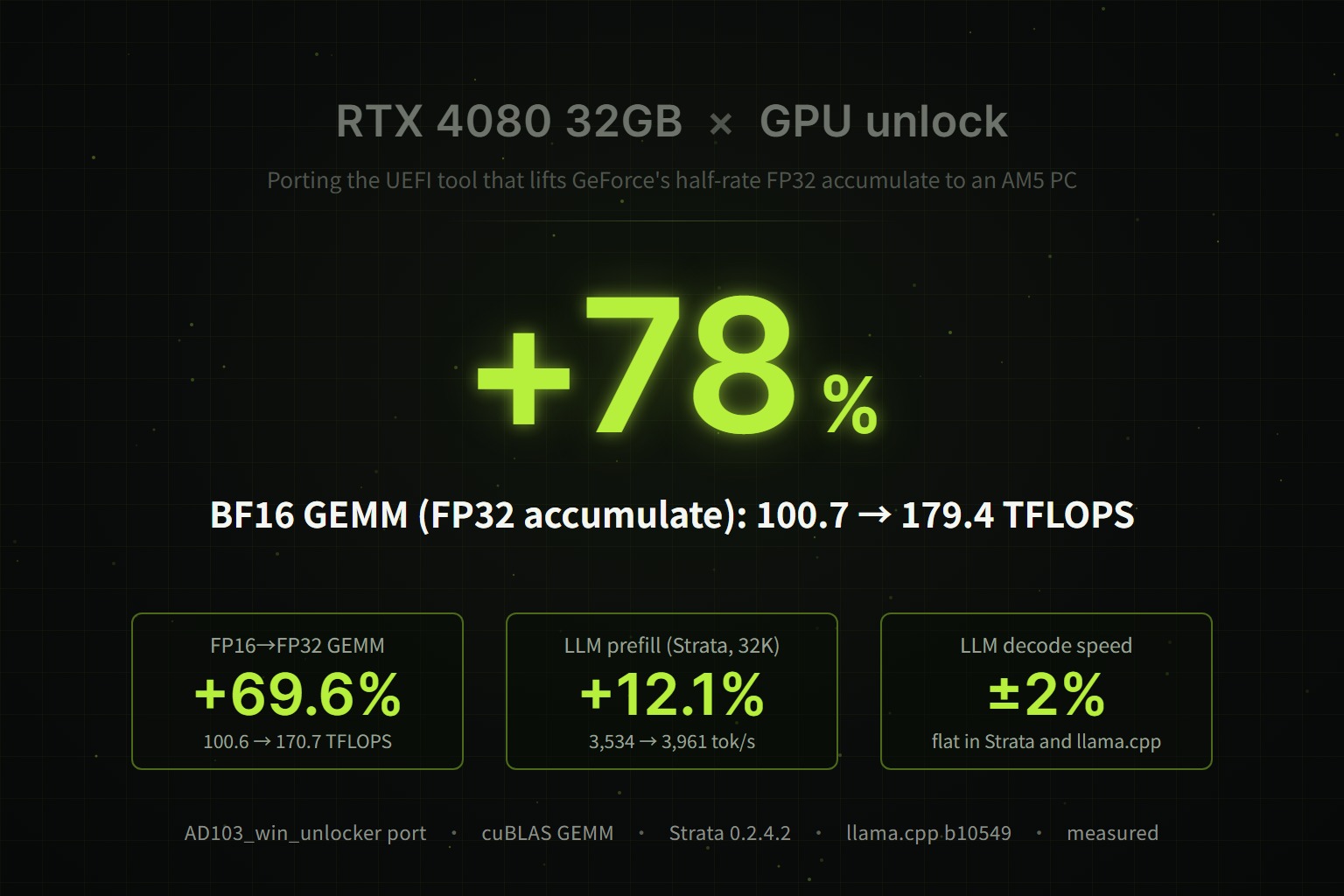
Here’s the bottom line: matrix math itself gets up to +78% faster (BF16, 100.71 → 179.42 TFLOPS), and TF32 and FP8 gain +40–63% as well. The outputs are bit-for-bit identical to stock in all 57 test cases. Real applications benefit far less, though: prefill of a 125B MoE LLM in Strata improves by 9–12%, LLM decode speed barely moves, and llama.cpp with quantized models sees essentially 0%.
Every number below comes from my own measurement logs. The places where things stopped are included as-is.
Warning: this is a record of running an experimental tool on a modded GPU whose author explicitly warns that boot failure, loss of display, data corruption and hardware damage are possible. There is no warranty from NVIDIA, the card vendor or the tool’s author (AS IS). If you try anything here, you do so entirely at your own risk. I am not distributing the ported EFI built for this article.
The results up front
| Metric | Stock | Unlocked | Change |
|---|---|---|---|
| BF16→FP32 GEMM (N=4096) | 100.71 TFLOPS | 179.42 TFLOPS | +78.2% |
| FP16→FP32 GEMM (N=4096) | 100.61 TFLOPS | 170.66 TFLOPS | +69.6% |
| TF32→FP32 GEMM (N=8192) | 51.88 TFLOPS | 84.54 TFLOPS | +63.0% |
| FP8 E4M3→FP32 GEMM (N=4096) | 192.32 TFLOPS | 294.51 TFLOPS | +53.1% |
| FP32 (CUDA cores), FP16 accumulate, INT8 | No change | −1.1 to +2.7% | |
| Strata (125B MoE) prefill, 32K prompt | 3,534.0 tok/s | 3,961.2 tok/s | +12.1% |
| Strata decode (chat) | 143.3 tok/s | 144.6 tok/s | +0.9% |
| llama.cpp Qwen3.8-27B Q4_K_M decode | 35.85 tok/s | 35.87 tok/s | +0.1% |
| Results (SHA-256 of the full output) | Identical in all 57 cases | — | |
The one line that matters: the only thing that gets faster is matrix math that takes FP16/BF16/TF32/FP8 inputs and accumulates in FP32. How fast an LLM chat feels (decode speed) is set by memory bandwidth, and that does not change.
What “GPU unlock” (SS unlock) is — removing GeForce’s half-rate FP32 accumulate
Tensor Core matrix math comes in combinations of “what the inputs are” and “what the running sum (accumulator) is kept in”. You can feed FP16 and accumulate in FP16, or feed FP16 and accumulate in FP32. The latter accumulates less rounding error, so PyTorch mixed-precision training and the BF16 GEMMs in many inference engines use FP32 accumulation.
NVIDIA’s own spec for the RTX 4080 lists FP16 Tensor throughput as 194.9 TFLOPS with FP16 accumulate, but 97.5 TFLOPS with FP32 accumulate. Same FP16 inputs, half the speed once you accumulate in FP32. Professional cards such as the RTX 6000 Ada and the data-center L40 do not have this limit. In other words, the hardware can do it; on GeForce it is held back as product segmentation.
The limit turns out to be governed by selector registers inside the GPU called the “SM speed-select” (SS0 / SS1), and rewriting them is what “GPU unlock” does (also called “SS unlock” after those registers). The lineage starts with Zagitta/gpu-unlock, a Linux kernel module for cards such as the RTX 3090. gpu-unlock-ada extended it to Ada (RTX 4090 and others). AD103_win_unlocker is a Windows-oriented UEFI application from the same author who created the Ada (AD102) payload that gpu-unlock-ada uses.
Roughly, the EFI booted from a USB stick does this:
- Checks that the card, ROM and asset files are exactly what it expects, and preloads Windows Boot Manager (nothing is written to the GPU up to this point)
- When
READYappears, the user presses U once - Disconnects the GPU’s UEFI driver and, through the GPU’s security processor (SEC2), rewrites four protection registers (WPR_CFG / FBPA / WPR / FEAT)
- Rewrites SS0 / SS1, issues a PCIe Function Level Reset (FLR), restores the display and boots Windows
The change does not persist. The VBIOS is not modified, and according to the author everything goes back to normal once the power is cut. To use it you boot from the USB stick every time.
| Tool | Platform | RTX 4080 (10de:2704) |
|---|---|---|
| gpu-unlock-ada | Linux (kernel module) | Not supported (RTX 4090 / 4070 Ti SUPER / 4060 Ti 16GB only) |
| AD103_win_unlocker | Windows (UEFI app) | Supported (but pinned to the author’s one card and one PC) |
The author reports FP16/BF16 GEMM with FP32 accumulation at roughly 2x for N=4096 and +60–71% for N=8192, and explicitly says that no FP8 or application-level LLM speedup is claimed. I measured both.
Test environment
| Item | Details |
|---|---|
| GPU | NVIDIA GeForce RTX 4080 32GB (modded) / PCI ID 10de:2704, subsystem 10de:1795 / VBIOS 95.03.33.40.5E / 32,760 MiB / 320 W power limit |
| Driver | 616.56 |
| CPU | AMD Ryzen 9 9950X (16 cores / 32 threads) |
| Memory | DDR5-4800 32GB × 2 (64GB) |
| Motherboard | ASUS TUF GAMING X670E-PLUS WIFI (BIOS 3278) |
| OS | Windows 11 Pro (build 26200) |
| Unlock | AD103_win_unlocker (revision 51df9c17, released EFI v0.4.18), ported to this PC |
| GEMM benchmark | My own script reproducing the author’s bench.py procedure / PyTorch 2.11.0+cu128 (cuBLAS / cuBLASLt), native Windows |
| LLM #1 | Strata 0.2.4.2 (engine 0.1.48) + Qwen3.8-Flash-Next IQ2_XS (125B MoE, about 64GB) |
| LLM #2 | llama.cpp b10549 + Qwen3.8-27B-based Q4_K_M / Q5_K_M |
The baseline is a stock run taken right before the unlock with the same display setup (integrated GPU disabled and the display driven by the RTX 4080, as described below). Stock and unlocked runs use the same scripts, the same order and the same open applications.
This is the same card as in the previous article.
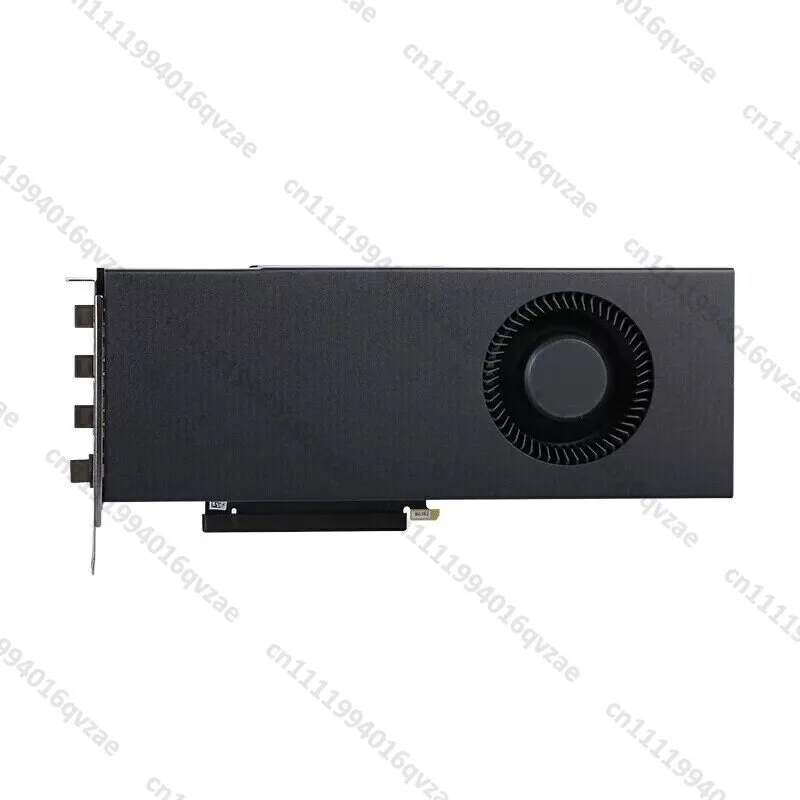
RTX4080 32G / RTX4080S 32G Turbo Graphics Card for GPU Rendering and AI
The released EFI won’t run as-is — finding the differences from the author’s setup
The README says the EFI is pinned to 10de:2704 / 10de:1795 and a specific ROM hash, and that another card with the same product name may be rejected. Reading the source, it turned out to be pinned not just to the card but to values from the author’s PC (motherboard) as well. I went through every check against my machine first.
| Check | Author’s setup | My setup | Result |
|---|---|---|---|
| PCI ID / subsystem | 10de:2704 / 10de:1795 | Same | ✅ |
| VRAM / power limit | 32,760 MiB / 320 W | Same | ✅ |
| Hash of the ROM image proper | 603baffe… | Same (whole-file hash differs) | ✅ |
| Secure Boot | Off | Off | ✅ |
| GPU driving the display | RTX 4080 only (no iGPU) | The CPU’s integrated Radeon | ⚠️ Fixed in BIOS |
| BAR0 address | 0x80000000 | 0xF5000000 | ❌ |
| Cold value of SS1 | 7 | 5 | ❌ (found later) |
The ROM image proper matches
I saved the VBIOS with GPU-Z 2.71.0 and ran the repository’s check_rom.py on it. Result: NOT MATCHED. Digging in, though, the 2MB file differs only in the leading header and a trailing region; the hash of the actual ROM image that the EFI checks (879,616 bytes) matches the author’s exactly. Same VBIOS (95.03.33.40.5E), with the file-level difference most likely coming from per-card data. In a later dry run, the hash of the full 1 MiB ROM window the GPU actually reads also matched the author’s record.
The saved ROM contains per-card data, so I’m not publishing it.
Disabling the integrated GPU in BIOS
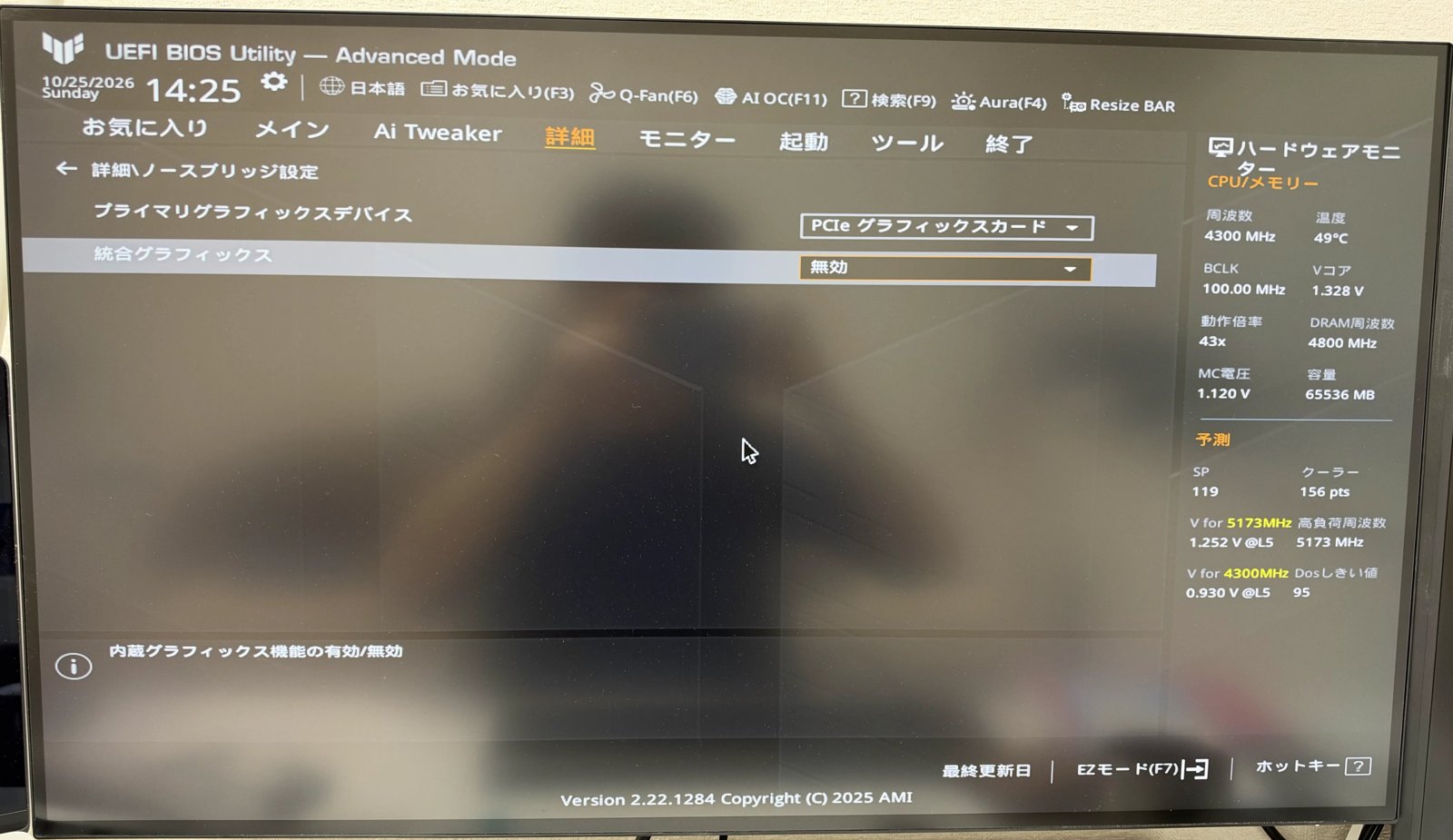
The EFI requires exactly one UEFI display output (GOP), owned by the RTX 4080. I normally drive my monitors from the CPU’s integrated Radeon, so I disabled it in BIOS and moved the monitor cables to the RTX 4080.
Dry run #1: the released EFI — stops at the BAR0 check
I didn’t go straight to the real thing. The first step was a dry run to confirm it stops before anything is written to the GPU. I read the EFI source to confirm that, until READY appears and U is pressed, it only reads PCI configuration and registers, and that if any check fails it just writes a report and returns to the firmware. Then I put the released EFI and the asset files on a FAT32 USB stick and booted it.
The “asset files” are GSP firmware and similar files extracted from NVIDIA’s Linux driver 610.43.03. They are NVIDIA’s files, so they are not distributed; you generate them locally with the bundled prepare_assets.py under WSL2, which verifies each hash (on my machine I had to install zstd and fetch one file through Git LFS).
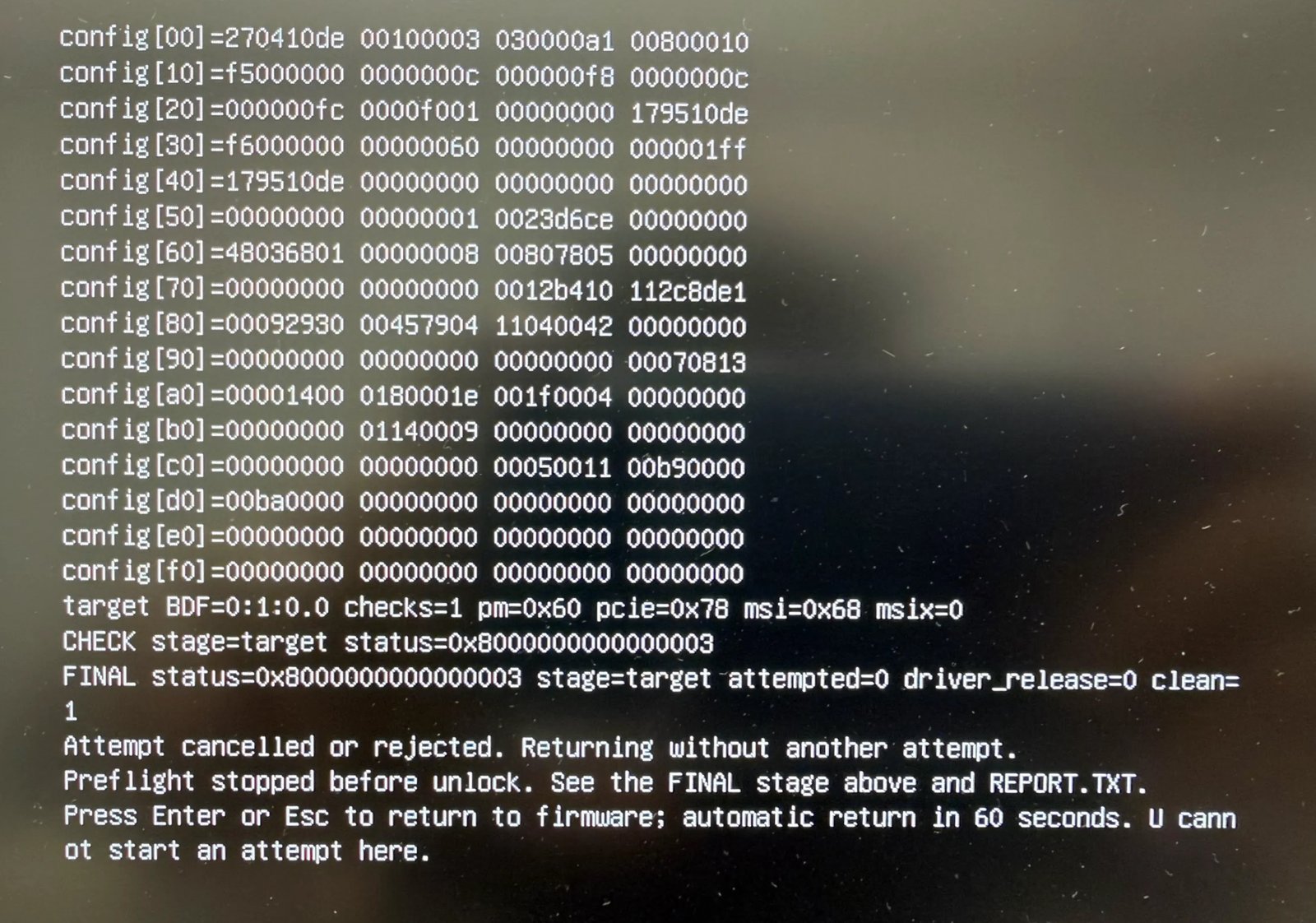
config[10]=f5000000 on the second line is BAR0. It differs from the author’s 80000000, so the very first check stopped the runCHECK stage=target status=0x8000000000000003
FINAL status=0x8000000000000003 stage=target attempted=0 driver_release=0 clean=1
Preflight stopped before unlock. See the FINAL stage above and REPORT.TXT.attempted=0 driver_release=0 means nothing was done to the GPU. Every card-side condition — ID, subsystem, class, capabilities — passed. BAR0 was the only mismatch.
BAR0 is the address where the GPU’s registers appear in memory space, and it is assigned by the motherboard BIOS at boot, not by the card. This PC’s 32-bit MMIO window is 0x80000000–0xF6FFFFFF, and the author’s value (the bottom of that window) is inside it. But the ASUS BIOS appears to allocate from the top down, putting BAR0 near the upper end. Disabling the iGPU moved it up from 0xF4000000 to 0xF5000000, which fits that picture. I found no BIOS option that changes the allocation order, so getting the released EFI past this check on this motherboard didn’t look possible.
Port #1: BAR0 constants set to this PC’s value — a 3-line source diff
Searching the source for 0x80000000 showed that the fixed value is used only in three pre-flight check lines; the actual work uses the real BAR0 reported by UEFI. So I changed just those three lines and rebuilt.
Before that, I confirmed that my toolchain produces the author’s binary. Building the unmodified source with Zig 0.14.1 (hash checked against the official one) gave SHA-256 9f821b8e…338eb01 — byte-for-byte identical to the released EFI. That puts me in a position to say “same procedure, built from source that differs by a few lines”.
| Location | Released | Port |
|---|---|---|
unlock/app.c:74 (BAR0 in PCI config) | ==0x80000000 | ==0xf5000000 |
unlock/app.c:160 (start of BAR0 range) | !=0x80000000 | !=0xf5000000 |
unlock/app.c:163 (end of BAR0 range) | !=0x80ffffff | !=0xf5ffffff |
None of the card-side checks (ID, subsystem, chip, ROM hash, VRAM, cold state, asset hashes and so on) were touched.
Dry run #2: SS1 differs from chip to chip
With the port, the BAR0 check passed, and so did display output, driver ownership and chip ID. It then stopped at the “cold state” check.
cold state: chip=0x193000a1 plm=0xffffff8f gfw=0x8b8f/0x3ff/0x10 WPR2_HI=0 SS0=0x4240021 SS1=0x5
CHECK stage=cold-state status=0x8000000000000006
FINAL status=0x8000000000000006 stage=cold-state attempted=0 driver_release=0 clean=1
The EFI requires SS1 to be 7; this card reads 5. Every other condition (not yet unlocked, protection registers in their initial state, and so on) is satisfied. Here are the cold SS0 / SS1 values from the published records:
| Card | Die | SS0 (cold) | SS1 | Outcome |
|---|---|---|---|---|
| Author’s RTX 4080 32GB | AD103 | 0x31322012 | 7 | Success |
| RTX 4070 Ti SUPER | AD103 | 0x06301153 | 6 | Success (Linux) |
| RTX 4090 | AD102 | 0x44023025 | 7 | Success |
| RTX 4060 Ti 16GB | AD106 | 0x01403041 | 3 | Success |
| MSI RTX 4070 Ti | AD104 | 0x23617005 | 1 | Success (Windows port) |
| My RTX 4080 32GB | AD103 | 0x04240021 | 5 | — |
The values differ between two AD103 cards, and even between two cards of the same product with the same VBIOS, so they most likely come from per-chip fuses. After an unlock, every card ends up at SS0=0x88888888, SS1=0x8. The Linux version runs the same transaction on cards with SS1=6, 3 and 1, so I concluded that “SS1 = 7” is not a precondition of the transaction but a pin that checks for the author’s exact card. After confirming in the source that nothing after the U key assumes SS1=7, I changed that one line to this card’s value (5) and built port v2.
Dry run #3: READY reached — Esc this time
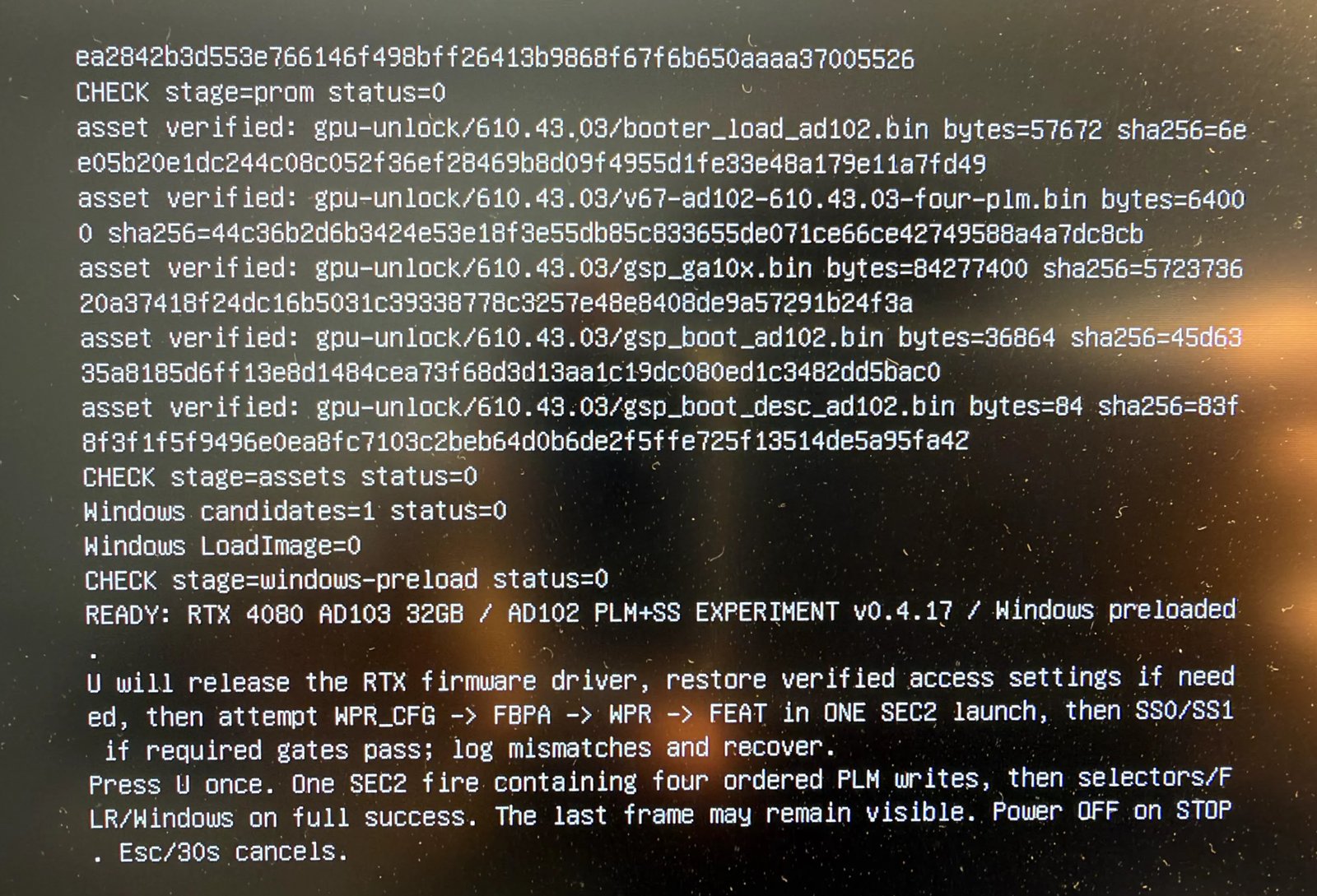
READY screen: ROM and asset hashes all match and Windows Boot Manager is preloaded. U starts the real run; Esc cancelsPort v2 passed every check up to the U key. This time I pressed Esc and collected the report. Here, the hash of the full 1 MiB ROM window the GPU reads matched the value recorded by the author exactly. So the only differences from the author’s card I could find were where the motherboard puts BAR0 and the chip’s own cold SS0 / SS1 values.
One practical annoyance: after every reboot, Windows reported the USB stick as an “Unknown USB Device” until I unplugged and replugged it. That’s how I collected each report.
The real run — press U once, unlock succeeds
Before the real run I captured a complete set of stock benchmarks. Then: full power-off, boot, pick the USB stick with F8, press U once at READY. After a short wait, Windows booted normally. The display came up on the RTX 4080 and nvidia-smi saw a 32,760 MiB card as usual. The key lines from the report:
AD102 PLM final: WPR_CFG=0xfffff0ff matched=1 / FBPA=0xffffff0f matched=0 / WPR=0xffffffff matched=1 / FEAT=0xffffffff matched=1
SELECTOR RESULT: SS0 before=0x5240021 after=0x88888888 expected=0x88888888 matched=1 status=0
SELECTOR RESULT: SS1 before=0x5 after=0x8 expected=0x8 matched=1 status=0
transaction result=0 containment=0 started=1 quiesced=1 fault=0 retained=0 maps=0 FLR=1
POST-FLR SS0=0x88888888 SS1=0x00000008
POST-GOP SS0=0x88888888 SS1=0x00000008
FINAL status=0 stage=post-unlock-handoff attempted=1 driver_release=1 clean=1
Both SS0 and SS1 reached their target values and held through the PCIe reset (FLR) and the display reconnect. Of the four protection registers, only FBPA misses its requested value — the same as in the author’s successful run, which also treats it as non-fatal.
One interesting detail: the cold SS0 value differed between the dry run (0x04240021) and the real run (0x05240021). The second digit went from 4 to 5, so it may shift slightly from boot to boot. The EFI only checks that SS0’s “already overridden” bits are clear, so it didn’t affect the gate.
Result 1: GEMM — only FP32-accumulate math gets faster
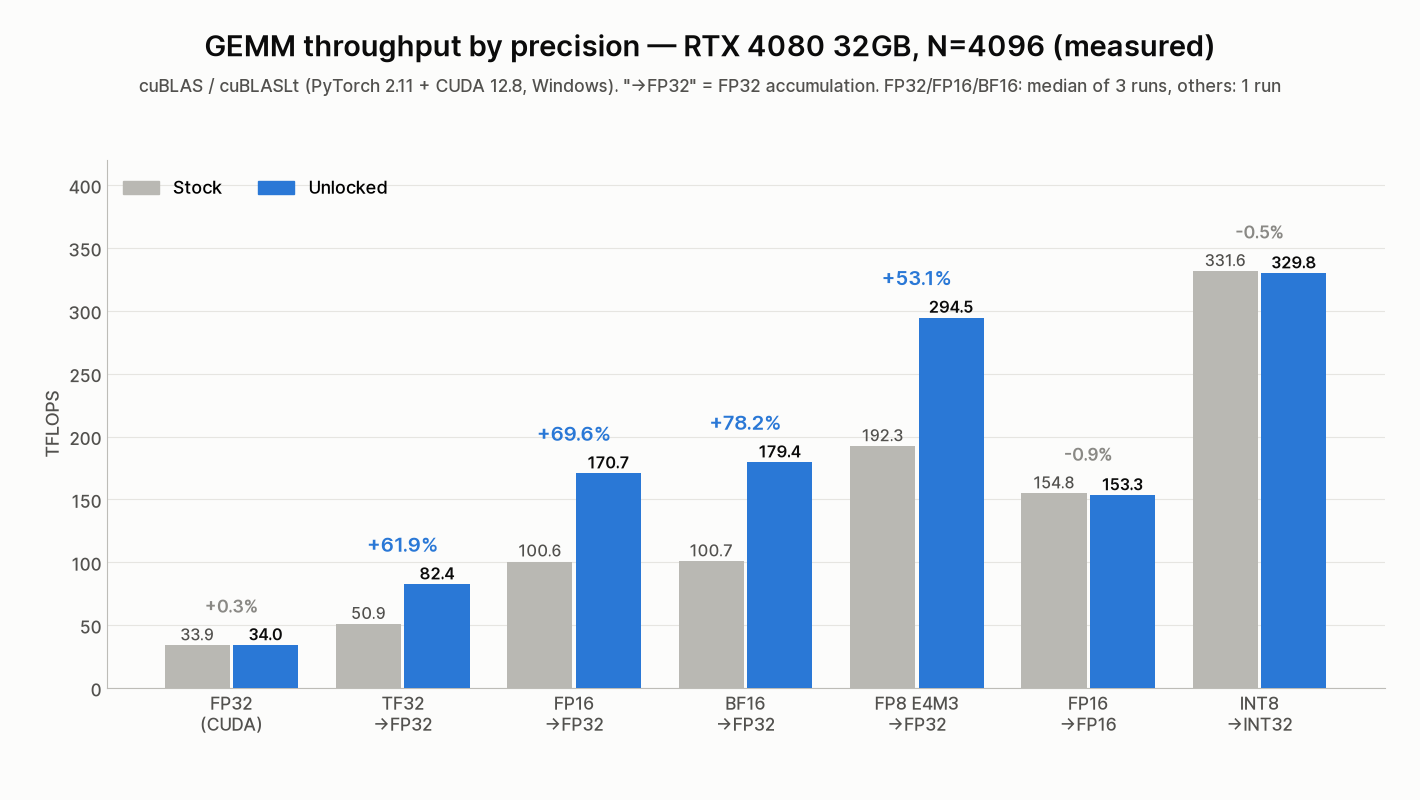
| Precision | N=4096 | N=8192 | N=16384 |
|---|---|---|---|
| FP32 (CUDA cores) | 33.88 → 33.98 (+0.3%) | 33.08 → 33.26 (+0.5%) | — |
| FP16→FP32 | 100.61 → 170.66 (+69.6%) | 100.56 → 155.93 (+55.1%) | 104.18 → 165.91 (+59.3%) |
| BF16→FP32 | 100.71 → 179.42 (+78.2%) | 102.37 → 166.16 (+62.3%) | 104.73 → 175.89 (+67.9%) |
| TF32→FP32 | 50.89 → 82.39 (+61.9%) | 51.88 → 84.54 (+63.0%) | — |
| FP8 E4M3→FP32 (cuBLASLt) | 192.32 → 294.51 (+53.1%) | 200.31 → 286.46 (+43.0%) | 199.40 → 281.05 (+40.9%) |
| FP16→FP16 (already full rate) | 154.77 → 153.30 (−0.9%) | 147.48 → 151.40 (+2.7%) | 171.17 → 172.66 (+0.9%) |
| INT8→INT32 (already full rate) | 331.57 → 329.81 (−0.5%) | 362.37 → 367.08 (+1.3%) | 373.01 → 368.94 (−1.1%) |
(TFLOPS. FP32, FP16→FP32 and BF16→FP32 at N=4096 / 8192 are the median of three runs using the author’s procedure; everything else is a single sweep run.)
Exactly as the theory says, only FP32-accumulate operations jump, while FP16 accumulate, INT8 and CUDA-core FP32 — already full rate — stay put. The ±1–3% wobble on those is measurement noise.
Beyond what the author covered, TF32 and FP8 (with FP32 accumulation) also gained +40–63%. That disagrees with gpu-unlock-ada’s RTX 4070 Ti SUPER report, where an FP8 CUTLASS kernel did not change (59.3 → 59.5 TF). I measured with cuBLASLt (PyTorch’s torch._scaled_mm) and have not verified whether the kernel difference explains it.
For rectangular matrices shaped like LLM weights (512–8192 tokens × 5120↔17408), FP16/BF16 with FP32 accumulation gained +30–72%.
Just as important, the results did not change at all. In all 57 cases, the SHA-256 of the complete output matched between stock and unlocked. The same kernels produce the same answers, only faster. Every case also passed a check against an FP64 reference.
Compared with the author’s numbers (measured in WSL2), my stock FP16/BF16 results come out 3–10% higher (e.g. BF16 at N=4096: author 91.91, mine 100.71). Running natively on Windows or a different cuBLAS version may explain it, but I haven’t verified that. All comparisons here are stock vs unlocked on the same setup.
Result 2: bigger matrices gain less — the 320 W power wall
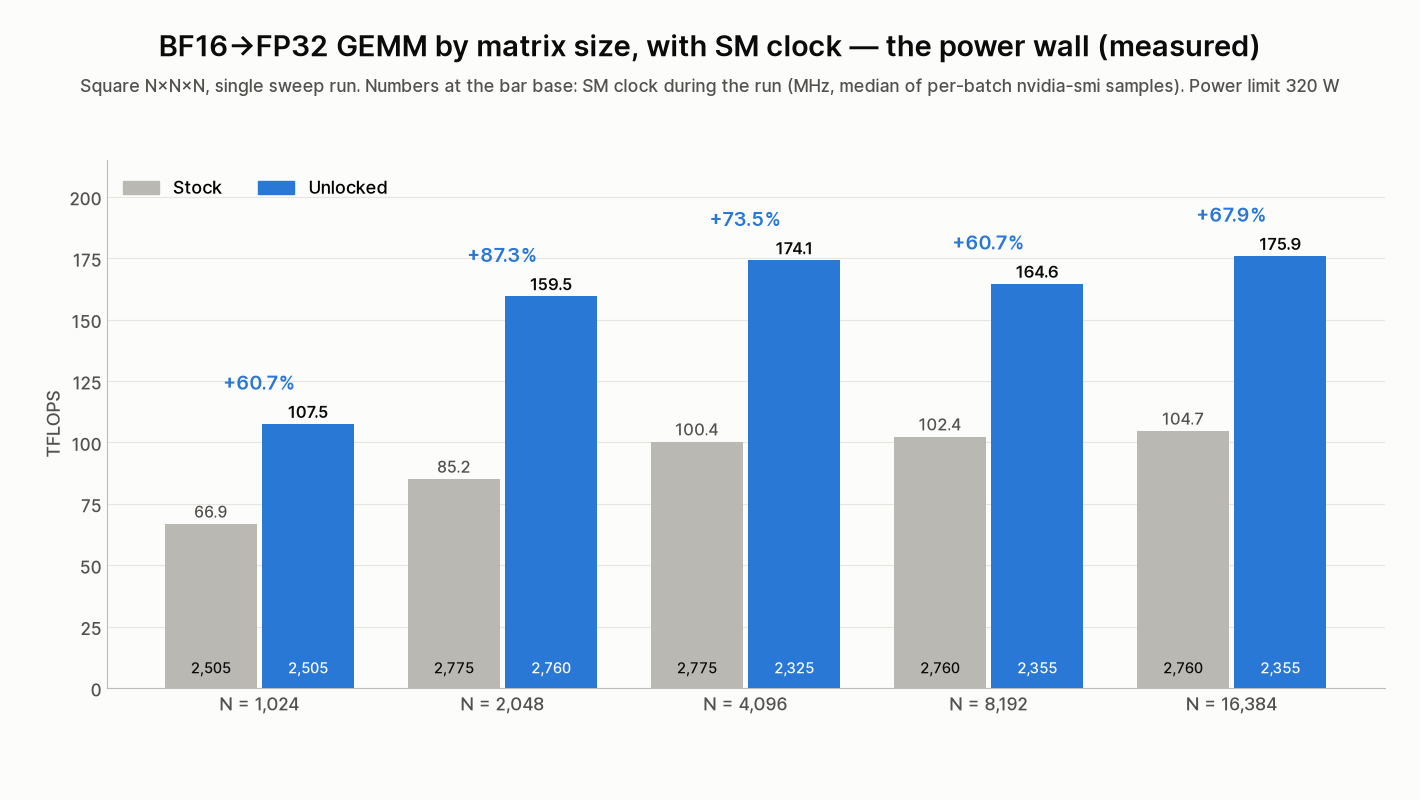
In theory FP32-accumulate math should run twice as fast, but I measured +53–78% at N=4096 and above. The reason is power. At N=8192 the SM clock sits at 2,730–2,790 MHz on stock but drops to 2,160–2,355 MHz after the unlock, with nvidia-smi reporting “SW Power Cap” as the throttle reason. The math units can go twice as fast, but the card hits its 320 W limit and the clock comes down, eating into the gain.
On small matrices (N=1024–2048) with power to spare, the clock stays about the same as stock and the gain is +60–87%. The author’s N=8192 results (+60–71%) and the RTX 4070 Ti report (2,940 → 2,565 MHz after unlocking) show the same pattern. For reference, NVIDIA’s full-rate FP16 (FP32 accumulate) figure would be 194.9 TFLOPS, so my best result of 179.42 TFLOPS is 92% of that.
Result 3: real apps — LLM prefill +9–12%, decode unchanged
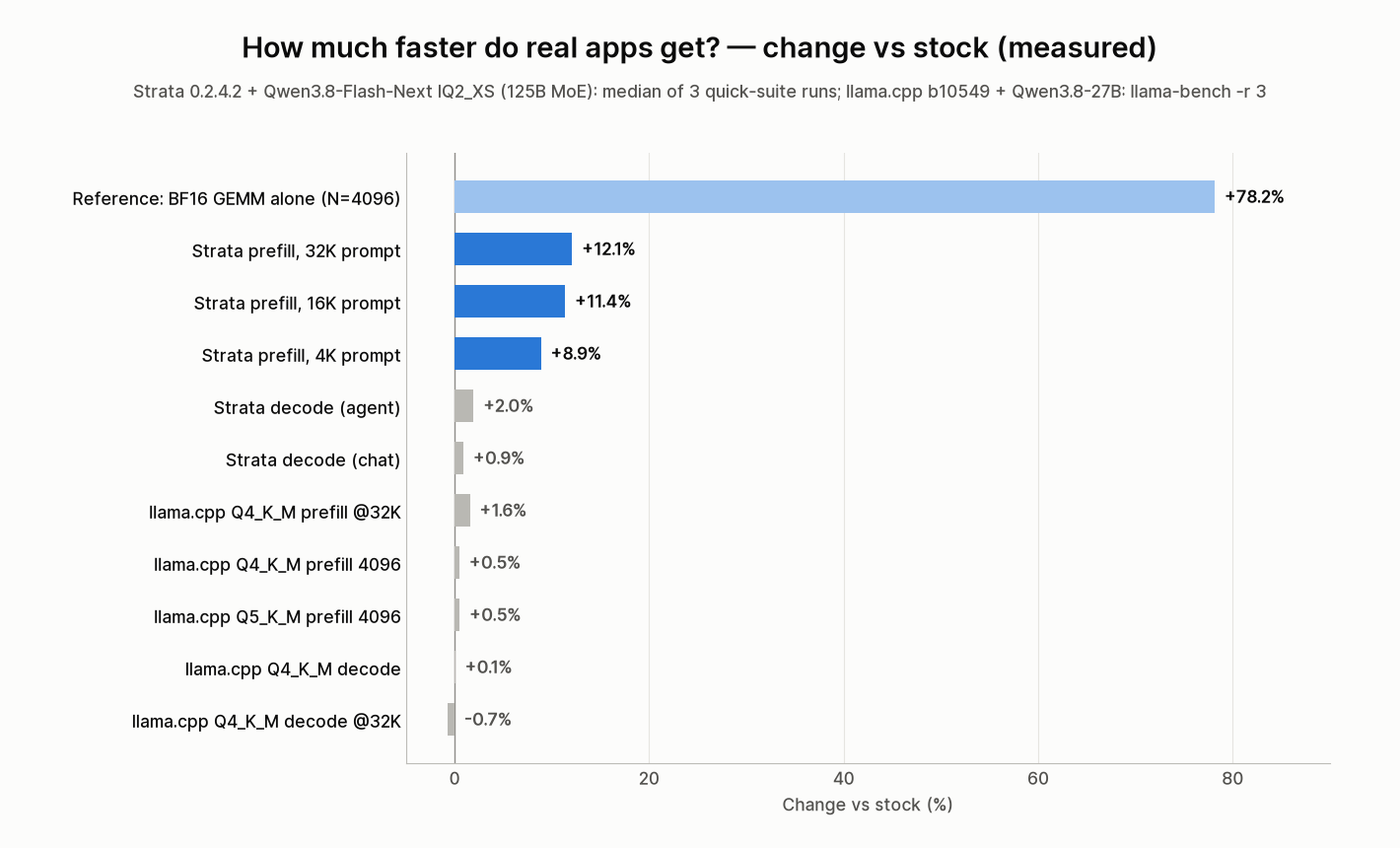
A +70% GEMM does not make a whole application +70% faster. How much it helps depends entirely on which operations the application spends its time in, and the results split cleanly.
Strata (125B MoE) — prefill +9–12%
Strata is a local inference engine that runs MoE models too large for VRAM by splitting them between VRAM and system RAM. In its source, the prefill (prompt processing) GEMMs are cuBLAS calls with BF16/FP16 inputs and FP32 accumulation (cublasGemmEx with CUBLAS_COMPUTE_32F) — precisely the operation the unlock speeds up. I picked it as the most likely place to see an effect.
| Metric (tok/s) | Stock | Unlocked | Change |
|---|---|---|---|
| 4K prompt processing | 2,896.8 | 3,153.9 | +8.9% |
| 16K prompt processing | 3,473.9 | 3,868.7 | +11.4% |
| 32K prompt processing | 3,534.0 | 3,961.2 | +12.1% |
| Chat decode | 143.3 | 144.6 | +0.9% |
| Agent (5 turns) decode | 148.3 | 151.2 | +2.0% |
| (Official standard-v1) prompt-4k | 2,762.0 | 3,035.0 | +9.9% |
| (Official standard-v1) prompt-16k | 3,409.2 | 3,792.7 | +11.3% |
(Quick suite: median of three runs. Prompt-processing runs stayed within ±1.5% of the median.)
Prefill gains more as the prompt gets longer, reaching +12.1% at 32K. It is much smaller than the +60–78% of the GEMM alone because prefill also includes non-GEMM work — attention, dequantizing weights, transfers from system RAM — which dilutes the part that got faster. Decode is most likely limited by streaming experts from system RAM, and as expected it didn’t change.
llama.cpp (Qwen3.8-27B, quantized) — essentially 0%
| Test (tok/s) | Stock | Unlocked | Change |
|---|---|---|---|
| Q4_K_M prefill 512 / 4096 | 1,903.2 / 1,869.3 | 1,907.1 / 1,878.5 | +0.2% / +0.5% |
| Q4_K_M decode | 35.85 | 35.87 | +0.1% |
| Q5_K_M prefill 512 / 4096 | 1,833.4 / 1,817.2 | 1,840.3 / 1,826.6 | +0.4% / +0.5% |
| Q5_K_M decode | 31.53 | 31.57 | +0.1% |
| Q4_K_M with 32K of context: prefill / decode | 1,386.3 / 31.53 | 1,408.0 / 31.30 | +1.6% / −0.7% |
Everyday llama.cpp use shows essentially no change. For quantized models, llama.cpp’s prefill runs on MMQ (INT8 Tensor math), and INT8 is already full rate, so it isn’t affected; decode is bound by memory bandwidth. The +1.6% prefill with 32K of context filled might come from the FP32-accumulate part of FlashAttention, but it isn’t clearly separable from noise.
If the question is “does this make my everyday LLM chat faster?”, the answer is no. As the previous article showed, this card’s decode speed is set by its 716.8 GB/s memory bandwidth, and the unlock doesn’t touch that.
Does it become an RTX 4090? Only in one respect
| GPU | FP16/BF16 Tensor (FP32 accumulate) | Notes |
|---|---|---|
| RTX 4080 (stock) | Spec 97.5 / measured 100–104 TFLOPS | Measured on this PC; boost clocks run above spec, hence the higher number |
| RTX 4080 (unlocked) | Measured 156–179 TFLOPS | This PC; capped by the 320 W power limit |
| RTX 4090 (stock) | Spec 165.2 TFLOPS | NVIDIA spec (theoretical) |
For this one operation, the unlocked RTX 4080 is in the same range as a stock RTX 4090’s spec figure. Note that the 4090 number is a theoretical spec and the 4080 numbers are measured, so it isn’t a strict comparison. And this is genuinely the only part that reaches 4090 level.
| Item | RTX 4080 (unlocked, this card) | RTX 4090 | Changed by the unlock? |
|---|---|---|---|
| FP16/BF16/TF32/FP8 (FP32 accumulate) | About the 4090’s spec | — | Improved |
| FP16-accumulate and INT8 Tensor | Still a 4080 | About 1.7x | No |
| FP32 (CUDA cores) | Spec ~48.7 TFLOPS | Spec ~82.6 TFLOPS | No |
| Memory bandwidth | 716.8 GB/s | 1,008 GB/s | No |
| VRAM | 32GB (modded) | 24GB | — |
| Power limit | 320 W | 450 W | No (it’s what caps the gain) |
Put together, this card becomes an odd combination: 4090-class BF16 GEMM, 4080 memory bandwidth, and 32GB of VRAM — more than a 4090.
Which GPUs can use GPU unlock — RTX 40 series status
Beyond this RTX 4080 32GB, here is where GPU unlock stands across the RTX 40 (Ada) series, based on the published tools’ target lists and the results reported in their issues and pull requests. Almost all of these are at the “tried on one card and it worked” stage; the same model name does not guarantee it will work on yours.
| GPU | PCI ID (die) | Tool | Status (as of Oct 25, 2026) |
|---|---|---|---|
| RTX 4090 | 10de:2684 (AD102) | gpu-unlock-ada (Linux) | Supported. About 2x FP16/BF16 (FP32 accumulate) reported. Also reported working on a 48GB modded card (Issue #21) |
| RTX 4090 D | 10de:2685 (AD102) | gpu-unlock-ada (Linux) | Experimental (opt-in) |
| RTX 4080 32GB (modded) | 10de:2704 (AD103) | AD103_win_unlocker (Windows) | Worked on the author’s card and on mine (ported). Pinned to per-card and per-PC values |
| RTX 4080 (16GB) | 10de:2704 (AD103) | gpu-unlock-ada (Linux, unmerged PR #9) | Experimental PR only. No success report found for a regular 16GB card |
| RTX 4070 Ti SUPER | 10de:2705 (AD103) | gpu-unlock-ada (Linux) | Experimental (validated on one card). The 10de:2689 version on a different die is PR #19, untested on hardware |
| RTX 4070 Ti | 10de:2782 (AD104) | Windows reference port (one MSI PC) / Linux PR #15 | Success reported on one MSI card + MSI Z490 setup and on one ASUS card |
| RTX 4070 SUPER | — | Windows (UEFI) | Only a single screenshot in Issue #8; details unknown |
| RTX 4070 | 10de:2786 (AD104) | gpu-unlock-ada (Linux, unmerged PR #11) | Experimental PR (includes a cold-boot success log) |
| RTX 4060 Ti 16GB | 10de:2805 (AD106) | gpu-unlock-ada (Linux) | Experimental (validated on one card). The 8GB model (different ID) is not covered |
| RTX 4080 SUPER | — | — | Not supported, no success reports (Issue #18 is just a question) |
The upstream Linux module originally targeted Ampere (GA102) cards such as the RTX 3090, and there are success reports for the RTX 3080 and RTX 3070 as well.
RTX 40 series on Amazon
I looked up the models in the table on Amazon Japan. A product page won’t tell you the PCI ID, the die or the VBIOS. For example, the RTX 4070 Ti SUPER also exists on a different die (10de:2689); only the AD103 version (10de:2705) is the experimental target in the table. The RTX 4080 listed here is a regular 16GB card, not the 32GB mod tested in this article. New stock of all of these is thin, and every price below (as of October 25, 2026) is from a marketplace seller and above launch pricing.


Who it’s for / caveats
Where it should help
- BF16/FP16 training and fine-tuning (GEMM-heavy) — not measured this time
- FP16/BF16 image generation — not measured this time
- LLM workloads that process lots of long prompts (+9–12% prefill in Strata)
Where it hardly matters
- Everyday LLM chat (decode is bound by memory bandwidth)
- Quantized models in llama.cpp (prefill is INT8, decode is bandwidth-bound)
- Games (graphics should barely use this operation; not measured)
Caveats
- Risks stated by the author: failure to boot, loss of display, data corruption, hardware damage. No warranty of any kind
- This port has succeeded exactly once, on this motherboard with this card. BAR0 and SS1 were set to values I measured with dry runs on my own system. Copying someone else’s values is meaningless, and other motherboards may differ in other ways (display ownership, USB handling and so on). The author also states that editing constants alone is not a validated port
- The effect doesn’t persist. Every time, you need a full power-off and a boot from the USB stick
- I had to disable the integrated GPU and drive the display from the RTX 4080. Secure Boot is off
- Not yet verified: long-term stability, behavior after a warm reboot, re-measuring stock after powering off, PyTorch training, image generation, games
Summary
The takeaway from “GPU unlock” on the RTX 4080 32GB: GEMM really does get faster, but few applications get to enjoy it.
- On this PC the released EFI stopped at two points: the BAR0 address (motherboard side) and the cold SS1 value (the chip itself). The card and ROM contents are identical to the author’s
- With a toolchain that reproduces the release byte-for-byte, I built a port that changes four lines, and Windows booted normally with the unlock applied
- BF16→FP32 GEMM went 100.71 → 179.42 TFLOPS (+78.2%), FP16→FP32 +69.6%, TF32 and FP8 +40–63%
- On large matrices the 320 W power limit pulls the SM clock down and shrinks the gain to +53–68%
- Outputs were bit-for-bit identical in all 57 cases
- For LLMs, Strata (125B MoE) prefill improved by 9–12%, while decode speed and llama.cpp with quantized models barely changed
If you ask whether this makes everyday LLM use faster on this card, the answer is no. For BF16 GEMM-heavy work, though, it turns into a genuinely interesting card: 32GB of VRAM alongside 4090-class matrix math. Next I’d like to test the areas where the effect should be largest but which I couldn’t measure this time — PyTorch training and image generation.
Related
- Modded RTX 4080 32GB Benchmarked: Qwen3.8-27B at 262K context, a 125B MoE and MiniMax H3 video
- Dual Tesla V100 SXM2 on a single PCIe slot: 64GB VRAM and 300 GB/s NVLink tested
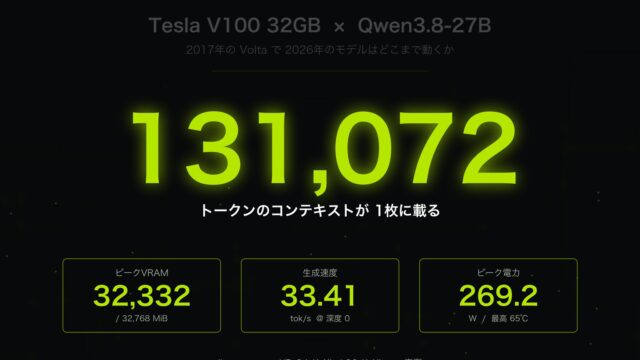
- Tesla V100 32GB runs Qwen3.8-27B: 131k context on a single card
Reproduction notes
All measurements were taken on October 25, 2026, on the same machine with the same driver (616.56) and the same scripts. The display setup (iGPU disabled, display on the RTX 4080) and the set of open applications were the same before and after the unlock.
# Repositories
TOTORONG/AD103_win_unlocker  51df9c17ec89eb8486df52cc9079dde4bd1f9974 (Hugging Face)
JustAResearcher/gpu-unlock-ada  4e7fefcc4923f9e083d5324dc75a7d2f906af77f (reference records)
Niko1221/Strata  7dd5cf18 (code identical to v0.2.4.2, engine 0.1.48)

# EFI hashes (SHA-256)
Released v0.4.18                9f821b8e9fa11cd8e145908e6abcf36bd28bfe96a138ddc07365f1700338eb01
Unmodified source, rebuilt      9f821b8e9fa11cd8e145908e6abcf36bd28bfe96a138ddc07365f1700338eb01 (match)
Port v2 (BAR0 + SS1)            49620079e3896862e7342f99491a0a699589d0fa9a29545f50fd2cd67128eb9d

# Asset files (WSL2 Ubuntu, Python 3.14; extracted locally from NVIDIA 610.43.03; not redistributable)
python3 -I tools/prepare_assets.py
git lfs pull --include="USB/RTX4080-EXPERIMENT/ASSETS/v67-ad102-610.43.03-four-plm.bin"

# EFI build (Zig 0.14.1)
python -I build.py --zig zig-x86_64-windows-0.14.1\zig.exe

# GEMM (same procedure as the author's bench.py: NN, seed 123, warmup 20, 7 batches x 30, FP64 check)
python gemm_bench.py --suite author   # N=4096/8192, FP32 / FP16→FP32 / BF16→FP32
python gemm_bench.py --suite sweep    # N=1024–16384 x FP32/TF32/FP16/BF16/FP16-acc/INT8/FP8 + LLM shapes

# llama.cpp b10549
llama-bench -m <Qwen3.8-27B-based Q4_K_M / Q5_K_M>.gguf -ngl 999 -fa on -ctk q4_0 -ctv q4_0 -p 512,4096 -n 128 -r 3
llama-bench -m <Qwen3.8-27B-based Q4_K_M>.gguf -ngl 999 -fa on -ctk q4_0 -ctv q4_0 -p 4096 -n 128 -d 32768 -r 3

# Strata (official benchmark and quick suite)
strata.py bench run --profile strata-iq2_xs.json --suite standard-v1 --track default
python tools/strata_bench.py --config strata-iq2_xs.json --long --runs 3
Strata’s official benchmark (standard-v1) completed all 21 requests and passed 12/12 sanity checks in both phases, but the runner could not stop the engine process at the end and recorded the run as “FAILED”. I list those numbers for reference and base the comparison in the text mainly on the quick suite.
For publication I have left out ROM dumps, NVIDIA firmware, anything that identifies the individual card such as the GPU UUID, and the ported EFI binary.
Credits
- TOTORONG/AD103_win_unlocker (code under GPL-2.0, explanatory documents under CC BY-NC 4.0) — the basis of this port; the author’s published figures and procedure are referenced
- JustAResearcher/gpu-unlock-ada — SS0 / SS1 values of other cards, the RTX 4070 Ti SUPER FP8 result and the RTX 4070 Ti Windows port record
- Zagitta/gpu-unlock, NVIDIA open-gpu-kernel-modules, Nouveau, envytools — upstream research
See you next time.



Leave a Reply