
Hello, this is Shichinomiya (@shichinomiya_s).
Up to now I’ve only written about running local LLMs to use them myself. This time it’s the opposite direction.
I tried Darkbloom — a service that lets you rent out your own Mac to other people’s AI inference and get paid for it. It’s a project by Eigen Labs, currently in public alpha, and it claims you can “turn your Apple Silicon Mac into an AI inference node and earn rewards from the network.”
So I actually registered as a provider, ran it for a full day, logged GPU usage every second, and worked out the profit and loss including electricity. Here’s the report.
September 2026 Update — Latest Earnings, Models, and Calculator
This article is the record of a one-day test in June 2026. I kept running the provider afterward, so here is the latest data as of September 2026. Back then only two models — GPT-OSS 20B and Gemma 4 26B — were available; now Qwen3.6 35B A3B and Qwen3.5 35B A3B have joined, so both the catalog and the calculator’s assumptions have changed.
Earnings and machine status (cumulative)
Here are the latest dashboard figures. Cumulative earnings have roughly doubled since the June test.
| Metric | June 2026 (first test) | September 2026 (latest) |
|---|---|---|
| Total earned | $1.445568 (886 jobs) | $2.912114 (12,275 jobs) |
| Average per job | $0.001632 | $0.000237 |
| Withdrawable | $1.45 | $2.91 |
| Reputation score | 0.89 | 0.60 |
| Machine status | Online / serving (v0.6.20) | Offline (last seen ~8 days ago / v0.8.15, latest is v0.9.1) |
| Last 24h earnings | $0.60 (564 jobs) | $0.00 (0 jobs, stopped) |
Job count grew from 886 to 12,275, but average pay per job fell from $0.001632 to $0.000237. Most of the $2.91 total is still the 5-minute base_reward +$0.002083 (= ~$18/month pace), exactly as in June. In other words, when the machine stops, the rewards stop — staying online is a prerequisite for actually collecting anything.
Serving catalog
My M1 Max 64GB now advertises three models:
qwen3.6-35b-a3b-vl-mtp-mxfp8(Qwen3.6 35B A3B family, MTP)gemma-4-26b-qat-4bit(Gemma 4 26B, QAT 4-bit quantized)qwen3.5-35b-a3b(Qwen3.5 35B A3B)
Across the whole network you’ll also find gpt-oss-20b, gemma-4-26b, Qwen3.5 35B, Qwen3-VL 30B, and Qwen3.8 27B 4bit. My June remark — “who would pay to use Gemma / GPT-OSS?” — feels a little more plausible now that the Qwen family has arrived, but the core situation is unchanged.
Network growth
As of September 2026 the network has scaled up considerably from June.
| Metric | June 2026 | September 2026 |
|---|---|---|
| Nodes online | 307 (273 hardware-attested) | 1,186 (1,058 attested = 89%) |
| Total requests | 1.2M | 107M (7.13M in the last 24h) |
| Total tokens served | 3,871.5M | 374B (15.43B in the last 24h) |
| Models serving | 5 | 7+ (Qwen3.6 35B / gpt-oss-20b / gemma-4-26b / Qwen3.5 35B / Qwen3-VL 30B / Qwen3.5 9B / Qwen3.8 27B 4bit, etc.) |
| Silicon mix | — | M4 34% / M1 21% / M3 18% / M5 16% / M2 11% (110.75 TB reported memory, 67 countries) |
Demand is clearly growing too. But looking at the per-model “connected nodes,” supply still outweighs demand, so the nodes are still sitting idle — the same picture as June.
The calculator now defaults to a 5% duty cycle
The biggest change is in the official “Provider Earnings Calculator.” In June it assumed “80% utilization with four concurrent batches” and returned $75.21/month. The current version has duty cycle as the only adjustable input, defaulting to 5%. For an M1 Max 64GB it picks Qwen3.6 35B A3B as the best-earning model, and here’s the result:
| Item | Value |
|---|---|
| Estimated monthly earning (5% duty cycle) | $12.51/mo ($150.10/yr) |
| Selected model | Qwen3.6 35B A3B (22.0 GB weights, 48 GB min memory) |
| Single-stream decode speed | 137.9 tok/s (400 GB/s x 65% / 1.89 GB/token, 3.0B active) |
| Monthly output capacity | 17.87M tokens (5% duty = 36 hours/month, no batching) |
| Output price (OpenRouter basis) | $0.700 / 1M tokens |
single_stream = (400 GB/s x 65%) / 1.89 GB/token = 137.9 tok/s
output/mo     = 137.9 x 36h x 3600s = ~17.87M tokens (5% duty)
usage         = 17,869,100 / 1,000,000 x $0.700 = ~$12.51/month
For the same M1 Max 64GB, the estimate is $2.83/month for Gemma 4 26B A4B and $1.08/month for GPT-OSS 20B. The drop from the old $75.21 is because the optimistic “batching x 80% utilization” assumption was removed and a realistic 5% duty cycle became the default. The electricity-cost input is gone, too. The stable floor is still the $18/month base reward, which lands more reliably than the calculator’s headline number.
Figures in this update are based on dashboard / network-stats / calculator displays as of September 11, 2026.
Overview — What is Darkbloom?
Darkbloom is a “decentralized private inference network.” Roughly speaking:
- Consumer (the user side) … you send a prompt, an Apple Silicon machine on the network runs inference and returns the result. The selling point is high privacy thanks to end-to-end encryption and hardware verification.
- Provider (the lender side) … you offer your Mac as an inference node and receive a usage reward based on the tokens you process, plus a base reward just for staying online.
What I tried this time is the latter, the “lender” side. Right now the only supported models are GPT-OSS 20B and Gemma 4 26B. It’s the classic “local LLM” approach — load the model straight into the Mac’s unified memory and run inference with MLX.
Looking at the network stats (at the time of writing), it’s a decent scale.
| Metric | Value |
|---|---|
| Total tokens served | 3,871.5M (3,093.8M in / 777.8M out) |
| Total requests | 1.2M |
| Nodes online | 307 (273 hardware-attested) |
| Network utilization | 7% (peak 9%) |
| Total GPU cores | 10,597 / Unified RAM 27,700GB |
| Models serving | 5 |
That last line — 7% utilization — is foreshadowing for the rest of this article.
Supply (Macs that want to lend) has completely outrun demand (people who want to use it), so the nodes are sitting idle. If you’re sharp, you probably already have a bad feeling about where this is going — and you’d be right (lol).
How it works — double sealing with a coordinator (TEE) and the Secure Enclave
Before getting into the provider side, let’s cover the design question of “why distribute AI inference across Macs at all.” The heart of Darkbloom is that each request is sealed twice. To summarize the explanation on the settings screen:
- In your browser, the prompt is sealed (NaCl Box) to the coordinator’s long-lived X25519 public key.
- The coordinator decrypts it inside its TEE (Trusted Execution Environment) and picks which provider to route to.
- It re-seals to that provider’s Secure Enclave key and forwards it.
As a result, anything in front of the coordinator — CDNs, proxies, network observers — only ever sees ciphertext, even past the TLS tunnel. On the provider side too, decryption only happens inside an environment protected by the Secure Enclave, SIP (System Integrity Protection), and Hardened Runtime.
And the key thing for the lender side is that rewards are two-tiered.
- Usage reward … tokens actually processed × unit price. The “sky’s the limit” part that grows with demand.
- Base reward … the “floor” that accrues every 5 minutes just for an attested machine being online. Your rank is set by memory capacity.
| Unified memory | Base reward / month | Roughly covers |
|---|---|---|
| 512GB | $40 | Netflix Standard |
| 128GB | $26 | 〃 |
| 64GB | $18 | Netflix Standard |
| 48GB | $16 | Netflix (with ads) |
| 32GB | $12 | 〃 |
| Under 24GB | Usage only | — |
My M1 Max 64GB (the one I blew my entire life savings on) lands at a base reward of $18/month. The official line is “the floor supports you while the network is quiet, and usage stacks on top once it gets busy.” Note that the base reward is explicitly not guaranteed — it requires being attested, online ≥90% of the time, and within a fixed monthly budget.
The estimate — the calculator said $75/month for an M1 Max 64GB
First I honestly entered my specs into the official “Provider Earnings Calculator.” Selecting MacBook Pro / M1 Max / 64GB, it recognized 400GB/s bandwidth and 15W (idle) → 40W (inference) power draw. The only thing I changed was the electricity price, setting it to $0.20/kWh (≈¥31) for Japan (the default is the US average of $0.15).
It automatically picked GPT-OSS 20B (20GB weights) as the “most profitable model,” and here’s the result.
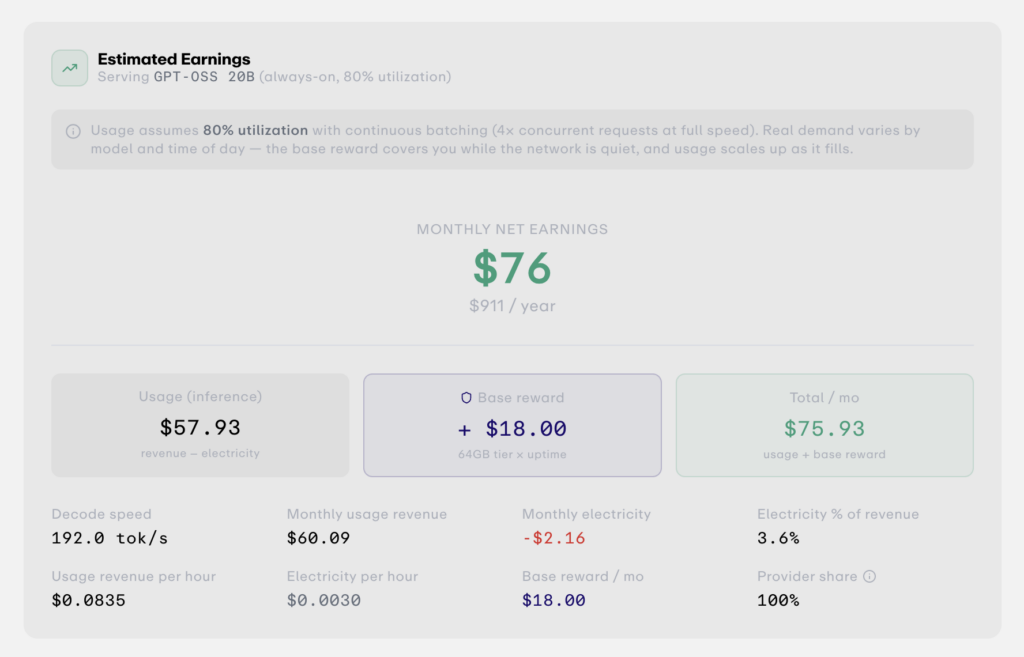
| Item | Value |
|---|---|
| Monthly net earnings | $75.21 ($903/year) |
| Usage revenue (after electricity) | $57.21 |
| Base reward | +$18.00 |
| Decode speed | 192.0 tok/s |
| Monthly electricity | −$2.16 |
| Electricity as % of revenue | 3.6% |
The formula is disclosed too:
single_stream = (400 GB/s / 4 GB) x 0.6 = 60.0 tok/s
decode_tok/s  = 60.0 x 4(batch) x 0.8(utilization) = 192.0 tok/s
monthly_usage = ($0.0835 - $0.0030) x 24h x 30 = $57.93
base_reward   = 64GB tier x 100% uptime = $18.00/month
total         = usage + base = ~$75/month
The key point is the assumption: “if you run at 80% utilization with four concurrent batched requests at full tilt.” The tool itself adds a small note that “the live network currently runs well below this.” Remembering that 7% utilization from earlier… well, you can probably guess what happens to that $57 usage portion. The estimate is the estimate — let’s go to the real measurements.
Installation — you can become a provider with three commands
Setup was almost anticlimactically easy. The requirements:
- Apple Silicon Mac (M1–M4 series, any tier)
- macOS 14.0 (Sonoma) or later ※required for Secure Enclave attestation
- 16GB+ RAM (recommended minimum for 4-bit quantized models; 32GB+ for larger ones)
- A stable, low-latency connection
You install the CLI, then it’s three commands.
# 1. Install the provider CLI
curl -fsSL https://api.darkbloom.dev/install.sh | bash

# 2. Link your account and machine (enter a code on the web to verify ownership)
darkbloom login

# 3. Start the provider (interactive model picker -> auto download -> start serving)
darkbloom start

# 4. Check status (Secure Enclave attestation happens automatically)
darkbloom status
When you run darkbloom start, an interactive list of models that fit your hardware appears; pick some and it auto-downloads and starts serving. I put GPT-OSS 20B and Gemma 4 26B (8-bit) into my catalog.
By the way, a MacBook “sleeps when you close the lid regardless of pmset settings.” For headless Mac mini/Studio operation, the official FAQ says to disable sleep with pmset -c sleep 0 disksleep 0 and the daemon runs in the background. To run a MacBook 24/7 you either leave it open or use a clamshell setup with external power and a display. This time I left the lid open and only turned the screen off (the electricity figure below is measured in that state).
Also, after one hour of being idle the inference backend (vllm-mlx) auto-stops to free GPU memory, and the next request triggers a lazy reload (10–30 second cold start). It’s a power-saving “wake on demand” design rather than always running flat out.
About MDM — what you’re allowing for “hardware attestation”
When people who know a bit about this hear “MDM enrollment,” they tend to want to run away immediately. I did too, for a moment — but I checked the contents of the profile and actually enrolled as a guinea pig, so here’s what I found.
To make sure “only trustworthy nodes receive paid traffic,” a provider Mac undergoes hardware attestation. According to the dashboard, each machine proves its identity through four things:
a Secure Enclave key / OS security posture / MDM enrollment / Apple Device Attestation
and the coordinator only routes paid requests to attested devices. The settings screen further says:
Provider trust is independently verified through MDM (Mobile Device Management) cross-checking with the coordinator.
In other words, your Mac gets enrolled in Darkbloom’s MDM (device management), and that state is constantly checked against the server. Indeed, my node showed up as “HARDWARE (hardware-attested)” and “1 of 1 machine hardware-attested” on the dashboard, with a reputation score of 0.89 and priority routing. Being attested raises your trust score so more traffic gets routed to you.
To be honest, MDM enrollment is the same framework a company uses to manage its issued PCs — installing a configuration profile means a third party can continuously verify your device’s security posture (SIP, Secure Boot, etc.). Darkbloom’s purpose is to exclude malicious nodes and guarantee privacy, and for now there’s no sign of any aggressive control. That said:
- If you’re uncomfortable putting an MDM profile on your everyday main Mac, be careful.
- A Mac that’s already under another MDM (company- or school-issued) may not enroll cleanly.
- It’s an alpha, so how this management scope changes in the future is unknown.
This is something to weigh against “how much you can earn.” Personally, I think the realistic move is to dedicate a secondary or always-on Mac, and holding off before handing over your main machine is the safer call. (Although… I went ahead and enrolled the MacBook Pro 16″ I blew my whole savings on, ha.)
Running it for a day — earnings, GPU usage, network utilization
Now for the main course. I started the provider and left it running for about 38 hours (the dashboard showed 15h 24m of continuous uptime), logging GPU usage every second.
Measured earnings
Here are the numbers from the provider dashboard.
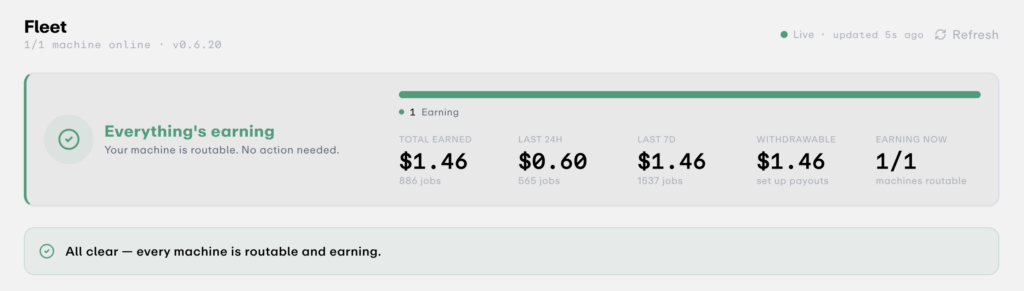
| Metric | Value |
|---|---|
| Earnings in the last 24h | $0.60 (564 jobs) |
| Total earned | $1.445568 (886 jobs) |
| Average per job | $0.001632 |
| Withdrawable | $1.45 (via Stripe) |
| Reputation score | 0.89 (89/89 ok) |
| Average TTFT (time to first token) | 711ms |
| Tokens processed | 2.7K (89 requests) |
“You run it for 24 hours and only make $0.60?!” was my honest first reaction — but let’s dig a little deeper.
Scrolling through the breakdown (Recent Activity), this is what fills the screen, over and over:
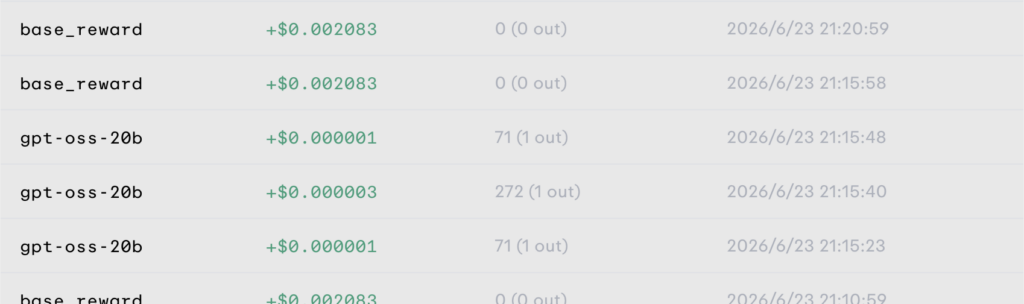
base_reward   +$0.002083   0 (0 out)    2026/6/23 22:10:58
base_reward   +$0.002083   0 (0 out)    2026/6/23 22:05:58
gpt-oss-20b   +$0.000001   71 (1 out)   2026/6/23 21:15:48
gpt-oss-20b   +$0.000003   272 (1 out)  2026/6/23 21:15:40
base_reward   +$0.002083   0 (0 out)    2026/6/23 21:10:59
...
base_reward +$0.002083 drops in automatically every 5 minutes. $0.002083 × 12/hour × 24 hours = $0.60/day. Yes — that 24-hour total of $0.60 is almost entirely the base reward. The actual inference jobs (gpt-oss-20b) paid +$0.000001 to $0.000024 each. Process 71 tokens and earn 0.0001 cents, that kind of world. Even the biggest job, which output 240 tokens, paid $0.000024. You could stack hundreds of jobs and not reach a single cent.
In short, the “$57 usage” the calculator promised is currently near zero because the network is empty, and earnings are pinned to the $18/month base-reward floor. The network utilization figure of 9% landed straight in my wallet.
The GPU usage log
To check “so was the Mac just bored all day?”, I recorded GPU usage across 129,059 samples (~1s interval, 38.7 hours total).
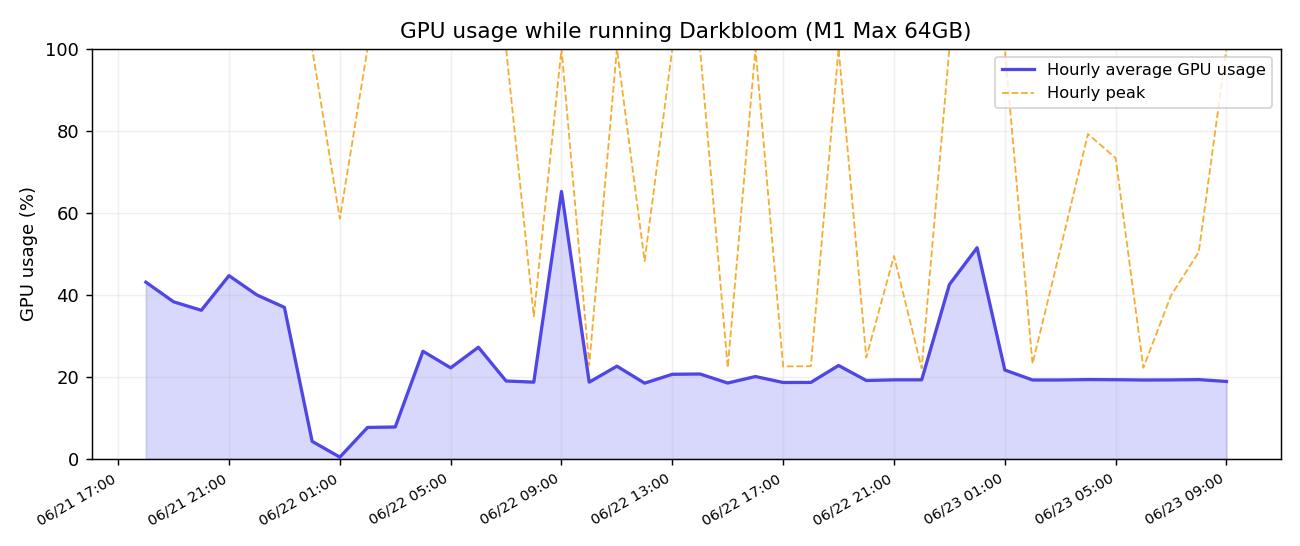
| Statistic | Value |
|---|---|
| Average GPU usage | 23.9% |
| Median | 18.9% |
| Max | 100.0% |
| Samples in the 10–30% band | 63.1% |
| Samples in the 90–100% band | 3.6% |
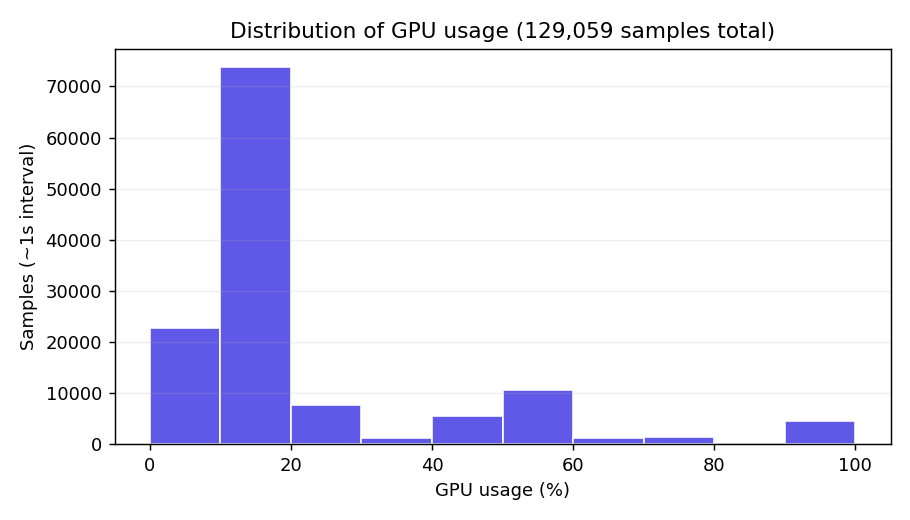
Average 23.9%, median 18.9% — most of the time it was faintly working at 10–30%. Occasionally, the moment a request arrived, it spiked to 90–100% (3.6% of all samples): the classic “long waits, high momentary gusts” pattern. (No wonder the fans never roared the way they do when I run a local LLM myself…)
The orange dashed line (hourly peak) occasionally hitting 100% is exactly when real inference jobs flowed in. The blue area (hourly average) hovering around 20% the whole time is, I assume, the overhead of keeping the model warm plus the trickle of tiny jobs.
Profit and loss including electricity — +$0.53 a day
Finally, the part everyone wants to know: the P&L. I measured power with a watt meter.
- 0.36 kWh/day with the screen off (= 15W average draw)
This is a quietly impressive number — it matches the calculator’s “15W idle” figure exactly. In other words, the power data confirms that my Mac spent almost the entire day effectively idle = hardly any paid work came in. Thanks to Apple Silicon’s efficiency, the electricity cost of leaving it running is astonishingly low.
For conversion I’ll assume $1 = ¥160 / electricity ¥31 per kWh (≈$0.19/kWh).
Per day (measured)
| Item | Amount |
|---|---|
| Income ($0.60) | +$0.60 |
| Electricity (0.36kWh × $0.19) | −$0.07 |
| Net profit | +$0.53/day |
Per month
Here’s the measured pace (base-reward dominated) next to the calculator’s optimistic figure (80% utilization).
| Income | Electricity | Net profit | |
|---|---|---|---|
| Measured pace | ~$18 | −$2.1 | ~+$15.9/month |
| Calculator (80% util) | ~$75.21 | −$2.1※ | ~+$73/month |
※Calculated with the measured power (0.36kWh/day = 10.8kWh/month). At an actual 80% utilization the draw would rise, so the optimistic scenario’s electricity would be a bit higher.
Two takeaways:
- It is in the black. Against $0.07 of electricity I earned $0.60 — about 9×. Thanks to Apple Silicon’s low power draw, it’s structurally impossible to go into the red on electricity.
- But the amount is tiny. At the measured pace it’s about $16/month = one ad-free Netflix. The $75+ figure is a “once the network is 80% full” story, and at 9% utilization today that’s still far off.
If demand grows in the future and the usage portion takes off, this number could turn into something uncapped. But anyone who’s dabbled in the LLM space is probably thinking the same thing I am:
“Is there really anyone paying to use Gemma 4 26B / GPT-OSS 20B?“
If they were serving something like Qwen 3.6 I could maybe see it, but otherwise you’d think people would just quietly use a cloud model (Claude, Codex). Personally I’d put the odds of it going “uncapped” pretty low. (whisper)
Summary
“You can earn just by leaving your Mac on” turned out to be true, but with a condition: the amount you can earn right now is basically the base reward (~$18/month pace), and the calculator’s $75/month is a story for after demand catches up.
Hmm. My shallow dream of “buy a Mac on a loan, lend it to Darkbloom when I’m not using it, and cover the loan payments” has officially evaporated…
- Official estimate for an M1 Max 64GB: $75.21/month (usage $57 + base $18, assuming 192 tok/s)
- Measured 24-hour earnings: $0.60 (564 jobs) / $1.45 cumulative. Almost all of it is the 5-minute
base_reward +$0.002083 - Real inference jobs pay $0.000001–0.000024 each. With network utilization at 9%, the usage portion barely materializes
- Power measured at 0.36kWh/day (15W average = idle-level). Electricity is about $0.07/day
- P&L: +$0.53/day / ~+$16/month. In the black, but small (earns ~9× the electricity)
- Installation is easy with three commands. But MDM enrollment + hardware attestation is a prerequisite
Who it’s for
- People with a spare, always-on secondary Mac (holding off on your main machine is recommended)
- Long-term thinkers who figure “if it doesn’t lose money on electricity, I’ll grab the base reward before demand grows”
- People interested in the mechanism itself — distributed inference, Secure Enclave attestation, and so on
Caveats
- Real income today is around $16/month. Less a “side hustle,” more “pocket money from a sleeping Mac”
- You must enroll your device in Darkbloom’s MDM. Be cautious with company/school-issued Macs or your main machine
- A MacBook sleeps when you close the lid. 24/7 operation needs some setup tweaks
- It’s a public alpha “not recommended for production.” The reward structure and the base-reward guarantee may change
My personal conclusion: “Since it costs almost nothing in electricity, there’s no harm in running it on a spare Mac — just don’t expect too much.” Whether it transforms when demand picks up is something I’ll keep tracking on a secondary machine.
Verification notes (reproducibility)
All numbers in this article are measured in my own environment.
| Item | Details |
|---|---|
| Machine | MacBook Pro / Apple M1 Max / 64GB (MacBookPro18,2, 32-core GPU) |
| Provider | Darkbloom v0.6.20 (public alpha) |
| Models served | gpt-oss-20b (active) / gemma-4-26b-8bit |
| Measurement period | 2026-06-21 18:37 – 06-23 09:17 (JST, ~38.7 hours) |
| GPU log | 129,059 samples / avg interval 1.08s |
| Power measurement | screen off, measured 0.36 kWh/day (15W avg) |
| Conversion | $1 = ¥160 / electricity ¥31 per kWh |
| Earnings (24h / total) | $0.60 (564 jobs) / $1.445568 (886 jobs) |
| Reputation / TTFT | reputation 0.89 (89/89) / avg TTFT 711ms |
| Network utilization | 7% (peak 9%, at time of writing) |
# GPU usage summary (excerpt)
rows: 129,059  duration: 38.7h
avg 23.9%  median 18.9%  min 0.0  max 100.0
distribution: 0-10%=17.6 / 10-30%=63.1 / 30-50%=5.3 / 50-70%=9.1 / 70-90%=1.4 / 90-100%=3.6 (%)
power cross-check: 0.36 kWh/day / 24h = 15.0W average (matches the calculator's 15W idle)
The figures have been cross-checked against the dashboard, the earnings breakdown, the stats page, and the GPU log (gpu_usage_log.csv).
Which Mac should you run Darkbloom on?
Darkbloom’s base reward is tiered by unified memory, and larger models open up more usage revenue. For generative-AI / local-LLM use, here are the latest-generation, high-memory Pro/Max picks.
This article contains affiliate links. Prices and stock vary by store.
Related reading
For more local AI / Apple Silicon experiments:



Leave a Reply