Hi, this is Shichinomiya (@shichinomiya_s).
Last time I benchmarked Qwen 3.6 on an M1 Max 64GB via MLX. This time I ran the same Qwen 3.6 on an NVIDIA Tesla V100 32GB. The V100 is a datacenter GPU that launched in 2017 — a former flagship that cost well over a million yen back then — and it has now dropped to around 135,000 yen (≈$900) on AliExpress. “A 32GB VRAM CUDA GPU for that price” is the kind of thing that immediately grabs a local-LLM tinkerer’s attention.
The models are the same as last time — Qwen 3.6 dense 27B and MoE 35B-A3B — running on llama.cpp. Beyond speed, VRAM, and power draw, this time I also dug into the actual output quality: the math solution, the summaries, and a hands-on test of a generated To-Do app.
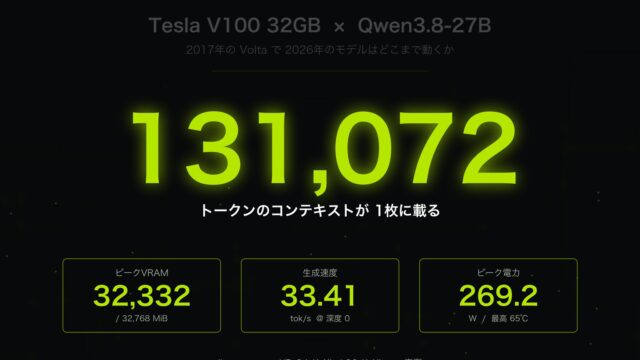
Bottom line up front: the speed was outstanding. MoE 35B-A3B (4-bit) hit 98.8 tok/s — about 1.6x the M1 Max’s 61.2 tok/s. Even the dense 27B model was plenty usable at 32.9 tok/s. That said, I can’t recommend this GPU unconditionally: the prebuilt llama.cpp binaries have already dropped support for the V100 (Volta generation), so it won’t generate a single token unless you build it yourself — a very 2026-specific trap. Speed, quality, value, and pitfalls — all reviewed honestly with real measurements and a real card.
What Is the Tesla V100 — Why Revisit a 2017 GPU Now?
The Tesla V100 is NVIDIA’s Volta-generation datacenter GPU, released in 2017. It’s the “former king” that once powered supercomputers and cloud AI training, and it’s also historically notable as the first generation to feature Tensor Cores. Its specs still hold up surprisingly well today.
| Spec | Tesla V100 32GB |
|---|---|
| Architecture | Volta (compute capability sm_70), 2017 |
| CUDA cores / Tensor cores | 5,120 / 640 (1st-gen Tensor Cores) |
| VRAM | 32GB HBM2, ~900GB/s bandwidth |
| TDP | 250W (PCIe) / 300W (SXM2) |
| Video output | None (compute-only card, no display output) |
| Used price | From ~135,000 yen (AliExpress, as of July 2026) |
The standout spec is the ~900GB/s HBM2 bandwidth. LLM generation speed is governed more by memory bandwidth than raw compute (the entire model has to be read from memory for every token generated), so a GPU with fat bandwidth stays fast even if it’s old. For reference, the M1 Max has 400GB/s and the RTX 4090 has about 1,000GB/s. In other words, on bandwidth alone, the V100 is nipping at the heels of a 2022 flagship.
And on top of that, huge volumes of used units have flooded the market as datacenters retire their fleets, meaning there’s basically no other way to get a “32GB VRAM CUDA GPU” at this price. More VRAM than an RTX 4090 (24GB) for less than half the price — it’s an appealing proposition. But a 2017 GPU comes with 2017-era baggage too, which I’ll get to later in the “Volta abandonment problem” section. First, let’s look at the numbers.
Test Environment
| Item | Details |
|---|---|
| GPU | Tesla V100-SXM2-32GB (Volta, compute capability 7.0) |
| CPU | Xeon Platinum 8260 (96 threads) |
| Driver / CUDA | 580.159.03 / CUDA 12.9 |
| Runtime | llama.cpp (self-built from source targeting sm_70) |
| Model | unsloth’s GGUF build of Qwen 3.6 |
| Measurement method | 2 warm runs per task, last run recorded / temperature=0 / context 16384 |
I tested the following three configurations.
| Model | Quantization | Type | Download size |
|---|---|---|---|
| Qwen3.6-27B-GGUF:Q4_K_M | 4-bit | dense 27B | ~21GB |
| Qwen3.6-27B-GGUF:Q8_0 | 8-bit | dense 27B | ~28GB |
| Qwen3.6-35B-A3B-GGUF:UD-Q4_K_M | 4-bit | MoE 35B / 3B active | ~22GB |
The four tasks are the same as in the previous M1 Max review: Japanese summarization, code generation, reasoning (math), and long-form writing. Speed was measured with thinking ON (Qwen 3.6’s default), while output quality was evaluated separately with thinking OFF (enable_thinking:false + /no_think) to get complete, uncut responses.
One note: the unit I tested is the SXM2 variant (a server-only form factor), but the GPU chip itself is identical to the PCIe version sold on the used market. The PCIe version has a slightly lower boost clock (1380MHz vs. 1530MHz), so your real-world numbers on a PCIe card could run up to roughly 10% slower than what’s reported here.
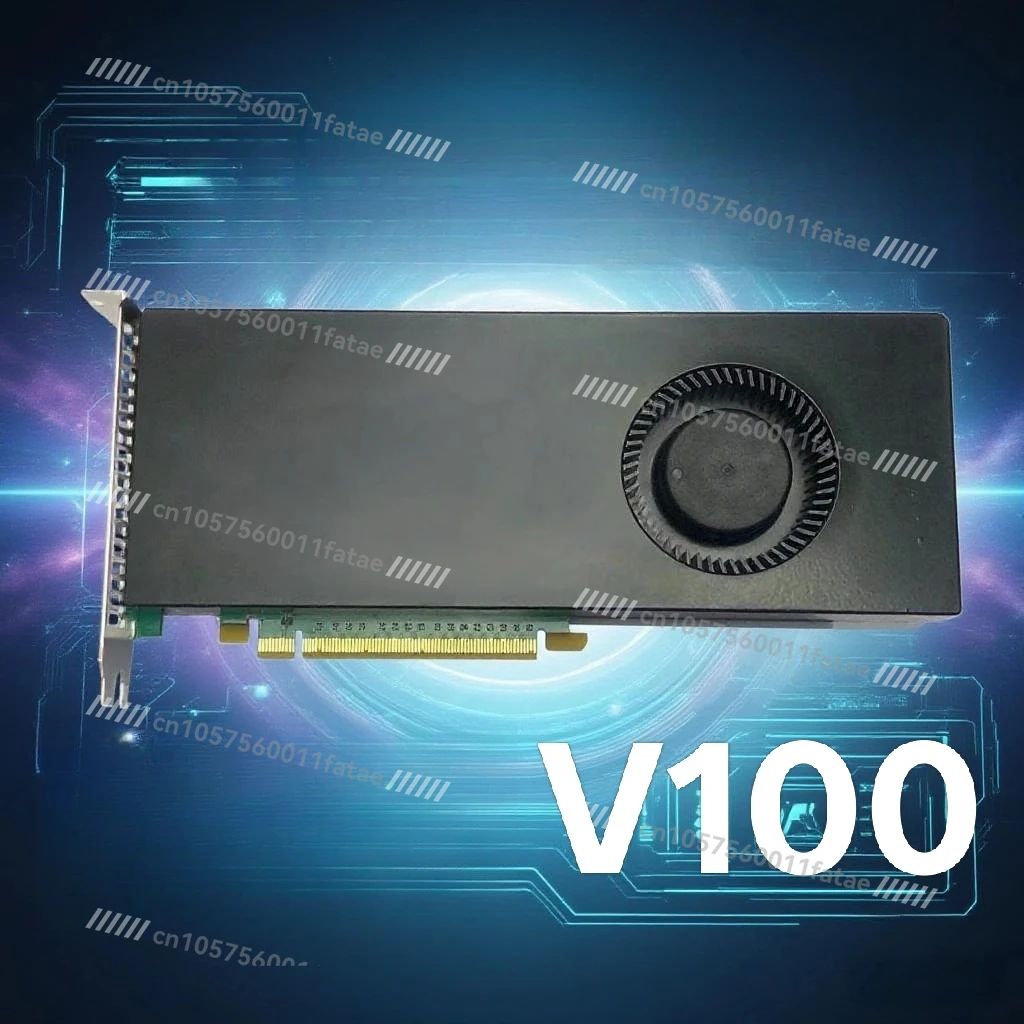
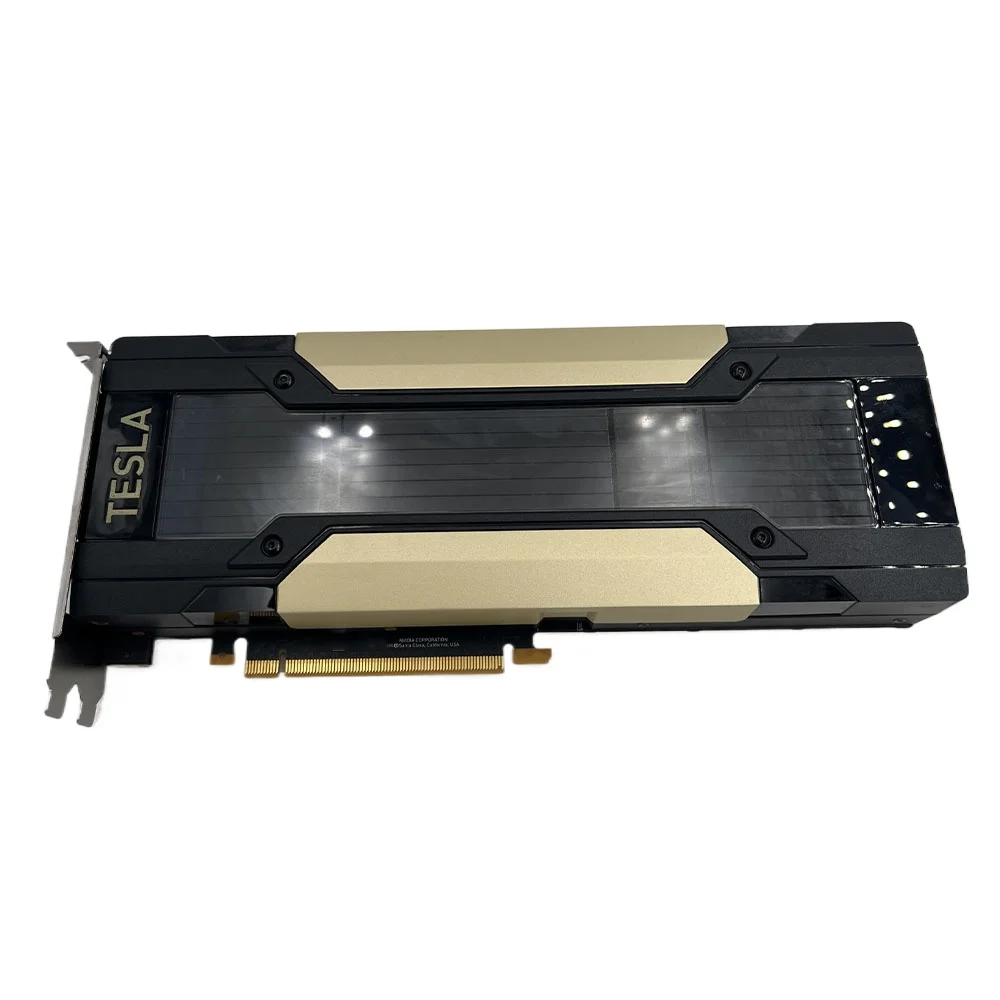
V100 32G Graphics Card PCIe Customized AI Artifact CUDA Graphics Card
Result 1: Generation Speed — MoE 35B-A3B Hits 98.8 tok/s, About 3x the Dense 27B
First, generation speed (decode tok/s). The trend was identical across all four tasks.
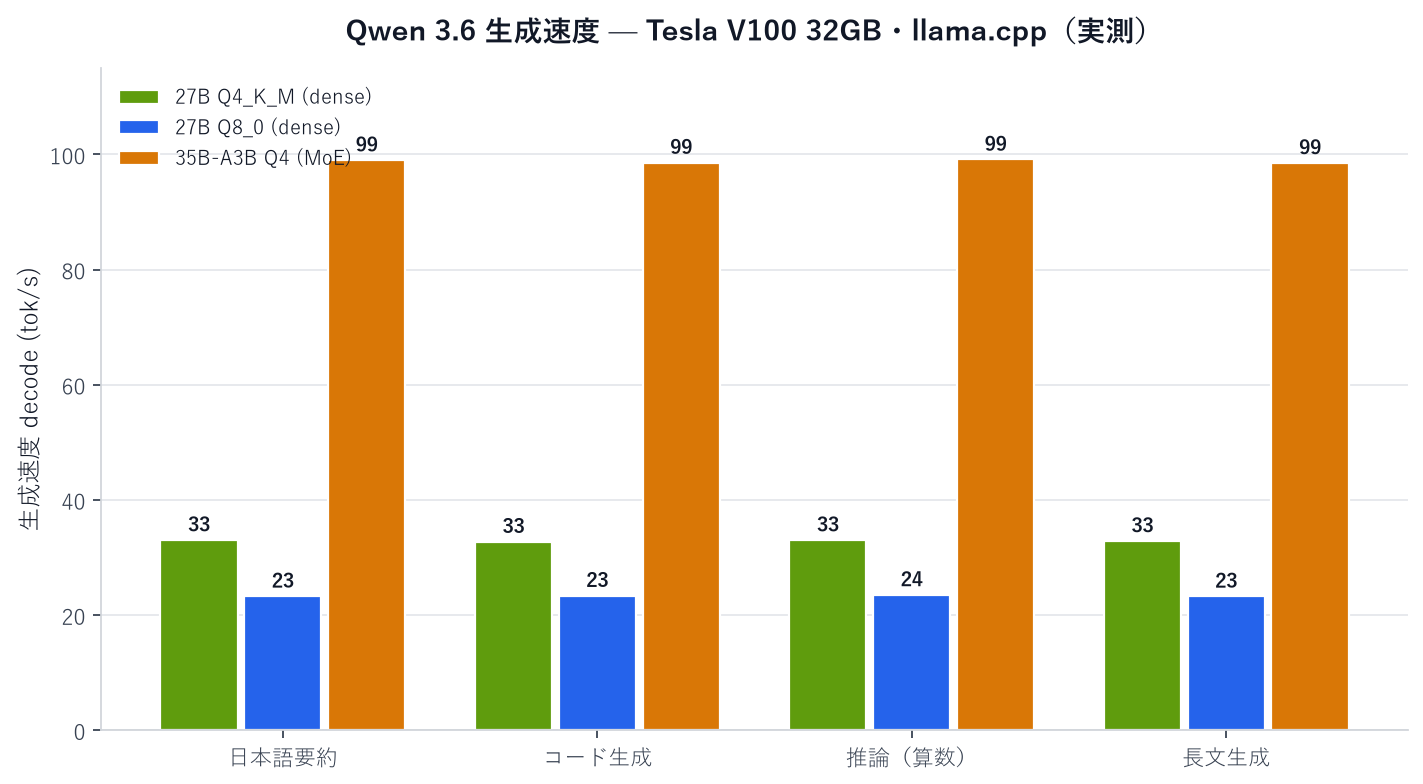
| Task | 27B Q4_K_M (dense) | 27B Q8_0 (dense) | 35B-A3B Q4 (MoE) |
|---|---|---|---|
| Japanese summarization | 33.04 | 23.27 | 99.02 |
| Code generation | 32.76 | 23.38 | 98.60 |
| Reasoning (math) | 33.03 | 23.51 | 99.14 |
| Long-form writing | 32.88 | 23.26 | 98.54 |
| Average decode | 32.9 tok/s | 23.4 tok/s | 98.8 tok/s |
| Average prefill | 206 tok/s | 219 tok/s | 352 tok/s |
MoE 35B-A3B is blazing fast at 98.8 tok/s — text scrolls by faster than you can read it. That’s about 3.0x the speed of dense 27B (Q4), cleanly reproducing the “MoE crushes dense in speed” trend I saw on the M1 Max, now on the CUDA platform too. The reasoning is the same: 35B-A3B only activates about 3B parameters per token, so it does far less compute and memory reading per step than dense, which has to read all 27B every time.
The dense 27B model was also plenty usable for chat at 32.9 tok/s with Q4_K_M. Q8_0, on the other hand, came in at 23.4 tok/s — about 29% slower than Q4. 8-bit roughly doubles the amount of weight data that needs to be read, and since LLM inference is memory-bandwidth bound, it slows down accordingly. Prompt processing (prefill) was also fastest on MoE at 352 tok/s, meaning shorter wait times even with long prompts.
Result 2: VRAM, Temperature, and Power — Q8_0 Barely Fits in 32GB, MoE Sips Power
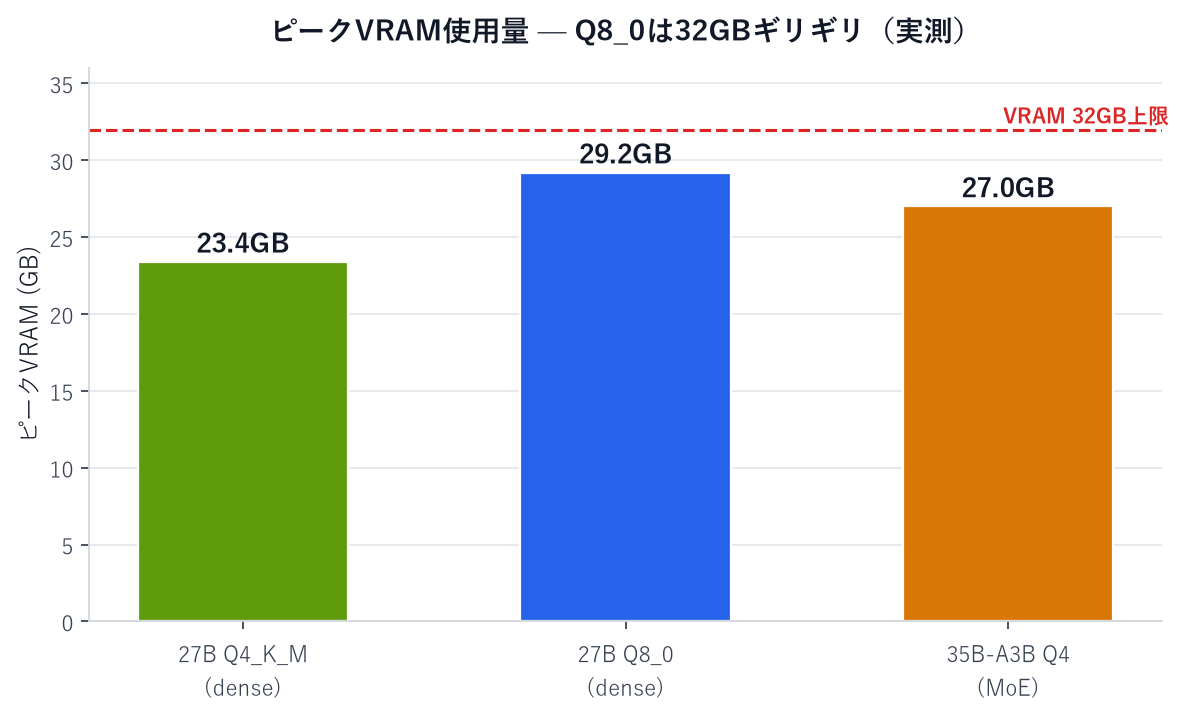
| Metric | 27B Q4_K_M | 27B Q8_0 | 35B-A3B MoE Q4 |
|---|---|---|---|
| Peak VRAM | 23.4GB | 29.2GB | 27.0GB |
| Peak power | 308.6W | 292.4W | 206.2W |
| Peak temperature | 78°C | 72°C | 74°C |
| Load time (warm) | 9.0s | 11.0s | 11.0s |
Three key takeaways here.
1. Q8_0 uses 29.2GB, barely fitting within the 32GB budget (about 2GB to spare). It worked fine with a 16384-token context, but there’s no room left for a longer context. This is where the gap with the M1 Max’s 64GB of unified memory really shows. With Q4_K_M, on the other hand, you only use 23.4GB, leaving room to extend context or run multiple models at once.
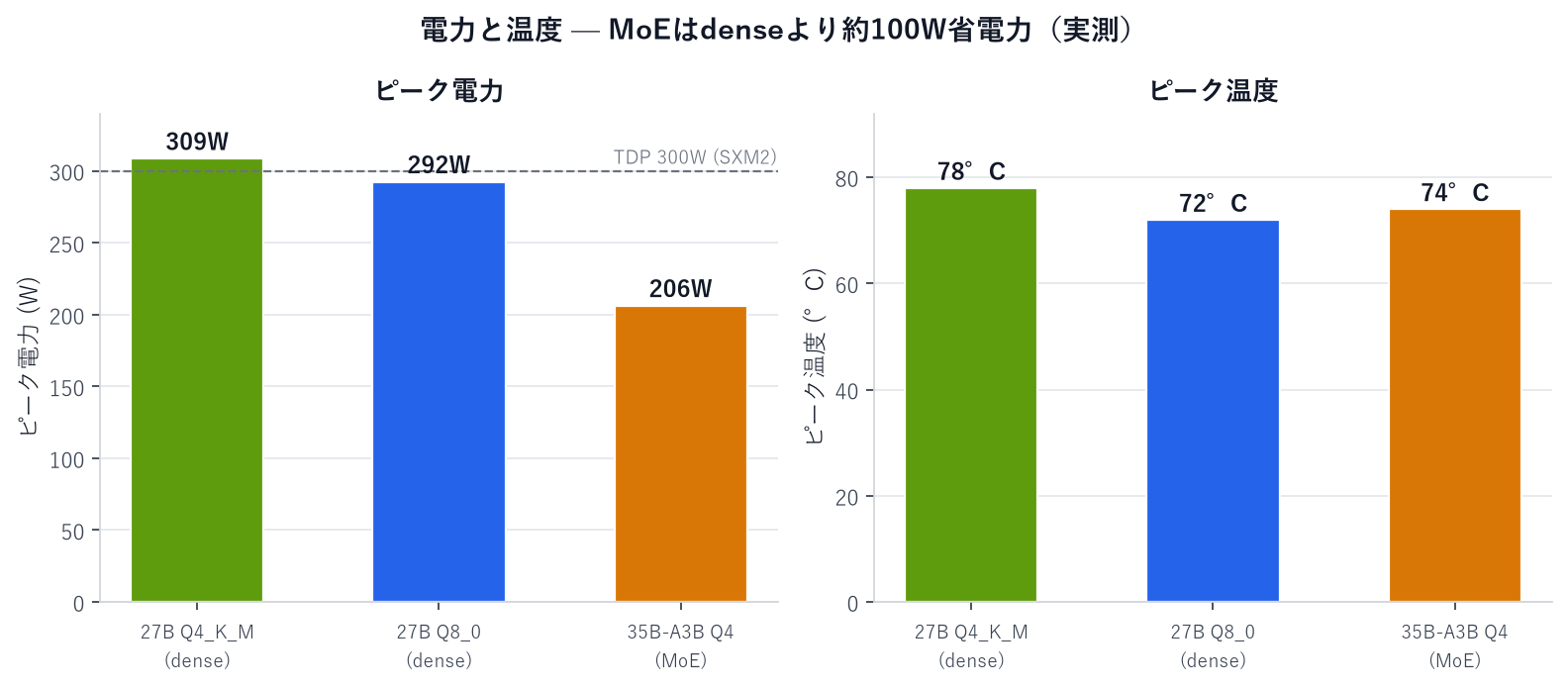
2. MoE draws only 206W, about 100W less than dense. Because fewer parameters are active, MoE spends more time waiting on memory bandwidth, whereas dense keeps the compute units running flat-out, pushing power past 300W. It’s a pleasant reversal — the fastest model is also the most power-efficient — good news for both your electricity bill and heat output.
3. Temperatures ran 72–78°C. Keep in mind this is with forced server airflow cooling in place. The V100 was designed as a fanless card (relying on chassis airflow), so if you’re putting one in a regular PC, a fan-equipped model is essentially mandatory. I’ll come back to this point in the value-for-money section below.
Result 3: Quality — Every Output, Shown in Full
Speed doesn’t matter if the output is bad, so I ran the same tasks with thinking OFF to capture complete responses and checked the actual content. Here’s the summary table.
| Evaluation axis | 27B Q4 | 27B Q8 | MoE Q4 |
|---|---|---|---|
| Reasoning (math word problem) | ✅ Correct, with self-check | ✅ Correct, with self-check | ✅ Correct, with self-check |
| Code (To-Do app) | ✅ Fully functional | ✅ Fully functional | ✅ Fully functional, best UI |
| Japanese summarization | 149 chars, faithful | 153 chars, faithful | 175 chars, most comprehensive |
| Long-form (1,200–1,500 chars) | Great structure, concrete examples | Clearest structure of the three | Easy to read |
Reasoning (Math) — All Three Models Got It Right, and Self-Checked Their Work
The question was this word problem.
A store sells apples for 120 yen each and oranges for 80 yen each. Taro bought a combined total of 15 apples and oranges and paid 1,560 yen in total. Find the number of apples Taro bought.
Here’s the actual output from 27B Q4_K_M (4-bit — the configuration I’d expect to show the most “degradation,” if any).
Let x be the number of apples and y be the number of oranges. (…)
120x + 80(15 − x) = 1560
120x + 1200 − 80x = 1560
40x = 360
x = 9So Taro bought 9 apples.
Let me verify by also checking the number of oranges.
y = 15 − 9 = 6
Total: 120 × 9 + 80 × 6 = 1080 + 480 = 1560 yen
This matches the given conditions.Answer: 9 apples
(Translated from the original Japanese output.)
Not only did it get the correct answer (9 apples), it volunteered a self-check I never asked for. The MoE model produced the most structured answer, with explicit headers: “1. Set up variables → 2. Build the equations → 3. Solve the system → 4. Verify.” The Q8 model solved it via a different method and also got it right. I couldn’t detect any reasoning degradation from 4-bit quantization, at least not at this difficulty level.
Japanese Summarization — All Three Outputs, Side by Side
The task was to summarize a roughly 600-character explainer on local LLMs down to about 120 characters. Here are the full outputs from all three models.
27B Q4_K_M (149 characters):
With the rise of generative AI, interest in local LLMs is growing. Unlike cloud APIs, they run without extra fees and let you process sensitive data on your own machine, giving them an edge in cost and privacy. However, high-performance models require a lot of memory, so compression techniques like 4-bit quantization to shrink footprint, plus choosing the right hardware, are key to making them practical.
(Translated from the original Japanese output.)
27B Q8_0 (153 characters):
With the rise of generative AI, interest in local LLMs is growing. Unlike cloud APIs, they run without extra fees and let you process sensitive data on your own machine, giving them an edge in cost, privacy, and freedom. However, high-performance models require a lot of memory, so compression techniques like 4-bit quantization to shrink footprint, plus choosing the right hardware, are key to making them practical.
(Translated from the original Japanese output.)
MoE 35B-A3B (175 characters):
With the spread of generative AI, interest in “local LLMs” that run on personal devices is rising. Compared with cloud use, they run without extra fees and can prevent sensitive data from leaking externally, which is a major draw. The challenge is hardware, but quantization techniques save memory, making practical speeds achievable even on used GPUs. They excel in cost, privacy, and freedom, and choosing the right hardware plus technical know-how are the keys to success.
(Translated from the original Japanese output.)
What’s interesting is that Q4 and Q8 produced nearly identical output (the only difference is roughly “excel in cost and privacy” vs. “an edge in cost, privacy, and freedom”). Again, no visible impact from quantization. MoE’s summary ran a bit longer, but it even picked up the source detail about “practical speeds even on used GPUs,” making it the most comprehensive of the three. None of the three summaries introduced information not present in the source (i.e., zero hallucination).
Code Generation — All Three Models Produced a Working To-Do App on the First Try
The prompt: “Build a To-Do app that runs as a single HTML file with no external libraries — add tasks, toggle complete, delete, and persist via localStorage.” I opened the generated code directly in a browser and tested it hands-on. All three models produced fully working apps on the first attempt.



I checked four behaviors: “adding a task via the add button,” “toggling complete via click (strikethrough),” “deleting,” and “persisting after reload (localStorage).” All three models passed on all four counts. The surprise was that the fastest model, MoE, also had the most polished UI. Completed items get a green checkmark circle, spacing is well balanced — nothing about it felt rushed despite the speed. The code itself was clean too; here’s an excerpt of the JS from the MoE-generated app.
// State management (loaded from localStorage)
let todos = JSON.parse(localStorage.getItem('todos')) || [];

// Toggle task completion
function toggleTodo(id) {
    todos = todos.map(todo => {
        if (todo.id === id) {
            return { ...todo, completed: !todo.completed };
        }
        return todo;
    });
    saveAndRender();
}

// Save and re-render
function saveAndRender() {
    localStorage.setItem('todos', JSON.stringify(todos));
    renderTodos();
}
Immutable updates via spread syntax, a clean separation between state and rendering — this would pass a human code review without complaint.
Long-Form Writing — Well-Structured 1,200–1,500-Character Articles
The task was to write a 1,200–1,500-character blog post on “the value of running LLMs locally as an individual.” Here’s an excerpt from the opening of 27B Q4’s output.
In recent years, large language models (LLMs) such as ChatGPT and Claude have advanced remarkably. But rather than relying solely on cloud-based APIs, a growing number of individual developers and researchers are running LLMs locally on their own PCs and servers. (…) For individuals, operating a local LLM carries profound significance in today’s digital society — securing data privacy, improving customizability, and deepening technical literacy.
(Translated from the original Japanese output.)
What followed was a tightly structured piece — “First (data sovereignty) → Second (domain optimization and offline autonomy) → Third (resisting black-box dependence) → Conclusion” — complete with concrete examples like a lawyer handling confidential documents or fine-tuning writing style with LoRA, all woven into a clear intro-body-conclusion structure. All three models kept their structure intact, with Q8’s version having the clearest heading organization of the three.
One caveat: since Qwen 3.6 is an always-thinking model, if you set a small output token limit, generation can get cut off mid-thought. In fact, during the speed benchmarks (thinking ON, fixed token cap), every task hit the cap and got cut short. In practice, you’ll want to set a generous token limit (the same quirk I noted in the M1 Max review).
Result 4: Cross-Comparison with M1 Max 64GB — V100 Is About 1.6–2.0x Faster
Here’s a comparison against the same four tasks from my previous M1 Max testing.
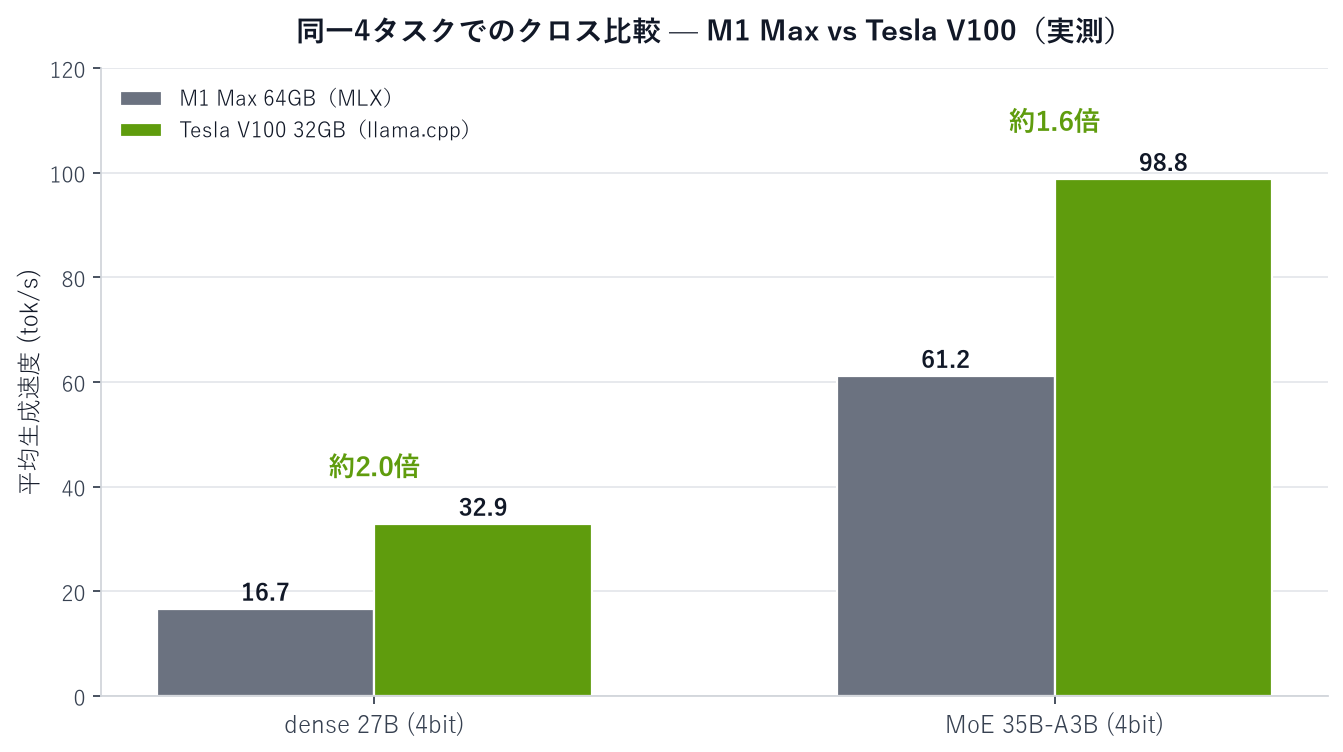
| Model | M1 Max 64GB MLX (4-bit) | V100 32GB llama.cpp (Q4_K_M) | Speed ratio |
|---|---|---|---|
| dense 27B | 16.7 tok/s | 32.9 tok/s | V100 ~2.0x faster |
| MoE 35B-A3B | 61.2 tok/s | 98.8 tok/s | V100 ~1.6x faster |
Since the quantization schemes differ (MLX’s nvfp4 vs. GGUF’s K-quant), this isn’t a perfectly apples-to-apples comparison, but as a real-world “practical 4-bit vs. 4-bit” comparison, the V100 came out about 1.6–2.0x faster. A 2017 GPU outperforming Apple’s top-of-the-line 2021 silicon in actual measurements — I think that comes down to the ~900GB/s of HBM2 bandwidth (versus 400GB/s on the M1 Max). LLM inference is, in the end, a memory-bandwidth game.
That said, the M1 Max has its own advantage: full access to 64GB of unified memory. For long-context Q8 workloads that won’t fit in the V100’s 32GB, or for larger models, the M1 Max wins out. The division of labor here is clear: “the V100 for speed, the unified-memory Mac for headroom.”
The Biggest Pitfall — Prebuilt llama.cpp No Longer Runs on Volta
This is the single most important thing I want to convey in this article. When I first tried loading a model with the officially distributed prebuilt llama.cpp binary, it crashed the instant it tried to generate the first token.
ggml-cuda.cu:104: CUDA error
CUDA error: no kernel image is available for execution on the device
Digging into the cause, the prebuilt binary’s target architectures were ARCHS = 750,800,860,890,900,1000,1200 — in other words, sm_75 (Turing) and later only; the V100’s sm_70 (Volta) isn’t included. There’s simply no GPU kernel for the V100 baked into the binary.
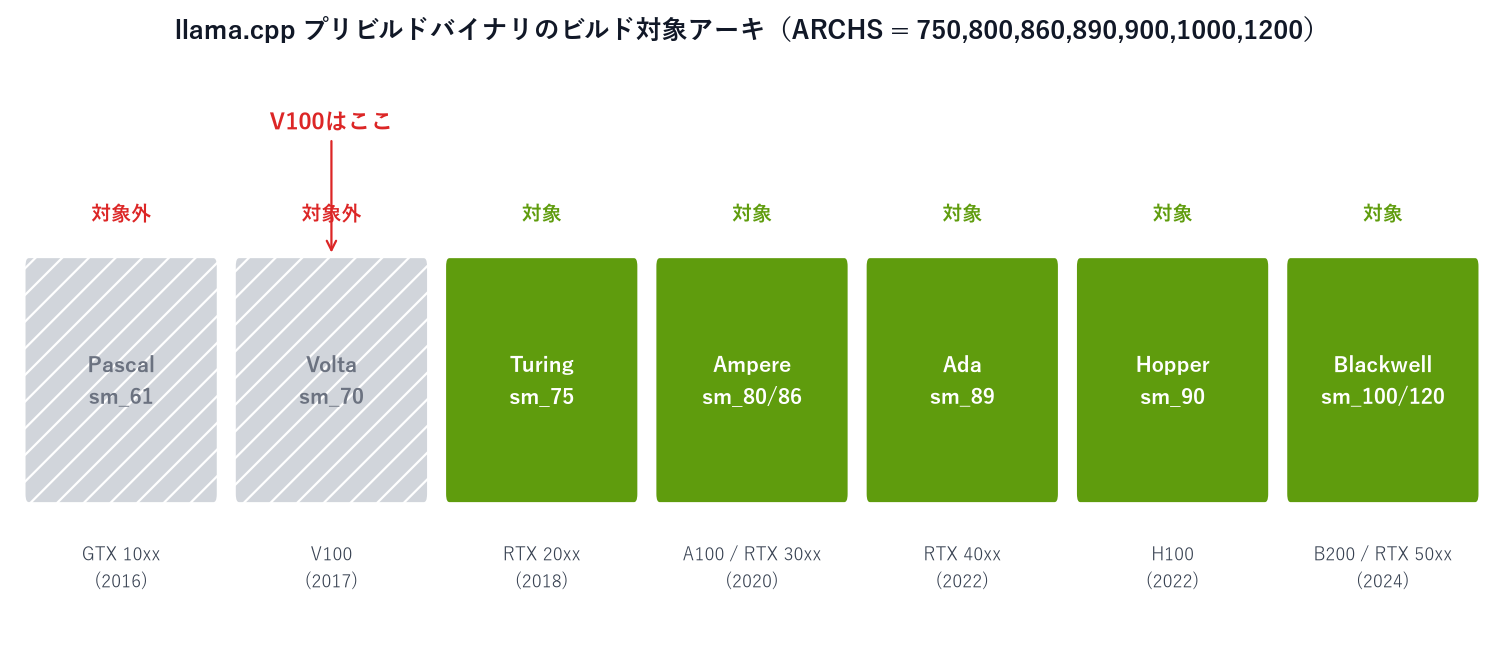
The fix is to rebuild from source, explicitly targeting sm_70. Once I did that, every model ran without a hitch.
apt-get install -y libcublas-dev-12-9
git clone --depth 1 https://github.com/ggml-org/llama.cpp
cmake -B build -DGGML_CUDA=ON -DCMAKE_CUDA_ARCHITECTURES=70 -DLLAMA_CURL=ON -DCMAKE_BUILD_TYPE=Release
cmake --build build -j"$(nproc)" --target llama-server llama-cli llama-bench
However, during the build, the CUDA compiler (nvcc) itself throws this warning.
Support for offline compilation for architectures prior to ‘sm_75’ will be removed in a future release
In other words, even the CUDA toolkit itself has announced the eventual end of Volta compilation support. Today, a self-built binary works flawlessly, but there’s no question the ecosystem is gradually abandoning Volta. If you buy a V100, factor in the risk that “setup takes extra effort” and that “at some point in the future, the latest software simply won’t support it anymore.” I learned firsthand that in 2026, an older-generation GPU no longer arrives in an “it just works” state.
Value-for-Money Analysis — Is a 135,000-Yen V100 Worth It?
Now, the main question: is it worth the money? As of July 2026, you can buy the PCIe version of the Tesla V100 32GB (fan-equipped model) on AliExpress for 135,751 yen (≈$900).

Tesla V100 32GB (PCIe, fan-equipped) — 135,751 yen (AliExpress)
Let’s weigh this price against the measured numbers.
| Angle | Measured / calculated value |
|---|---|
| Cost per GB of VRAM | 135,751 yen ÷ 32GB ≈ ~4,200 yen/GB |
| Real-world speed | 33 tok/s at the 27B class, 99 tok/s for MoE 35B (measured in this article) |
| Electricity cost (full load) | Peak ~300W → about 9 yen/hour (at 31 yen/kWh). Roughly 6,700 yen/month if run 24/7 |
Getting 32GB of VRAM for about 4,200 yen/GB is more or less a one-of-a-kind deal right now. The closest rival at a similar price point is a used RTX 3090 (24GB), which has 8GB less VRAM. The RTX 4090 (24GB) dominates on speed and future-proofing, but costs more than twice as much. As this article’s own measurements show — Q4_K_M loading a 27B-class model in 23.4GB with over 8GB still free — the 32GB capacity itself is the V100’s core value proposition. And in absolute terms, MoE hitting 99 tok/s means you’re unlikely to ever feel short on speed for everyday use.
There are two things to watch out for before buying.
1. Cooling. The V100 is designed to be cooled by a server’s forced airflow and has no onboard fan. Even in my tests, temperatures hit 72–78°C under full load (with server cooling assisting), so if you’re putting it in a normal PC case, a fan-equipped model is basically the only sane choice. Fanless cards are also out there, but those are meant for people racking it into a real server, or for those willing to rig up their own duct-and-blower cooling setup.
NVIDIA Tesla V100 32GB (PCIe, fanless) — see it here (AliExpress)
2. Form factor. When shopping used, always pick the PCIe version. The SXM2 version requires a specialized NVLink motherboard and physically cannot be plugged into a normal PC (this is exactly why suspiciously cheap SXM2 units show up so often). Also, since there’s no video output, you’ll need a separate iGPU or a cheap graphics card just to drive a display.
Bottom line: if you can accept it purely as an “inference-only machine” — the cheapest way to get 32GB of VRAM, running 27B-class local LLMs at practical speeds — the 135,000-yen price tag holds up under real measurements. But given the Volta-abandonment issue from the previous section, this isn’t for anyone expecting “plug it in and it just works.”
Who It’s For, and What to Watch Out For
Good fit for:
- Anyone who wants a CUDA machine with 32GB of VRAM for around 100,000+ yen and plans to run 27B-class local LLMs at practical speeds (33–99 tok/s)
- Anyone who needs to process sensitive data locally that can’t go through a cloud API
- DIY/server enthusiasts who actually enjoy building from source and wrangling drivers
Things to watch out for:
- The prebuilt llama.cpp binary won’t run. A self-built binary targeting sm_70 is mandatory, and CUDA itself has already announced the end of Volta support — factor in the ecosystem’s limited remaining lifespan
- Q8_0 uses 29.2GB, barely fitting in 32GB. Use Q4_K_M if you need a long context
- No video output, and cooling assumes a server environment. If it’s going in a home PC, get a fan-equipped model, and make sure it’s the PCIe version, not SXM2
- 250–300W under full load. Budget for the electricity cost (~9 yen/hour at full tilt) and the summer heat
- Qwen 3.6 always uses thinking mode — set a generous output token limit
Conclusion
Here’s the summary of running Qwen 3.6 on the Tesla V100 32GB (all figures are measured values).
- MoE 35B-A3B (4-bit) = 98.8 tok/s, about 3x dense 27B’s 32.9 tok/s, and about 1.6–2.0x faster than the M1 Max 64GB
- Quality held up too. All three models solved the math problem correctly and self-checked their work; all three generated To-Do apps worked fully in real browser testing; summaries and long-form writing were consistently coherent
- With Q4_K_M, VRAM use is a comfortable 23.4GB; Q8_0 barely fits at 29.2GB. MoE sips power at just 206W
- The biggest pitfall is Volta being phased out. A self-built llama.cpp is mandatory, and future compatibility is at risk
- 32GB of VRAM for 135,000 yen (~4,200 yen/GB) is a truly unique deal. Worth “buying” if you’re okay treating it as a dedicated inference box; “skip it” if you want plug-and-play
The idea that “a 2017 GPU is already too slow” was completely disproven by these measurements — on speed alone, it’s still first-tier. But what I really learned from this test is that the real question for an older-generation GPU isn’t “is it fast,” it’s “will it keep working going forward.”
Used V100 PCIE 32GB Computing Graphics Card 32G SMX2 Interface Adapter Card PCIE Deep Learning GPU
Related Reading
More local LLM benchmark write-ups here.
- Benchmarking Qwen 3.6 Locally on a Mac — MoE 35B Ran “3.7x Faster Than 27B” on an M1 Max 64GB
- How Far Can a GTX 1080Ti Run the Latest “Qwen 3.5”? A Local LLM Benchmark
Verification Notes (for reproduction)
Every figure in this article was measured on a real Tesla V100-SXM2-32GB unit. Reproduction steps below.
Environment: Tesla V100-SXM2-32GB / driver 580.159.03 / CUDA 12.9 / llama.cpp (self-built for sm_70)
# 1) Build llama.cpp targeting sm_70 (Volta) -- the prebuilt binary does NOT run on the V100
apt-get install -y libcublas-dev-12-9
git clone --depth 1 https://github.com/ggml-org/llama.cpp
cmake -B build -DGGML_CUDA=ON -DCMAKE_CUDA_ARCHITECTURES=70 -DLLAMA_CURL=ON -DCMAKE_BUILD_TYPE=Release
cmake --build build -j"$(nproc)" --target llama-server llama-cli llama-bench

# 2) Start the server (example: 27B Q4_K_M)
./build/bin/llama-server -hf unsloth/Qwen3.6-27B-GGUF:Q4_K_M -ngl 999 -c 16384 --port 18001

# 3) Measure via the OpenAI-compatible API (prefill/decode tok/s are included in the response's timings field)
curl -s http://127.0.0.1:18001/v1/chat/completions -H 'Content-Type: application/json' \
  -d '{"messages":[{"role":"user","content":"..."}],"max_tokens":512,"temperature":0}'
Measured values (average decode, real measurements): 27B Q4_K_M = 32.9 tok/s (peak 23.4GB, 308.6W) / 27B Q8_0 = 23.4 tok/s (29.2GB, 292.4W) / 35B-A3B UD-Q4_K_M = 98.8 tok/s (27.0GB, 206.2W). Last run of 2 warm runs per task, temperature=0, context 16384.
Known limitations: Speed measurements were taken with thinking ON (default), so every task hit the token limit and output was cut off mid-generation. Quality evaluation was performed separately with thinking OFF (enable_thinking:false + /no_think) to obtain complete outputs. TTFT was replaced with prefill time, since streamed TTFT values were unstable due to always-on thinking. The tested unit was the SXM2 version (1530MHz boost); the PCIe version (1380MHz) may run up to roughly 10% slower. The 72–78°C temperature range assumes server cooling. MoE used unsloth’s dynamic quantization (UD-Q4_K_M), since a plain Q4_K_M build wasn’t distributed. The To-Do app screenshots show the generated code opened unmodified, after the test tasks were performed.



Leave a Reply