Hi, this is Shichinomiya-san (@shichinomiya_s).
Last time I tested how far you can push Qwen as a local LLM on a GTX 1080Ti. This time I ran the new Qwen 3.6 on an Apple M1 Max (64GB unified memory) and benchmarked it thoroughly with MLX. I compared a dense 27B against a MoE (mixture-of-experts) 35B-A3B, plus 4-bit (nvfp4) and 8-bit (mxfp8) quantization.
Here’s the bottom line: “more parameters = slower” simply did not hold this time. The MoE 35B-A3B, which activates only ~3B params per token, ran about 3.7x faster than the dense 27B (61.2 tok/s vs 16.7 tok/s) — at roughly the same memory. Meanwhile the 8-bit build was slower than 4-bit and used about 1.8x the memory. The numbers make the trade-offs crystal clear. I’ll review it honestly, including the always-on “thinking” quirk that inflates generation.
What is Qwen 3.6 — and why run it locally now?
Qwen 3.6 is Alibaba’s new-generation LLM series; open-weight releases landed in spring 2026 (35B-A3B on Apr 16, 27B on Apr 22). It made headlines on agentic benchmarks (e.g. Terminal-Bench 2.0), but what’s interesting here is that the open weights ship as MLX quantizations you can run on your own Mac.
The two protagonists:
- dense 27B — an ordinary 27B that uses all parameters for every token.
- MoE 35B-A3B — 35B total, but only ~3B activate per token (A3B = Active 3B). “Big, but only part of it fires each time.”
Apple Silicon shares memory between GPU and CPU (unified memory), so there’s no VRAM wall — the whole installed memory is usable for the model. 64GB comfortably reaches the 35B class. Let’s look at the numbers.
Test environment
| Item | Detail |
|---|---|
| Machine | Apple M1 Max (10-core CPU / 32-core GPU) |
| Memory | 64GB unified memory |
| OS | macOS (Darwin 25.4.0) |
| Runtime | mlx-lm 0.31.3 (Python 3.11) |
| Method | 2 warm runs per task, last run reported. Max generation tokens fixed |
All three models are mlx-community MLX quantization builds.
| Model | Quantization | Type |
|---|---|---|
| Qwen3.6-27B-nvfp4 | FP4 (4-bit) | dense 27B |
| Qwen3.6-35B-A3B-nvfp4 | FP4 (4-bit) | MoE 35B / active 3B |
| Qwen3.6-35B-A3B-mxfp8 | FP8 (8-bit) | MoE 35B / active 3B |
Tasks: Japanese summarization, code generation, reasoning (arithmetic), and long-form generation. No Ollama — everything via Apple’s native MLX.
pip install "mlx-lm==0.31.3"
python -m mlx_lm.generate --model mlx-community/Qwen3.6-35B-A3B-nvfp4 --prompt "Hello"
Result 1: Generation speed — the MoE 35B-A3B was ~3.7x faster than the dense 27B
Generation speed (tok/s) first. The trend was clear across all four tasks.
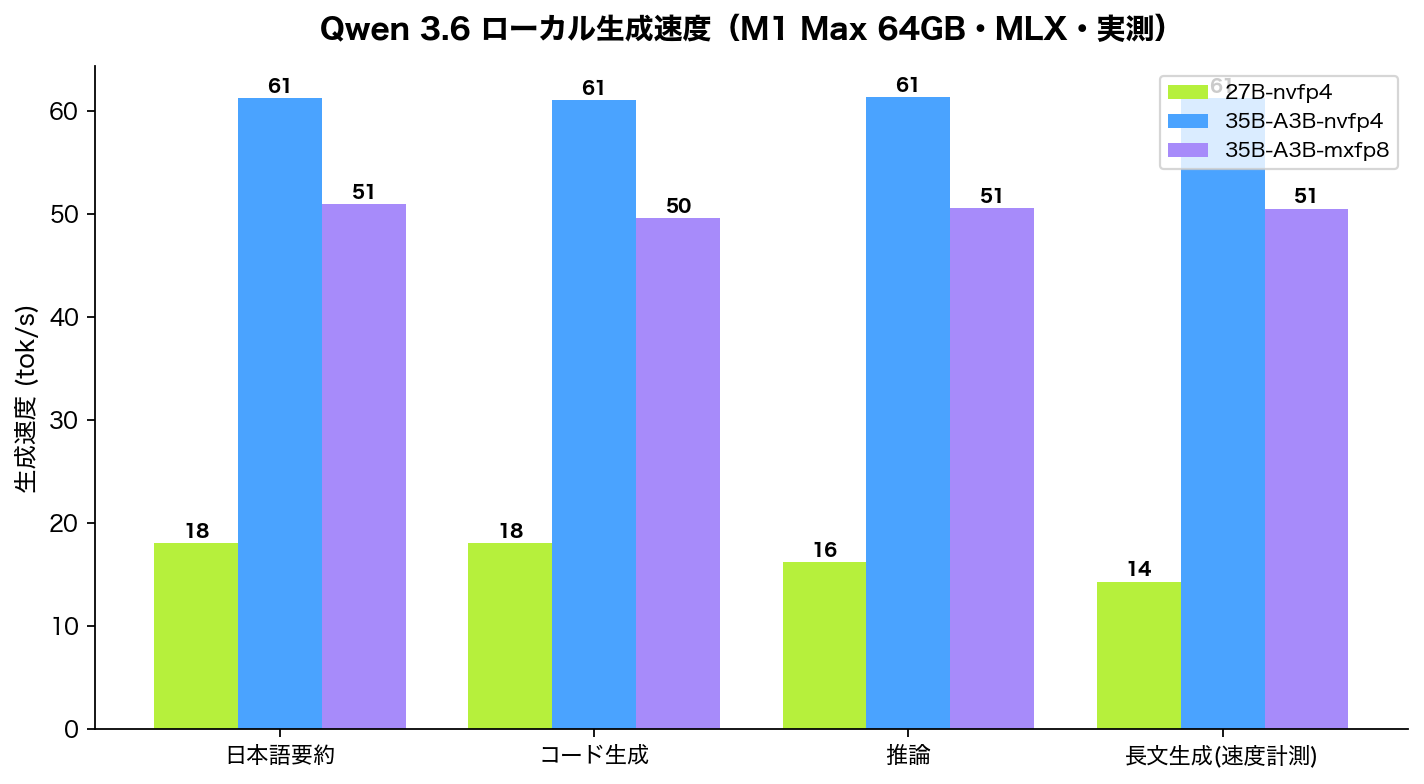
| Task | 27B-nvfp4 (dense) | 35B-A3B-nvfp4 (MoE) | 35B-A3B-mxfp8 (MoE/8bit) |
|---|---|---|---|
| JP summarization | 18.09 | 61.26 | 50.97 |
| Code generation | 18.08 | 61.03 | 49.63 |
| Reasoning (math) | 16.24 | 61.32 | 50.60 |
| Long-form | 14.35 | 61.28 | 50.53 |
| Average | 16.7 tok/s | 61.2 tok/s | 50.4 tok/s |
“The 35B total is ~3.7x faster than the 27B” looks paradoxical, but that’s the essence of MoE. The 35B-A3B activates only ~3B per token, so the actual compute is like a 3B model. The dense 27B uses all 27B every time, so it’s naturally heavier. The prefill (prompt processing) gap is even larger: ~237 tok/s for the MoE vs ~59 tok/s for the dense.
Result 2: Quantization FP4 vs FP8 — 4-bit was faster AND half the memory
Same 35B-A3B, comparing 4-bit (nvfp4) and 8-bit (mxfp8).
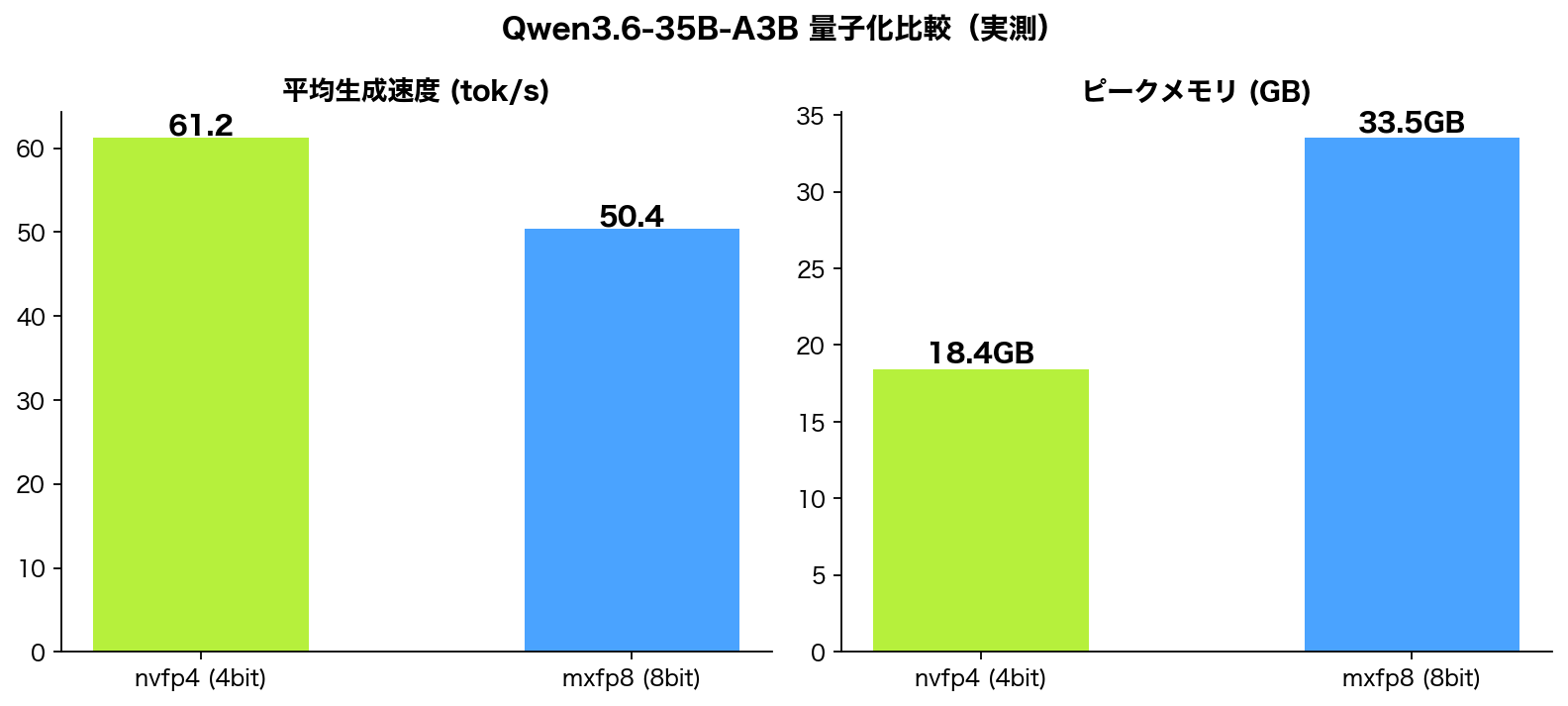
| Metric | nvfp4 (4-bit) | mxfp8 (8-bit) |
|---|---|---|
| Avg generation | 61.2 tok/s | 50.4 tok/s |
| Peak memory | 18.41GB | 33.5GB |
4-bit was faster (about +21%) and used roughly half the memory. 8-bit is an option when you want extra quality headroom, but the cost shows up clearly in the measurements. Given the M1 Max’s memory bandwidth, the practical order is: try 4-bit first, move to 8-bit only if quality disappoints.
Result 3: Memory and load — 64GB has plenty of room, but 8-bit is “heavy”
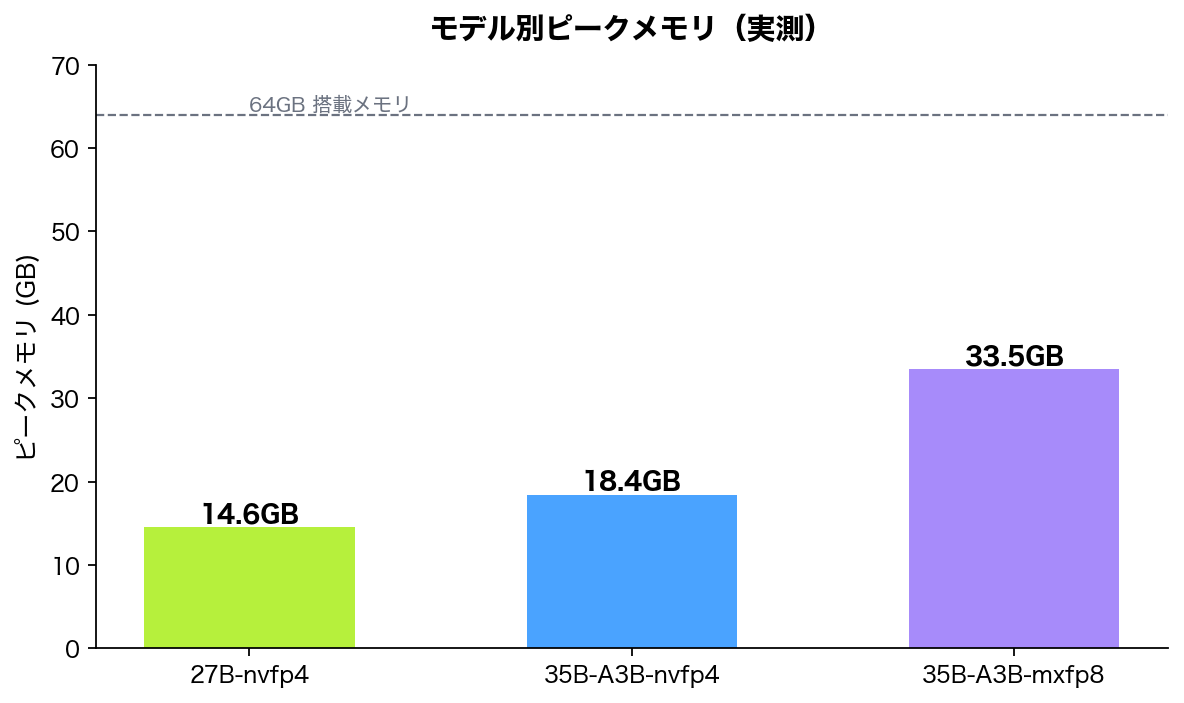
Peak memory: 14.55GB for the dense 27B, 18.41GB for the MoE 35B (4-bit), 33.5GB for the MoE 35B (8-bit). Even the heaviest, the 8-bit 35B, peaked at 33.5GB — just over half of 64GB. On an M1 Max 64GB all three run with ease; a 32GB machine should handle the 4-bit builds (max 18.4GB) fine too.
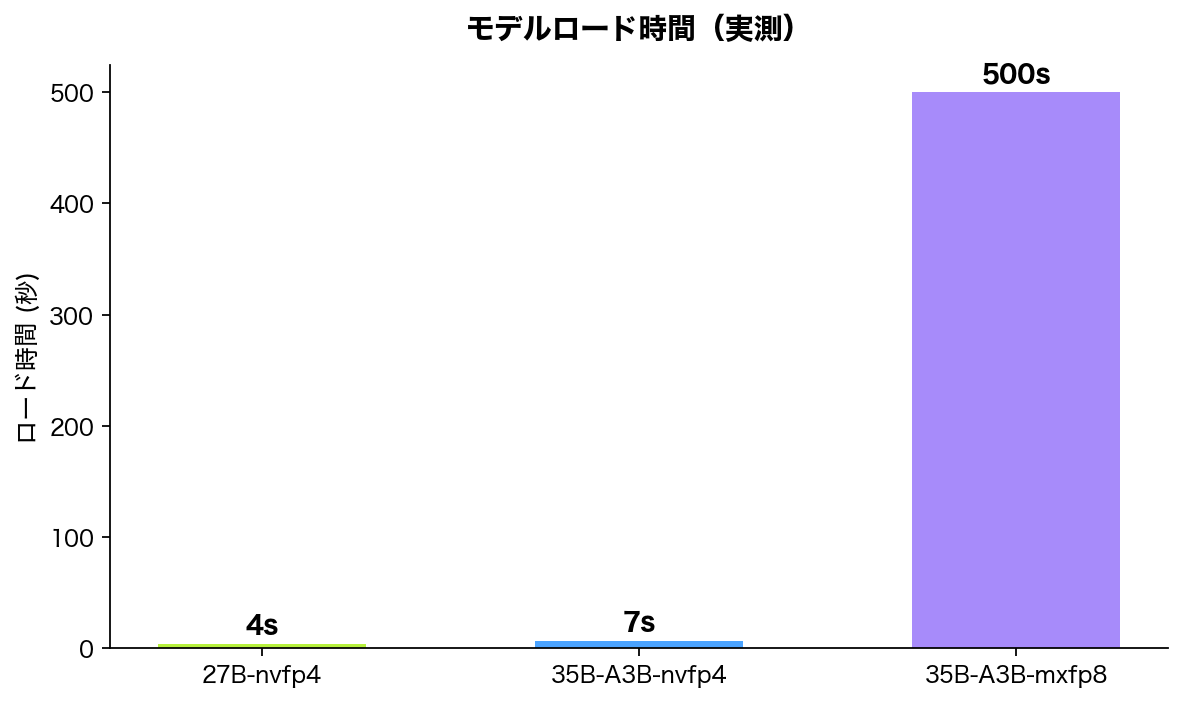
Load time: 3.6s for the dense 27B, 6.8s for the MoE 35B (4-bit). One caveat: the 8-bit build (mxfp8) shows ~500s in the chart, which is NOT a fair comparison. At runtime, some of the model files weren’t cached and a re-download from Hugging Face (~8 minutes) got mixed in. Cached, it should be comparable to the 4-bit build (6.8s). Honestly, read this as “first-time-including-download,” not “load time.”
Discussion — why MoE is fast, and the “always-on thinking” quirk
The headline is clearly MoE speed. The intuition “more parameters = heavier” doesn’t apply to MoE. The 35B-A3B is large in total size (it eats memory), but inference compute is ~3B-equivalent, so it’s dramatically faster than the dense 27B. If you want “smart and fast” locally, the MoE 4-bit build is the first candidate.
Now the honest, unexpected part. Qwen 3.6 uses always-on thinking, emitting an internal reasoning trace before answering. It tends to think in English even for Japanese prompts, and with a small generation cap (~200 tokens) it sometimes got cut off mid-thinking before reaching the final answer. For practical local use, you’ll want a generous max-token setting (which then affects perceived speed). Note: this test focused on speed and memory; I did not formally score output quality.
Who it’s for / caveats
Good fit for:
- People on Apple Silicon Macs (especially 32GB+ memory) who want local LLMs at usable speeds
- Anyone processing sensitive data that can’t go to a cloud API
- People who avoided big models thinking “big = slow” (MoE is fast)
Caveats:
- 8-bit quantization costs ~1.8x memory and ~18% speed. 4-bit is often enough
- Qwen 3.6 is always-on thinking; set a generous generation cap
- Downloads are large (30GB+ for the 8-bit 35B). Mind time and bandwidth on first run
- These are community quantization builds; verify quality on your own tasks
Apple Silicon Macs for local AI are easy to find even on the used market, and with 64GB you can play with up to the 35B class — good value.
Summary
Conclusions from measuring Qwen 3.6 locally on an M1 Max 64GB (all measured):
- MoE 35B-A3B (4-bit) = 61.2 tok/s, about 3.7x faster than the dense 27B (16.7 tok/s)
- The speed comes from the MoE structure: only ~3B active per token
- For quantization, 4-bit (nvfp4) is faster with half the memory; 8-bit costs −18% speed and 1.8x memory
- Peak memory topped out at 33.5GB. An M1 Max 64GB handles all of them; 32GB can run the 4-bit builds
- Qwen 3.6 is always-on thinking; use a generous generation cap
If you want a “smart and fast” local model, Qwen3.6-35B-A3B in 4-bit is my top pick right now. As long as your Mac has the memory, you can get this far without the cloud.
Recommended Macs for local LLM / AI development
When you run AI locally, unified memory is what matters — it decides which models fit and how fast they run. Here are the latest-generation, high-memory Pro/Max picks.
This article contains affiliate links. Prices and stock vary by store.
Related reading
More on AI, local LLMs, and Claude Code:
- How far does Qwen 3.5 run on a GTX 1080Ti? A local LLM benchmark
- The Definitive Claude Code Getting-Started Guide
Verification note (for reproduction)
All numbers in this article are measured on the author’s M1 Max (64GB). Reproduction:
Environment: Apple M1 Max / 64GB / macOS (Darwin 25.4.0) / mlx-lm 0.31.3 (Python 3.11)
# setup
python3.11 -m venv venv && source venv/bin/activate
pip install "mlx-lm==0.31.3"

# measure (load each model, warm-run 4 tasks)
python -m mlx_lm.generate --model mlx-community/Qwen3.6-27B-nvfp4 --prompt "..."
python -m mlx_lm.generate --model mlx-community/Qwen3.6-35B-A3B-nvfp4 --prompt "..."
python -m mlx_lm.generate --model mlx-community/Qwen3.6-35B-A3B-mxfp8 --prompt "..."
Measured (avg generation speed): 27B-nvfp4 = 16.7 tok/s (peak 14.55GB, load 3.6s) / 35B-A3B-nvfp4 = 61.2 tok/s (peak 18.41GB, load 6.8s) / 35B-A3B-mxfp8 = 50.4 tok/s (peak 33.5GB).
Known limitations: the mxfp8 load time is excluded from fair load comparison because a Hugging Face re-download (~8 min) was mixed in at runtime. Qwen 3.6 is always-on thinking, so a small generation cap can cut answers off mid-thought. Output quality was not formally scored here (focus was speed and memory).


Leave a Reply