
You may have seen people on social media calling it “cheap,” “insanely priced,” or “wait, is that an Ultrastar?!” — yes, that WD Elements external HDD. When I caught wind of a flash sale on Amazon US (thanks to a friend who tipped me off), I jumped on it.
High-Capacity HDDs Are Absurdly Cheap
First, take a look at this screenshot.
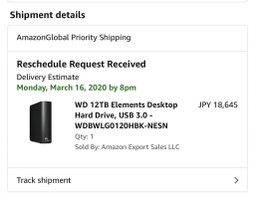
A standard WD 12TB external HDD, right?
Now let’s check kakaku.com (Japan’s price comparison site).
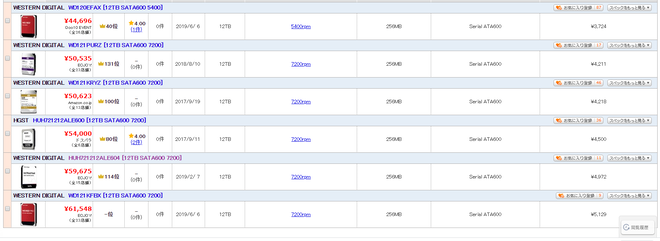
The cheapest WD Red 12TB is 44,696 yen.
Now look at the Elements price again: 18,645 yen.
Yeah. The pricing is absolutely insane.
The Infamous “HDD Lottery”
The “lottery” refers to the fact that these external HDDs could contain one of two different drive models — one helium-filled, one air-filled — creating a gamble for buyers.
For the WD Elements 12TB I purchased, both known models are helium-filled as far as current reports show. I’ll explain the differences between the two later.
If you’ve been reading closely, you might be thinking “wait, what?” At this bargain price, you get a helium-filled drive — the kind normally reserved for premium HDDs.
Compared to even the cheapest WD Red 12TB, there’s a 26,000 yen price gap. And against HelioSeal models…
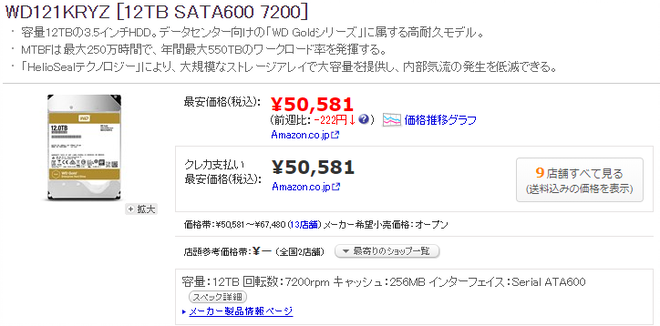
The gap is roughly 32,000 yen. And that’s WD Gold territory. The pricing is absolutely bonkers.
The Two 12TB Models
Currently, WD Elements/Easystore/My Book series contain these two models:
WD120EMAZ-11BLFA0
WD120EMFZ-11A6JA0
WD120EMAZ-11BLFA0
Most buyers from this flash sale received this model (based on my research).
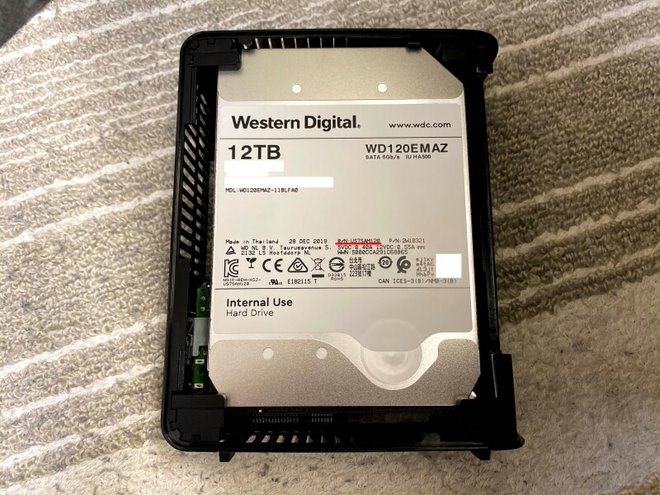
The R/N on this model reads “US7SAM120.” A Google search for this part number hits the OEM data sheet for the Ultrastar DC HC520.
Ultrastar DC HC520 (He12) SATA OEM … – Western Digital
*Direct PDF link.
WD120EMFZ-11A6JA0
This model was mostly reported in the Easystore variant.
I don’t own this one, but according to images uploaded overseas, the R/N is “US7SAP140.” Checking the data sheet reveals it’s an OEM variant of the Ultrastar DC HC530 — a 14TB model.
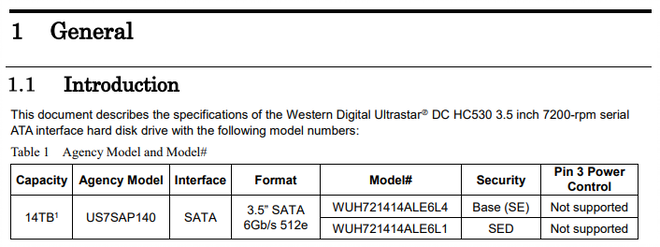
Yes, you read that right. It’s a 14TB drive firmware-downgraded to 12TB.
Western Digital has truly lost the plot.
What Is Ultrastar, Anyway?
Ultrastar was originally a brand owned by HGST (Hitachi Global Storage Technologies), which WD acquired in 2012. After operating under the HGST umbrella for a while, WD launched the Ultrastar DC HC300 series under its own name in 2018, replacing the WD Gold lineup. Ultrastar is now WD’s top-tier HDD brand.
And here it is, being sold at rock-bottom prices in external enclosures.
The Performance Is Not Ultrastar-Grade
In short, the firmware throttles performance. Think of it like a CPU with vendor-imposed clock restrictions.
The Ultrastar data sheet clearly states 7,200 rpm, but the WD Elements spec page lists 5,400 rpm.
However, since the part numbers on the drive match the Ultrastar data sheet, it’s either physically spinning at 5,400 rpm or running at 7,200 rpm with firmware-limited transfer speeds.
Measuring vibration frequency at 1Hz resolution:
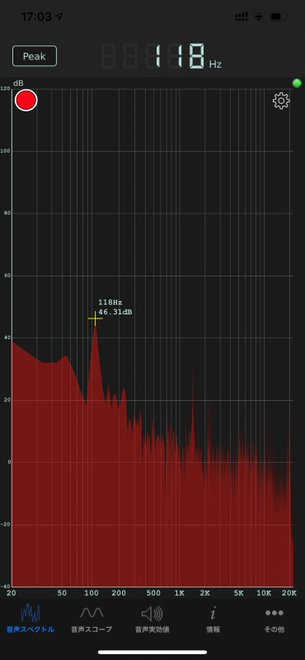
Result: 118 Hz. Multiply by 60 to convert to RPM: 118 x 60 = approximately 7,200 rpm.
Conclusion: the drive spins at 7,200 rpm but firmware limits transfer speeds to 5,400 rpm levels.
Benchmarks
Test Environment
Model: Precision T3600 Desktop Workstation
CPU: Intel Xeon E5-2690 (8 core / 16 Threads)
GPU: DELL GeForce GTX 1060 (6GB)
RAM: 40GB (4+4+16+16)
SSD: Samsung 960EVO 500GB
OS: Windows 10 Pro (Build 1909)
CrystalDiskMark
5 iterations, 1GiB test size:
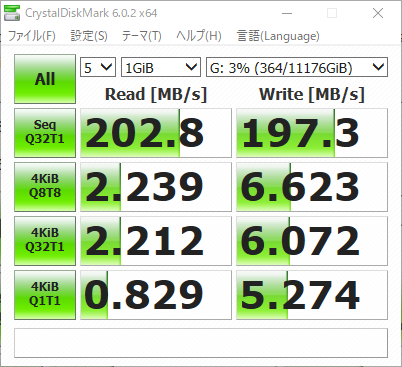
Using the same conditions as an Ultrastar DC HC510 review site, but the results fell short of the 250MB/s+ figures shown there.
WD Ultrastar DC HC510 10TB SATA Hard Drive Review
HD Tune
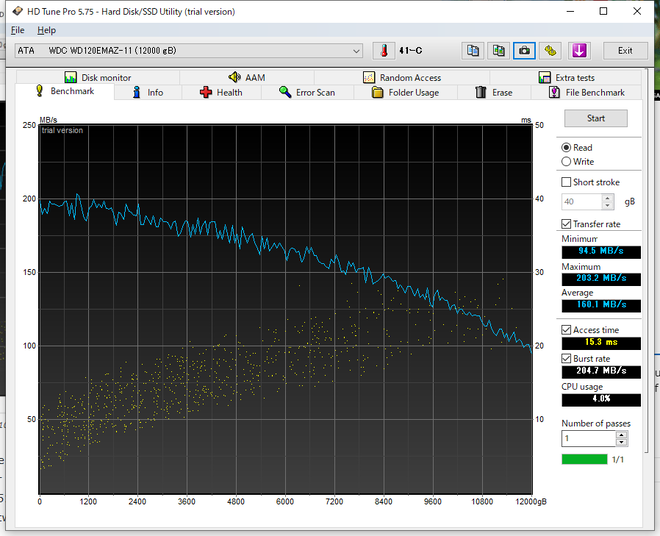
I expected a peak around 200MB/s with the minimum matching reference results. I was way off — the reference showed a minimum of ~110MB/s, while the Elements dipped below 100MB/s.
Why Does WD Sell Ultrastar Drives in Cheap External HDDs?
This is purely speculation — only a WD employee would know for sure. Note that the HDD inside bears no “Ultrastar” branding whatsoever. It’s effectively “unbranded.”
Reduced Warranty Period = Cost Savings
The standalone Ultrastar carries a 5-year warranty, but the WD Elements has just a 2-year warranty (same as WD Blue). Moreover, the warranty only applies when used as an external HDD — disassembly voids it. This significantly cuts support costs.
Firmware Throttling + Economies of Scale
Ultrastar drives serve data centers and enterprise archival, which means lower demand than WD Blue or Red. Manufacturing only what’s needed would drive up costs. By overproducing Ultrastars and channeling the surplus into Elements/Easystore/My Book enclosures, WD can maintain stable production volumes and pricing. The USB enclosure limits usage to archival purposes anyway, and disassembly voids the warranty. Even so, the firmware throttling ensures the enclosed drives don’t cannibalize standalone Ultrastar sales.
The storage controller components are identical to retail Ultrastar units (verified by PCB part numbers), which further supports this theory.

Final Thoughts
So that’s the WD Elements 12TB HDD. The speculation section is just my personal theory — if you have alternative explanations, I’d love to hear them in the comments.
An Ultrastar-based drive at this price is an incredible deal. If you’re in the market for high-capacity storage, consider ordering from Amazon US.
Leave a Reply