
Hi, this is Shichinomiya-san (@shichinomiya_s).
When you use AI agents like Claude Code or Cursor, one thing quietly adds up: token cost. Every time you have them read logs, return huge JSON, or ingest whole files, the context balloons and your API bill climbs with it.
So I found Headroom, an open-source tool that claims to “compress the context an AI agent reads by 60–95%.” Does it really shrink that much? Does quality survive? So I actually installed it on my Mac and measured the compression ratio on four data types: logs, JSON, code, and RAG.
Here’s the bottom line: it’s not “magically 95% off everything,” but bulky data really does shrink a lot. In my tests, code shrank 79.8%, JSON 59.2%, and logs 31.0%. Across a full multi-tool debugging session, I cut 47.5% (~28,000 tokens). On the other hand, natural-language prose (RAG docs) isn’t compressed by default — there are quirks. Here’s the honest review, with numbers.
What is Headroom — compressing “what the AI reads”
Headroom compresses everything an AI agent processes (tool output, logs, RAG chunks, files, conversation history) before it’s sent to the LLM. It’s written in Python (and Rust) and is provider-agnostic (Anthropic / OpenAI / Bedrock, etc.).
The key point is that it doesn’t “just cut.” It chains several specialized compressors in a pipeline and switches the method based on data type.
- SmartCrusher — compresses JSON and structured data
- CodeCompressor / Kompress — AST-aware (syntax-tree) code compression
- CacheAligner — optimizes the provider’s KV cache hit rate
- CCR (Compress-Cache-Retrieve) — reversible compression that stores the original locally and lets you pull it back via the
headroom_retrievetool only when needed
There are four ways to use it: ①Library (call compress()), ②Proxy (zero-code: just sit it on localhost:8787), ③CLI wrap (integrate directly into Claude Code / Cursor / Aider), and ④MCP server. I measured quantitatively with the highly reproducible ①Library, and also tried the ②Proxy.
Installing it — one pip command, but heavy dependencies
It needs Python 3.10+. I created a Python 3.11 virtual environment on macOS (Apple Silicon).
python3.11 -m venv venv
source venv/bin/activate
pip install "headroom-ai[all]"
The command is a one-liner, but with [all] it pulls in a pile of ML dependencies — PyTorch, Transformers, onnxruntime, sentence-transformers. That’s 200+ packages and a 2GB+ pip cache. Depending on your connection it can take several to a dozen-plus minutes, so brace for it. The installed version was headroom-ai 0.22.3.
The library API is simple — just pass a message array.
from headroom import compress

result = compress(messages, model="claude-sonnet-4-5")
print(result.tokens_before, "->", result.tokens_after)
print(f"{result.compression_ratio:.1%} reduction")
# the compressed messages are in result.messages
Test environment
| Item | Detail |
|---|---|
| Machine | Apple Silicon Mac (macOS / Darwin 25.4.0) |
| Python | 3.11 (venv) |
| Headroom | headroom-ai 0.22.3 (OSS edition, no license key) |
| Token counting | Computed by Headroom with the target model’s tokenizer (primary: Claude Sonnet; comparison: GPT-4o) |
| Settings | Defaults (no special tuning) |
I deterministically generated generic dummy data with no sensitive content. As typical of what an AI agent actually gets “fed,” I prepared four types:
- Logs — verbose app/server logs (~25K tokens)
- JSON — a largish REST API response (~33K tokens)
- Code — Python source code
- RAG docs — fragments of technical documentation (~12K tokens)
Crucially, I passed these to the agent’s conversation as “tool results.” That’s because Headroom is designed to protect “the task in progress (the latest user message)” while targeting bulky tool output for compression (more below).
Result 1: Reduction by data type
First, compressing each of the four types individually (Claude Sonnet, default settings). The more structured and verbose the data, the better it shrinks.

| Data | Tokens before | After | Reduction | Transform that worked |
|---|---|---|---|---|
| Code | 877 | 177 | 79.8% | kompress (AST) |
| JSON | 33,485 | 13,676 | 59.2% | SmartCrusher family |
| Logs | 25,423 | 17,548 | 31.0% | mixed |
| RAG docs | 11,818 | 11,818 | 0.0% (passed through) | protected |
The standout is code at 79.8%. AST-aware kompress condensed 877 tokens down to 177. JSON also dropped ~60% and logs ~30% — it’s a nice property that the data engineers tend to feed agents is exactly where the effect is biggest.
On the other hand, RAG docs (natural language) compressed 0% — not at all. That’s not a bug but by design: Headroom protects natural-language prose (whose meaning breaks easily) by default and prioritizes compressing data with structural redundancy (i.e., safe to shrink). It’s the honest reality that “not everything shrinks.”
Result 2: What about a whole debugging session?
Beyond individual data, I reproduced a real investigation flow as a single conversation: the common pattern of “timeouts spike → fetch logs → check API status → review code → identify cause,” calling several tools in sequence.
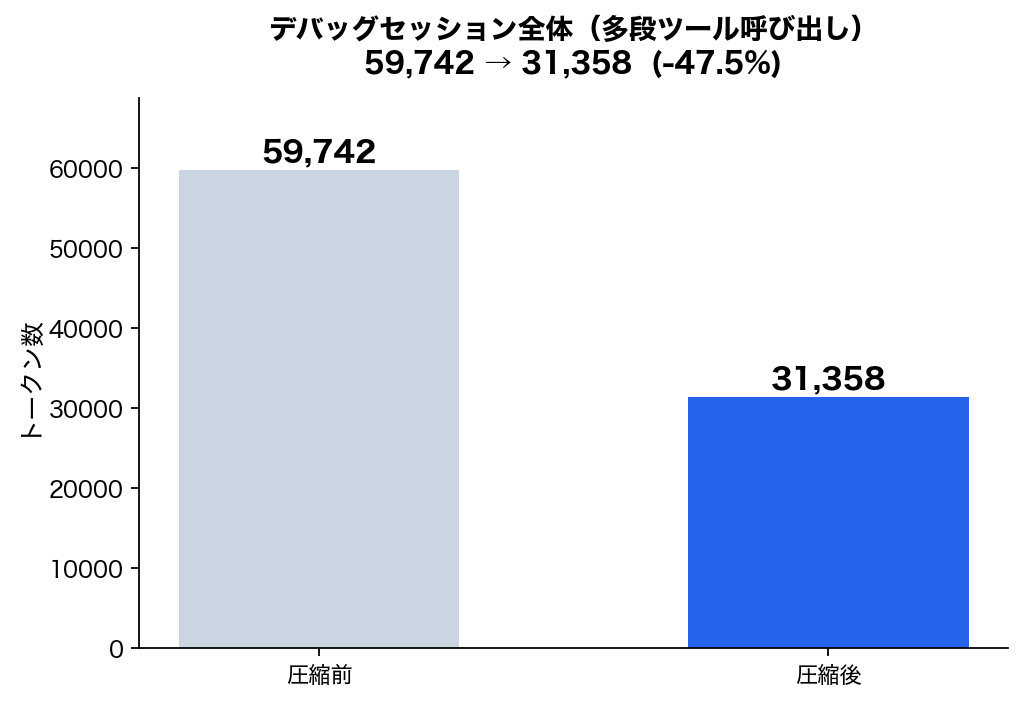
The result: 59,742 tokens → 31,358 tokens, a 47.5% reduction (~28,000 tokens saved). The three tool results that piled up in the conversation (logs, JSON, code) were each compressed, while the latest user question and the assistant’s reasoning text were kept intact. The longer the investigation session, the more this pays off.

Result 3: Is quality preserved, and is processing heavy?
“If compression deletes important info, it defeats the purpose,” so I checked whether keywords survive in the compressed text.
- Logs → the root-cause
TimeoutErrorsurvived ✅ - JSON → a specific user’s
emailvalue survived ✅ - RAG → the keyword
Kubernetessurvived (passed through anyway) ✅ - Code → kompress transforms it into a different representation, but CCR stores the original and the LLM can recover the full text on demand via
headroom_retrieve(reversible)
I also measured latency: a single compression is sub-1ms to a few tens of ms. Compared to the LLM’s response time (seconds), that’s effectively zero — no bottleneck to worry about here.
Result 4: How much do you actually save? — cost estimate
Let me convert the saved tokens into real money (Japanese yen). Assuming “the agent reads this kind of context 100 times a day (3,000/month)”, I calculated with input pricing (Claude Sonnet $3 / Opus $15 / GPT-4o $2.5 per million tokens; $1 = ¥157).
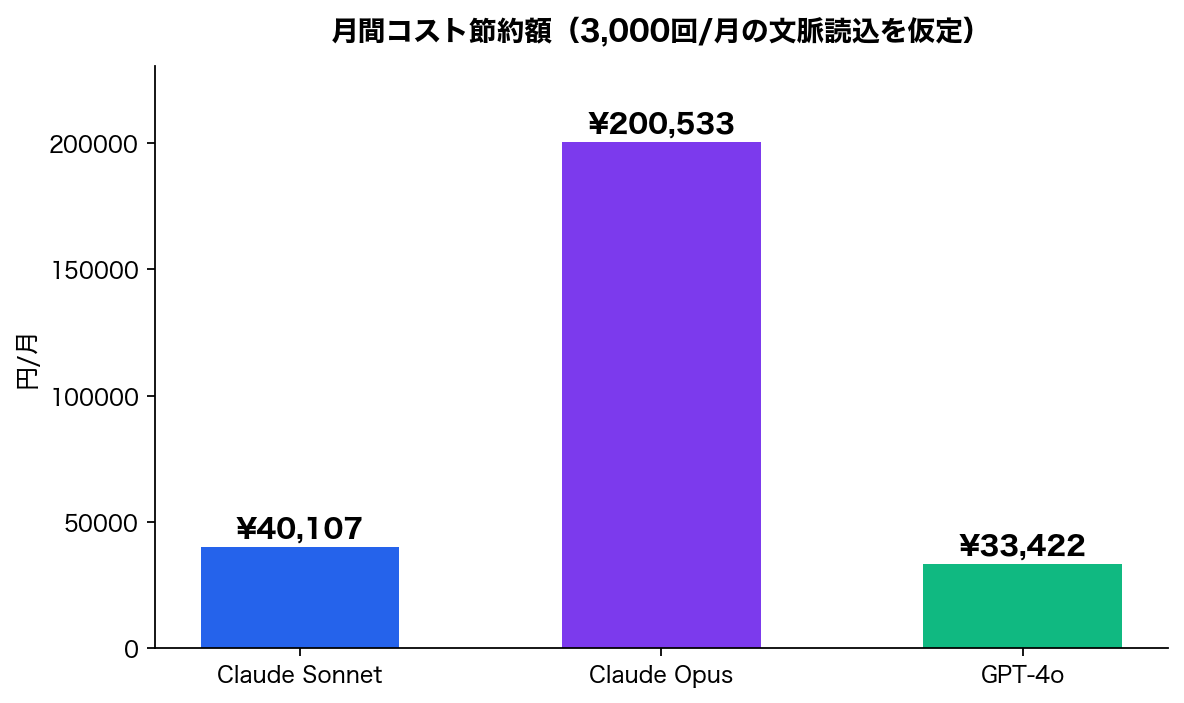
| Model | Before | After | Saved |
|---|---|---|---|
| Claude Sonnet | ¥101,175 | ¥61,068 | ¥40,107 / month |
| Claude Opus | ¥505,875 | ¥305,342 | ¥200,533 / month |
| GPT-4o | ¥84,313 | ¥50,890 | ¥33,422 / month |
It’s a hypothetical estimate, but if you lean heavily on pricey Opus, savings on the order of ¥200K/month are plausible. The heavier your agent usage, the more it matters (in reality output tokens and caching are also involved, so treat it as a ballpark).
I also tried the “zero-code” proxy
Besides the library, there’s a proxy mode that just sits in front without changing any of your code. The launch command is one line.
headroom proxy --port 8787

# from Claude Code
ANTHROPIC_BASE_URL=http://127.0.0.1:8787 claude
# for an OpenAI-compatible client
OPENAI_BASE_URL=http://127.0.0.1:8787/v1 your-app
On launch, I confirmed it provides routing to Anthropic / OpenAI / Google, two modes — token (compression-first) and cache (prefix-cache-first), plus health-check and Prometheus metrics endpoints. For subscription users (no API contract), there’s also headroom mcp install to add an MCP server to Claude Code and recover compressed content via headroom_retrieve.
To be honest: in my environment the proxy didn’t open a listening port, so I couldn’t verify end-to-end (actual API forwarding) (partly because I hadn’t set an API key). That said, the proxy uses the same compression engine internally as the library, so the reduction ratios in this article should still apply. Proxy for convenience, library for certainty — that’s the split.
The core idea — “protect the latest, shave the bulky”
What impressed me most during testing was Headroom’s smart router. By default it:
- protects the user’s latest message and recent context (don’t break the task in progress)
- targets accumulated tool results and stale context for compression
As a test, with “compress everything” (compress_user_messages=True, protect_recent=0), even protected data got compressed and JSON alone dropped ~52%. You can dial between safety and compression ratio via settings — practical.
Who it’s for / caveats
Good fit for:
- People who frequently have Claude Code or Cursor read large logs, JSON, and code
- People running agents heavily on API billing who seriously want to cut token costs
- People whose context balloons in long investigation/debugging sessions
Caveats:
- Heavy dependencies (2GB+ of ML stack). Not a lightweight tool
- Natural language / RAG prose isn’t compressed by default (prioritizing meaning preservation)
- The proxy mode needs per-environment verification (it didn’t listen in my environment)
- The effect depends heavily on data type — the more structured and verbose, the better
Summary
Looking at the “95% token reduction” tagline alone feels like hype, but measuring it for real showed that “the targeted data types really do shrink a lot.”
- Code 79.8% / JSON 59.2% / Logs 31.0% reduction (Claude Sonnet, default, measured)
- 47.5% across a full multi-step debugging session (~28K tokens)
- Important info is preserved, and code is reversible via CCR
- Compression overhead is effectively zero
- Natural language passes through by default. Not a silver bullet, but strong when it fits
If you run AI agents hard on API billing and “token cost quietly hurts,” it’s well worth measuring your own workload with the library version once. Install is a single pip install "headroom-ai[all]". It’s OSS, so you can try it for free.
Recommended Macs for local LLM / AI development
When you run AI locally, unified memory is what matters — it decides which models fit and how fast they run. Here are the latest-generation, high-memory Pro/Max picks.
This article contains affiliate links. Prices and stock vary by store.
Related reading
More on AI and Claude Code:



Leave a Reply