This article covers the connection quality and speed performance of the iVideo Wi-Fi service.
Let me be clear upfront: I am not affiliated with iVideo or FUJI Wifi in any way. This is not a sponsored review, so you can trust the speed test results presented here.
Rented Device
iVideo also offers the 30xZT as an unlimited plan, but the device I rented is the Pocket WiFi 501HW. This model was released in 2015, so it is about three years old at this point.
Connection Quality
This is the most important part.
In short: “Not blazing fast, but comfortably usable at all hours of the day.”
Here is the data behind that conclusion.
I measured speeds every 15 minutes over a 24-hour period from October 17-18, 2018.
Test conditions: Strong signal, 2.4GHz output, inside a reinforced concrete building in a relatively developed area within the greater Tokyo metropolitan region.
Test device: SHARP Android One S3 (S3-SH) using Speedcheck Pro.
The data shows speeds hovering around 20Mbps across most time periods.
Even during the lunch hour rush — traditionally a weak point for MVNOs — speeds stayed above 15Mbps, which is impressive.
The 24-hour average speed was 16.04Mbps. This includes the slower late-night and early-morning hours, but daytime speeds consistently exceeded 20Mbps.
20Mbps equals 2.5MB/s, which is plenty for web browsing and FHD video streaming.
4K video or large cloud uploads might struggle, though.
With speeds like these, connecting smartphones and tablets for on-the-go use should work without issue, potentially reducing your cellular data plan costs.
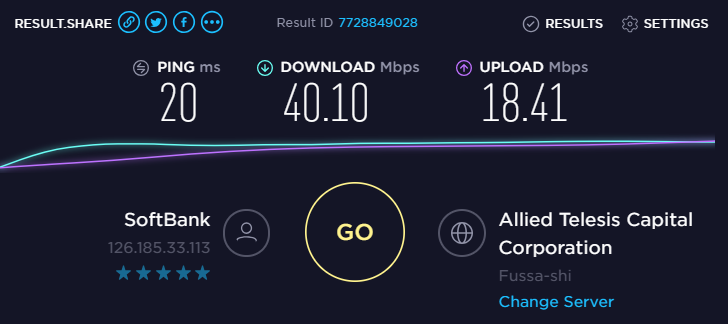
When used in central Tokyo, speeds easily hit around 40Mbps. The lower speeds at my home are likely due to connecting to a less optimal frequency band.
(Measured in Shinjuku, Tokyo, inside a reinforced concrete building)
SIM Swapping: Not Possible
Some might want to use the SIM in their own device to avoid risking the rental equipment. Unfortunately, this is not possible — IMEI restrictions are in place.
I tried inserting it into a SIM-unlocked 304HW I had lying around, but it did not work. Discussions on 5ch reached the same conclusion.
You will have to use the rental device as-is.
If you absolutely must use your own device, I recommend FUJI Wifi as an alternative. They offer 200GB/month for 4,800 yen/month, plus separate 100GB and 50GB SIM-only plans.
Device Impressions
The battery does not last a full day. There is a sleep mode feature, but it only activates when no devices are connected via Wi-Fi — once a phone or tablet connects, it stays active, limiting the feature’s usefulness.
The 601HW I previously rented had noticeably better battery life (to be expected from a newer model).
For all-day use, bring a portable battery. For long-term rentals, purchasing a spare 501HW battery pack could be worthwhile.
For home use, there is no cradle available, so no elegant desk setup. Amazon does sell universal cradles for various devices, though.
I wish there were a dedicated cradle with an Ethernet port, like NTT Docomo offers.
Summary
The competing service FUJI Wifi costs 6,000 yen/month (4,980 yen/month with a long-term contract), which is over 1,000 yen more than iVideo.
I have not used FUJI Wifi personally, but feedback on Twitter suggests their service quality is solid.
While iVideo is working to improve their service, they do fall short of FUJI Wifi in some areas, which could be challenging for less tech-savvy users.
They do respond fairly quickly via LINE inquiries, though the service is operated by Taiwanese staff (their Japanese is excellent, though).
If you prioritize peace of mind, go with FUJI Wifi. If price is your top priority, iVideo’s unlimited plan is the way to go.
That is all for now.
Recommended Items
High-Capacity Power Bank
Essential companion for mobile Wi-Fi – stay connected all day.
![[Preparation] Running Windows 10 on ARM on the Lumia 950 XL](https://miyagadget.page/wp-content/uploads/2019/02/kQ6Lm44l.jpg)
Leave a Reply