
Skip to content
MIYA·AI·LAB / generative-AI test logs LLM · Claude Code · MLX · Ollama
AI MiyaAILab_
  • // Lab
  • // all logs
JA / EN
← Miya-Gadget
Generative AI PC

Smart Shopping with Claude Code: Building an Automatic Price Monitoring Tool

2025年11月20日 · Shichinomiya
Smart Shopping with Claude Code: Building an Automatic Price Monitoring Tool

Table of Contents

Toggle
  • Building a Price Monitoring Tool with Claude Code
  • What We’re Building A Price Monitoring Tool
      • Key Features
  • Conversation with Claude Code
  • Implementation Walkthrough
      • 1. Product Registration
      • 2. Automatic Price Fetching
      • 3. Price History Management
      • 4. Notification System
  • Price Trend Graph
  • My Impressions After Using It
      • What’s Great
      • Room for Improvement
  • Conclusion
  • You might also like

Building a Price Monitoring Tool with Claude Code

So far, I’ve built a number guessing game, a to-do list, and a budgeting app using Claude Code. This time, I’m taking it up a notch with a more practical project: a price monitoring tool.

You know that feeling when you want something but the price is too high? Wouldn’t it be great to have a tool that automatically alerts you when the price drops? I built exactly that through a conversation with Claude Code.

What We’re Building: A Price Monitoring Tool

Key Features

  • Product URL Registration: Register product URLs along with your target price
  • Automatic Price Checks: Periodically fetches and records current prices
  • Price Drop Notifications: Alerts you when the price falls below your target
  • Price History Charts: Visualize price trends with graphs
  • Multi-Site Support: Works with major e-commerce sites like Amazon and Rakuten
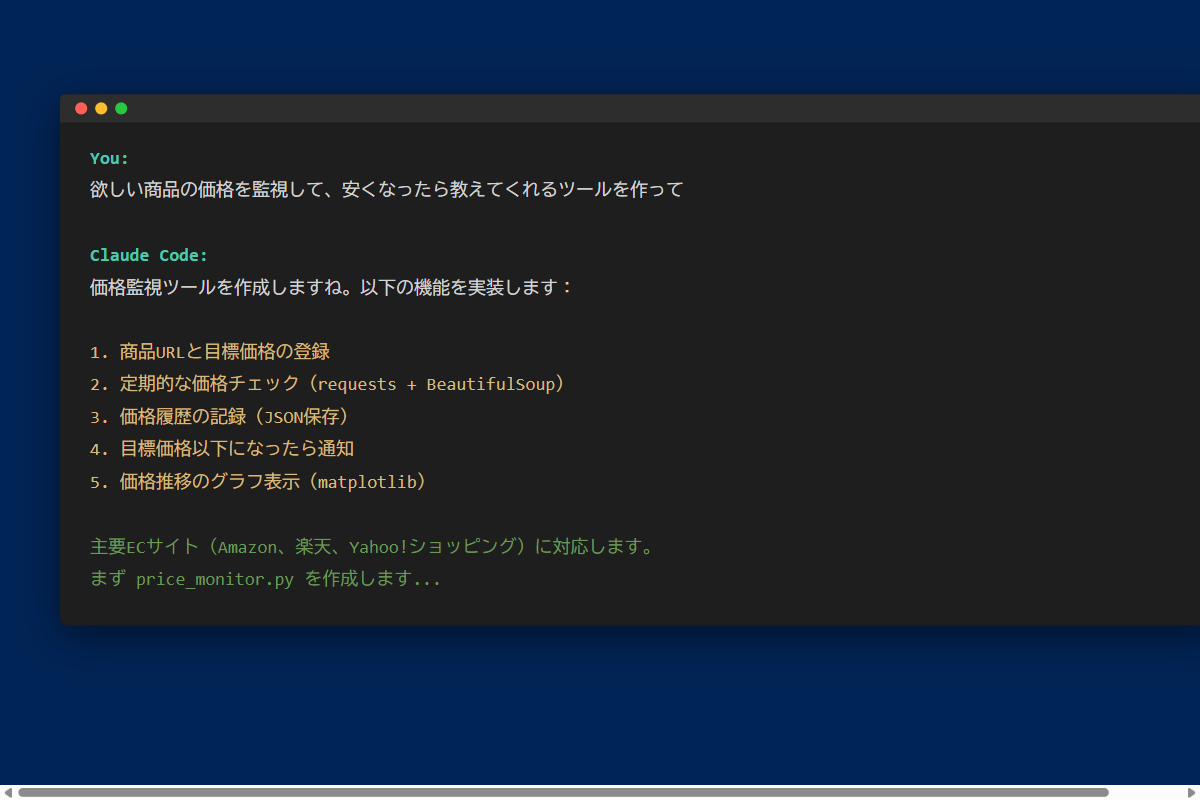
Claude Code - Price monitoring tool creation request

Conversation with Claude Code

I started by asking Claude Code to “build a tool that monitors prices of items I want to buy and notifies me when they get cheaper.”

Claude Code proposed the following features:

  • Fetch price data from product URLs
  • Save price history to JSON files
  • Compare against target prices
  • Display price trend graphs

Implementation Walkthrough

1. Product Registration

Register the URL and target price for the products you want to monitor.
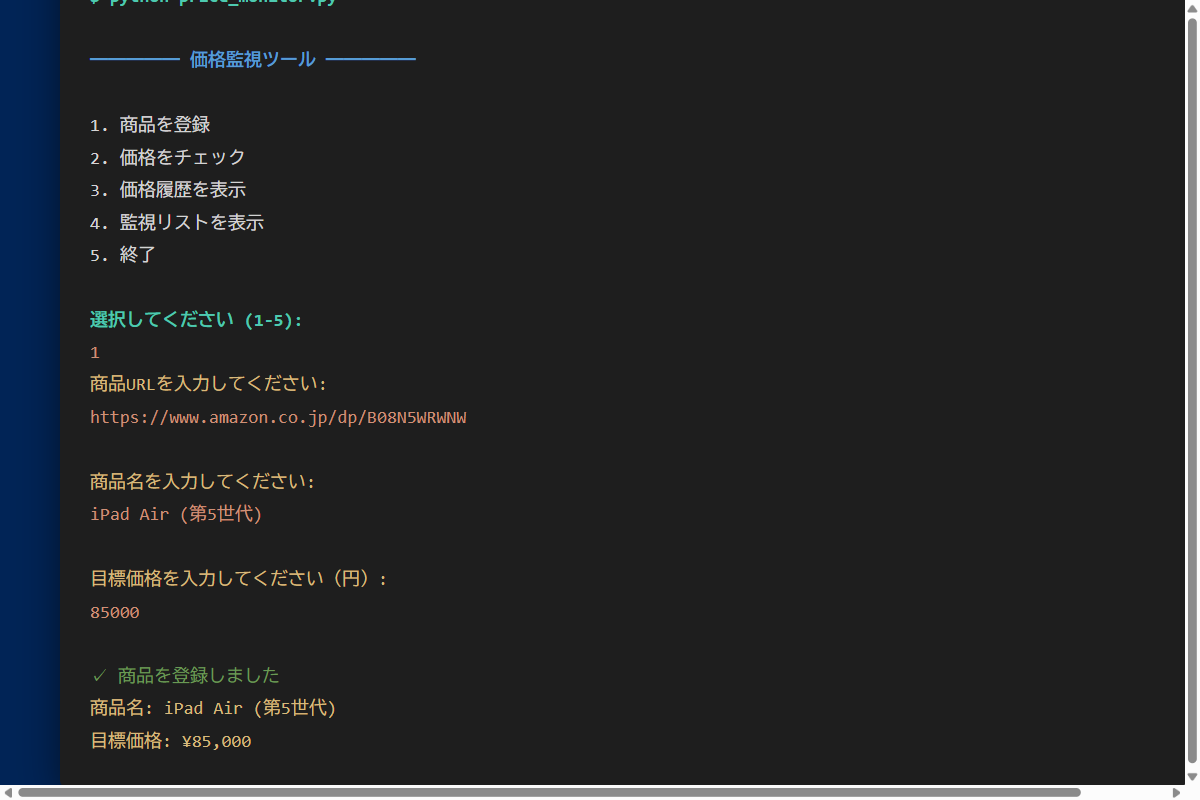
Product registration screen

2. Automatic Price Fetching

Claude Code wrote the price-scraping logic using requests and BeautifulSoup.

It handles the different price display patterns for major e-commerce sites (Amazon, Rakuten, and Yahoo! Shopping).

Price checking in progress

3. Price History Management

Fetched prices are saved to a JSON file along with timestamps. This makes it possible to track price trends over time.

4. Notification System

When a price drops below the target value, a notification is displayed in the console. In the future, this could be extended to support email or LINE notifications.
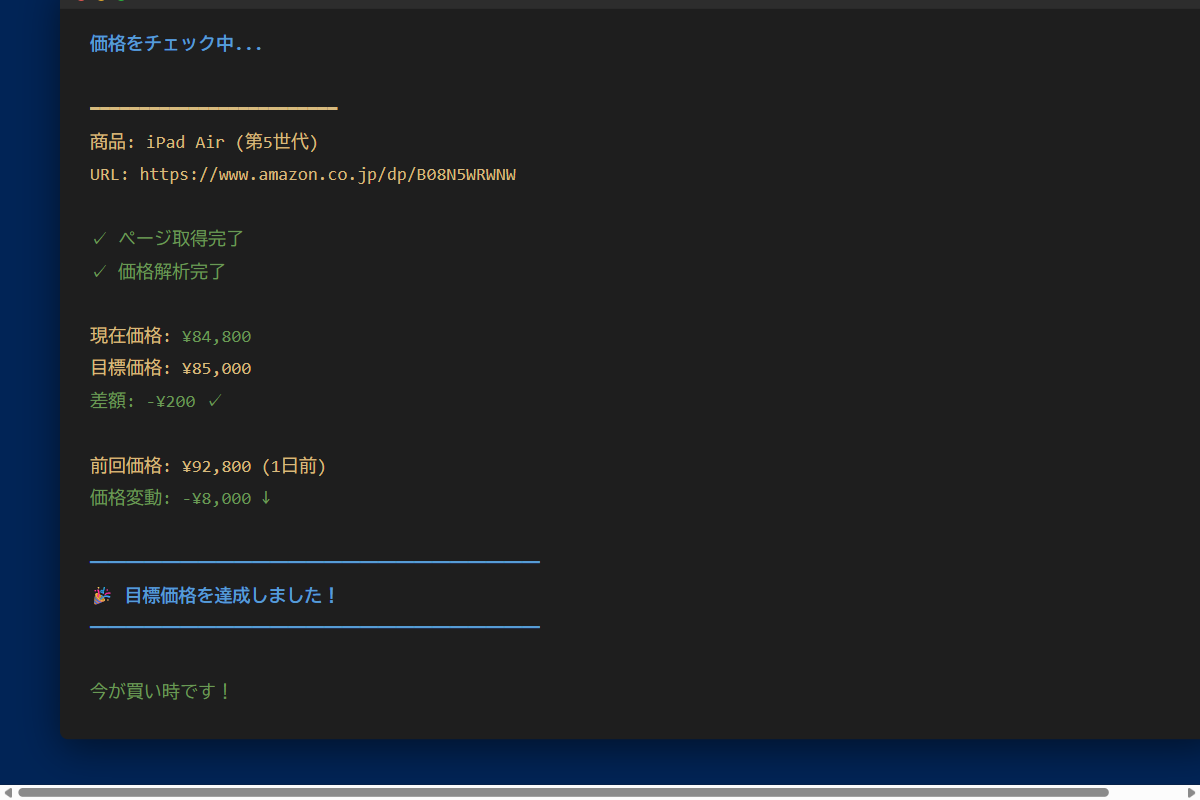
Price drop alert notification

Price Trend Graph

Using matplotlib, you can visualize price trends in a graph.
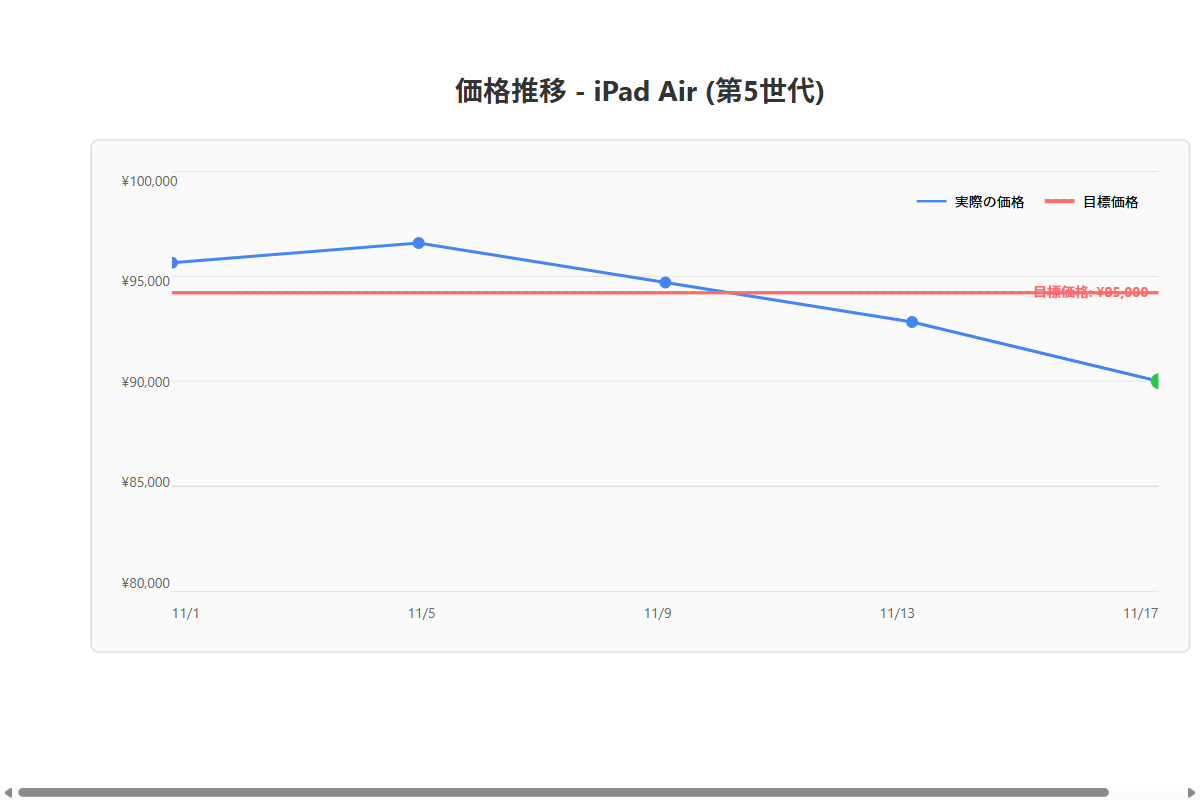
Price trend graph

The horizontal axis shows dates, and the vertical axis shows prices, making price changes easy to see at a glance. The target price is shown as a dashed line, so you can quickly tell how close the current price is to your buy point.

My Impressions After Using It

What’s Great

  • Automated price checking: No more manually checking prices every day
  • Never miss a deal: Get notified as soon as the price hits your target
  • Manage multiple items at once: Monitor your entire wish list in one place
  • Price history visibility: Spot sale patterns and trends

Room for Improvement

  • Add more notification methods (email, LINE, etc.)
  • Automate scheduled runs (cron or Task Scheduler)
  • Support more e-commerce sites
  • Fetch additional info beyond price (stock status, etc.)

Conclusion

Using Claude Code, I was able to build a practical price monitoring tool from scratch.

Web scraping might sound intimidating, but by working through it conversationally with Claude Code, even a beginner can get it done. Claude Code handles the differences in HTML structure across different sites seamlessly.

Next time, I’d like to take this tool further by adding automated scheduling and email notification features.

Until next time!
You might also like

More generative-AI logs from the lab.

  • Can you really cut your AI API bill? I deployed the context-compression tool “Headroom” and measured it
  • Modded RTX 4080 32GB Benchmarked: Qwen3.8-27B at 262K Context, 125B MoE, and MiniMax H3 Video — What 32GB Actually Delivers
  • Build a Budget Tracker App with Claude Code: Data Visualization Made Easy
  • Automate File Organization with Claude Code: Tidy Up Messy Folders in Seconds
Previous Article Easy Task Management with Claude Code — Building a Mobile Budget App from Your Smartphone
Next Article Building a Weather Forecast App with Claude Code and API Integration

Related Posts

Automate File Organization with Claude Code: Tidy Up Messy Folders in Seconds

Automate File Organization with Claude Code: Tidy Up Messy Folders in Seconds

Can you really cut your AI API bill? I deployed the context-compression tool “Headroom” and measured it

Can you really cut your AI API bill? I deployed the context-compression tool “Headroom” and measured it

The Complete Guide to Claude Code: Get Started with AI Development on Windows in 5 Minutes

The Complete Guide to Claude Code: Get Started with AI Development on Windows in 5 Minutes

Build a Budget Tracker App with Claude Code: Data Visualization Made Easy

Build a Budget Tracker App with Claude Code: Data Visualization Made Easy

Leave a Reply Cancel reply

Your email address will not be published. Required fields are marked *

Shichinomiya

Shichinomiya

A blogger who loves PC and gadgets. Sharing daily discoveries.

@shichinomiya_s

Popular Posts

  • Does the trending Claude Code skill “ADHD” actually make the agent smarter? A measured duel vs single-shot
  • Darkbloom Review: Can a Mac Really Earn Money Serving AI? (I Tested It for a Day)
  • Simplify Task Management with Claude Code! Building a Simple Todo List App
  • Tesla V100 32GB in 2026: Local LLM Benchmark with Qwen 3.6 — 98.8 tok/s on MoE 35B, 1.6x Faster Than M1 Max (Used, ≈$900)
  • Automate File Organization with Claude Code: Tidy Up Messy Folders in Seconds

Categories

  • Announcements
  • Cars
  • Cycling
  • Gadgets
  • Generative AI
  • Home Appliances
  • Internet Service
  • Outings
  • Overseas Shopping
  • PC
  • Rental Servers & VPS
  • Travel

MiyaAILab

A hands-on lab for generative AI — new models, tools, and services tested for real, from benchmarks to everyday usefulness.

Lab

  • AI Lab トップ
  • 生成AI 全記事
  • ← Miya-Gadget 本体

Latest

  • Dual Tesla V100 SXM2 on a Single PCIe Slot: 64GB VRAM & 300 GB/s NVLink Tested — Is This $700 Setup Worth It?
  • Modded RTX 4080 32GB Benchmarked: Qwen3.8-27B at 262K Context, 125B MoE, and MiniMax H3 Video — What 32GB Actually Delivers
  • Tesla V100 32GB Runs Qwen3.8-27B: 131k Context on a Single Card — Measured Benchmark
  • Tesla V100 32GB in 2026: Local LLM Benchmark with Qwen 3.6 — 98.8 tok/s on MoE 35B, 1.6x Faster Than M1 Max (Used, ≈$900)
© 2026 Miya AI Lab — a section of Miya-Gadget. miyagadget.page