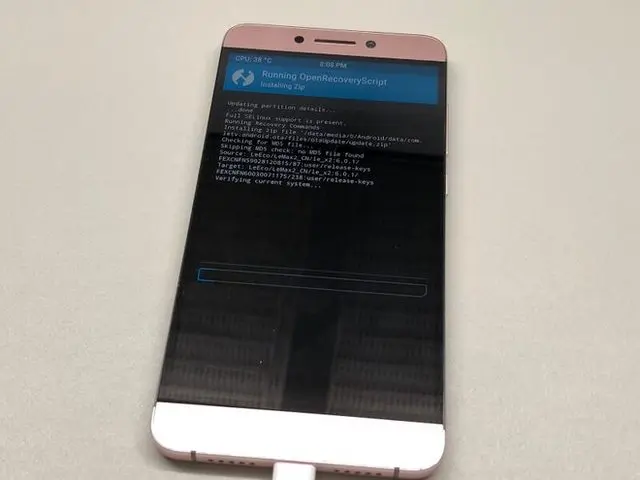
In this post, I’ll be covering the official release of EUI 6.0 for the LeEco Le Max 2 and what the update brings to the table.
It’s been a while since the LeEco Le Max 2 has appeared in an article. (It hadn’t shown up on the old blog for quite some time either.)
I’ll start with a brief background before diving into the update itself, so if you just want the update details, feel free to skip ahead.
Introduction
Do you remember when LeTV (later renamed to LeEco) made waves in the Chinese smartphone scene for offering incredibly cost-effective devices?
Among their lineup, the Le Max 2 featured a 2K display and a flagship SoC of the time, all at a surprisingly low price. LeEco was honestly riding quite a wave back then.
The secret behind their ability to maintain such strong cost performance? LeTV (LeEco) was originally a Chinese video streaming service company — think of it as something similar to Hulu or other streaming platforms.
To get more viewers for their streaming service, they manufactured dedicated devices and offered smartphones and smart TVs to subscribers at heavily discounted prices.
That much was normal, but at some point LeEco shifted its direction and started manufacturing smartphones at rock-bottom prices for everyone, which caught the attention of major media outlets both domestically and internationally.
However, around 2017, things went south. Financial difficulties, a failed smartphone manufacturer acquisition, and problems with their EV sports car project (LeSEE) all piled up. LeTV (LeEco) founder Yueting Jia stepped down as CEO, followed by massive layoffs and the sale of their headquarters building.
By the end of 2017, while they announced a new smart TV, all LeEco smartphone listings were removed from their official e-commerce site, LeMall.
Then, unreleased devices like the LeEco Le Max 3 and Le Turbo started appearing on the market, and the next update file (EUI 6.0 Beta) was leaked.
Despite all this, development of EUI (LeEco’s custom Android-based UI) never completely stopped. They recruited beta testers for EUI around the end of last year and released EUI 5.9 (.0.28s) in December, showing that development was quietly continuing.
(That said, the Android version remained stuck at 6.0.)
And then, this August, EUI 6.0 — which most people assumed would never see the light of day — was officially released.
That was a bit long-winded, but let’s move on.
EUI 6.0 Finally Arrives… But There’s a Catch
After being stuck on EUI 5.9 (Android 6.0) for so long, the update to EUI 6.0 (Android 7.0) — which at one point seemed like it might become nothing more than a legend — finally arrived via OTA. I was beyond excited, but then something caught my eye.
Take a look at this OTA screen. Notice anything odd?
Yes. Exactly.
The update file is clearly way too small!!!!!
A terrible feeling crossed my mind, but let’s go ahead and update anyway…
The Update Process Is Simple
Since it’s an OTA update, you just hit the start button and let it do its thing.
Actually, before this update arrived, I had been running a custom ROM based on CUOCU92’s EUI, but when I learned about this update, I quickly reverted to EUI 5.9.
I had flashed TWRP to the recovery partition, so I figured the OTA wouldn’t work. But somehow, TWRP launched and handled the flashing automatically.
That was a pleasant surprise.
The flashing through TWRP took a while, but for a first boot, it started up surprisingly smoothly.
Something definitely felt off though…
A Bad Feeling Confirmed
To put this “bad feeling” to rest, let’s check something in the Settings app.
“Android Version 6.0.1” / “Android Security Patch Level: January 1, 2017”
AAAAAAAAAAAAAAAAAAAHHHHH!
The bad feeling was spot on. The Android version hasn’t changed at all!!!!!
Let me share some personal speculation here. Based on the leaked beta ROM and the EUI found on unreleased devices, there’s no doubt they were developing on an Android 7.0 base.
However, EUI 6.0 (Android 7.0) was apparently riddled with bugs, unstable, and the company was in severe financial trouble. So it seems they just built EUI 6.0 on top of the stable EUI 5.9 base (Android 6.0).
In other words, this is essentially EUI 5.9 (5.9.0.30s). Why did they even call it EUI 6.0?!
I have plenty of complaints, but considering LeEco’s financial situation and LeMobile’s circumstances, we should be grateful they’re still releasing updates at all. The EUI development team truly deserves credit for their efforts.
*I may or may not have already known from XDA that EUI 6.0.0.23s wouldn’t include an Android version upgrade. I’ll never tell.
EUI 6.0 (6.0.0.23s) Review
Let’s start with the release notes.
Since not many people can read the Chinese release notes at a glance, here’s a translated summary:
Release Notes
Stable Version 6.0.030S
Release Date: 2018-08-21
Size: 265MB, Data Savings: 0M (no compression)
New Feature Highlights
Face recognition can now be used for screen unlock.
Face recognition can now be used for individual app locks.
Face recognition can now be used for privacy locks.
Other Updates
[Browser]
Optimized performance, improved page loading speed, and enhanced stability.
[Location Services]
Added a weather forecast app.
Added hot word list to real-time search.
Improved location accuracy and speed.
[Home Screen]
Optimized perceived responsiveness.
[Theme Store]
Performed screen optimizations.
[Phone Manager (Device Security)]
Optimized virus detection and improved virus removal efficiency.
Optimized overall Phone Manager performance.
Improved cache scanning performance and efficiency, freeing up more storage space.
Updated virus definitions.
[Calendar]
Optimized app stability and loading speed.
That roughly covers it. The translation may not be perfectly precise, but the substance of the update content should be accurate.
Now, let me introduce the new features.
1. Face Recognition
Face recognition has been a hot topic lately. While some Android devices had this feature long ago, it’s become trendy again — likely due to the influence of iPhone X’s Face ID.
Unfortunately, this isn’t a 3D facial recognition system like Apple’s TrueDepth camera, so the security level is significantly lower (probably even less secure than pattern unlock). The upside, however, is that the recognition speed is fast and convenient.
And now, face recognition has finally come to the Le Max 2.

Polaris@Polaris__x64

Registering your face was simple enough, but the face registration screen was in Chinese, which made things a bit tricky. I suppose translating it to other languages was too much trouble…
By the way, face recognition can also be used for screen lock, app lock, and privacy lock (voice memos, contacts, etc.).
For screen lock, you can use all three methods simultaneously: face, fingerprint, and pattern/password.
Ad Display
This is a step backwards. While LeEco’s financial situation may make it understandable, launching LeEco’s built-in apps now shows a 3-second ad before loading.
Honestly, it’s annoying and probably what users hate the most, so they should really get rid of it…
((Then again, there are no new LeEco devices to upgrade to, so maybe they don’t care anymore.))
That’s about it for the new features.
Closing Thoughts
Personally, I’m quite disappointed that the development of EUI 6.0 based on Android 7.0 was cancelled, and instead we got EUI 6.0 still built on Android 6.0.
However, I’m grateful to the EUI development team for continuing to release even minor updates despite the company’s financial struggles and withdrawal from the mobile business.
LeEco pioneered the removal of the headphone jack before Apple, and their commitment to off-screen navigation bars set them apart. I’ve been a fan since the original Le 1 Pro, so I truly hope the company can make a comeback.
I sincerely hope that LeEco’s situation improves quickly and that LeMobile will once again be able to announce new devices with pride.

Leave a Reply