In this article, I’ll walk you through how to return your phone through the “Sumaho Tokusuru Program” (au’s device return/trade-in program) after switching from au to UQ Mobile, with step-by-step screenshots.
Why I Created This Guide
You might think “just return it online,” but finding the actual return page is surprisingly difficult.
Even though all you want to do is return a device, you have to navigate through 12 page transitions to reach the return procedure page.
This guide is designed to help users who switched from au to UQ while still enrolled in the Sumaho Tokusuru Program, or who cancelled au entirely, to easily complete the device return process.
Prerequisites
In this guide, we’ll walk through the process of using the Sumaho Tokusuru Program benefit (device return) after purchasing a phone through the program on au and then switching to UQ.
If you purchased a device standalone through the Sumaho Tokusuru Program without an au line contract, you should be able to reach the return page through similar steps.
Steps
Step 1: Open the My au app and log in with your au ID.
Important note right away: use “My au,” NOT “my UQ.”
*The device purchase contract is still under au.
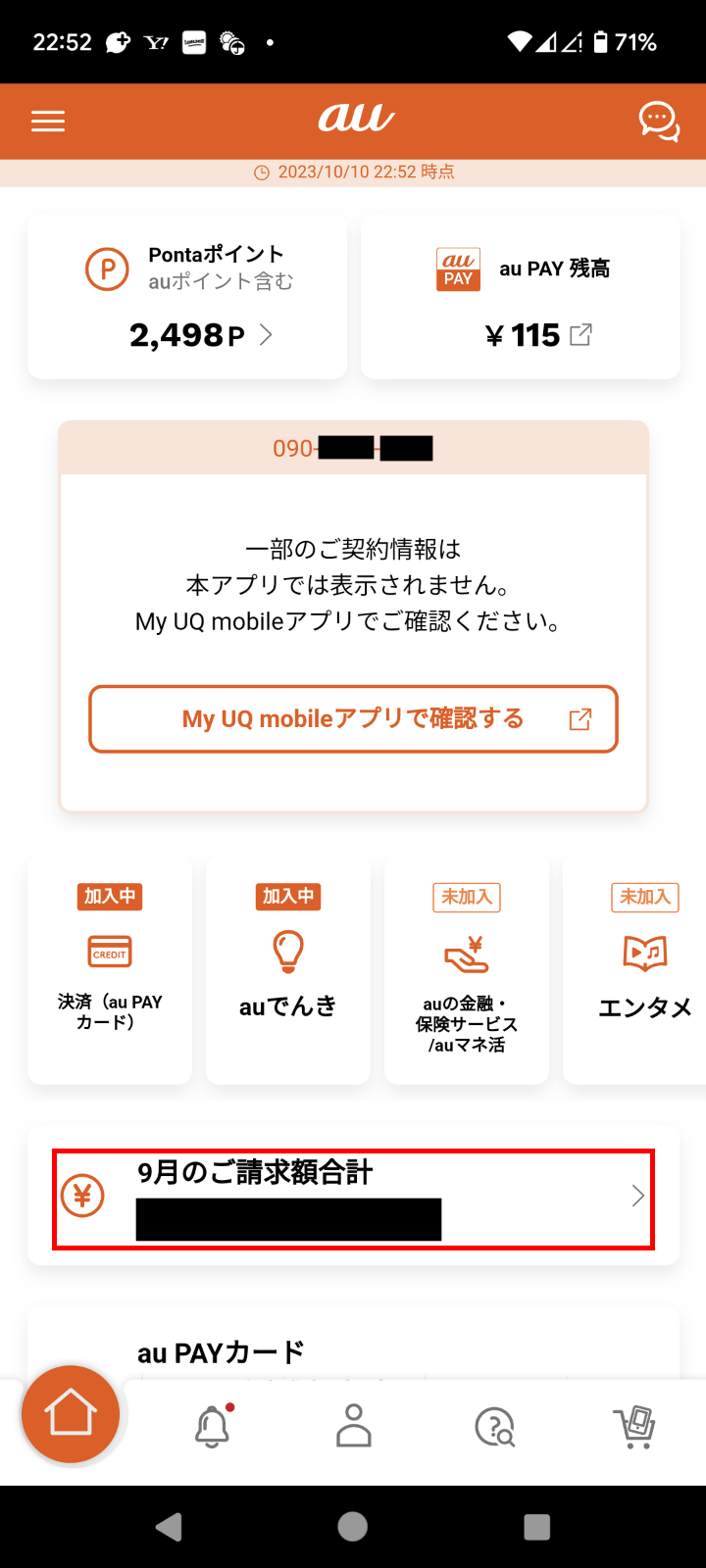
Step 2: After logging into My au, you’ll see a top page like the image below. Tap the billing amount for the current month at the bottom of the screen.
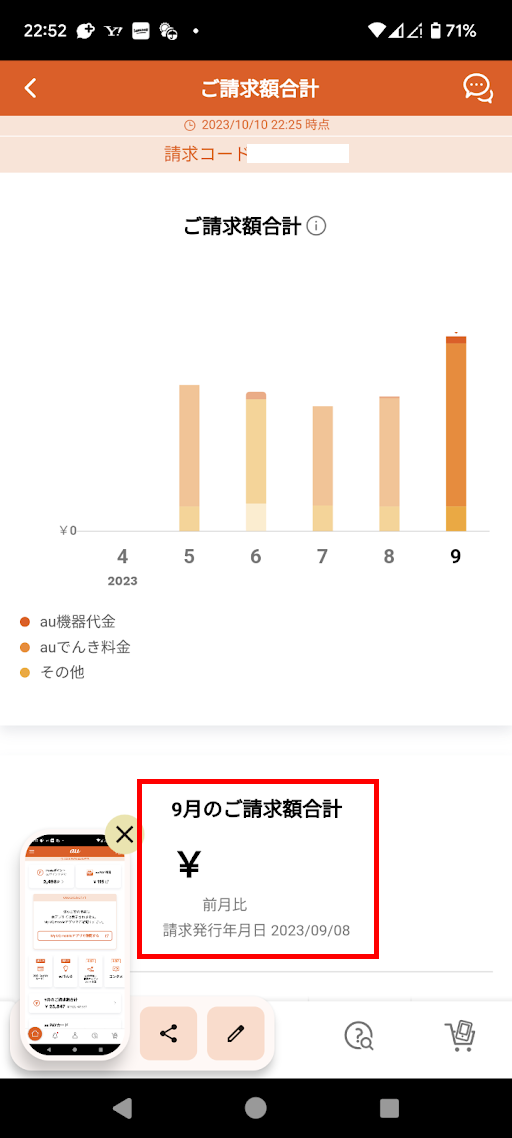
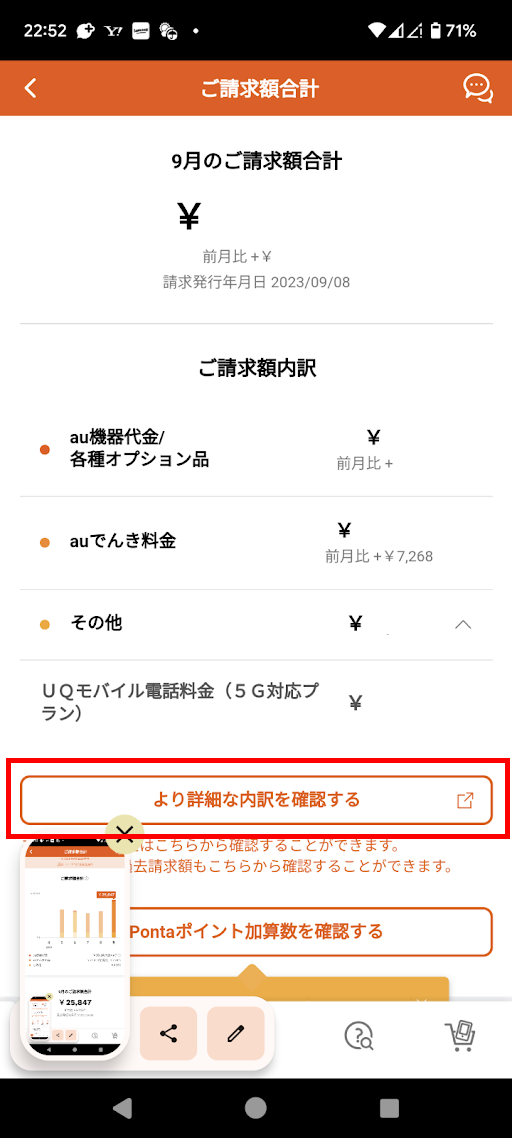
Step 3: You’ll be taken to the billing page. Scroll to the bottom and tap “View more detailed breakdown.”
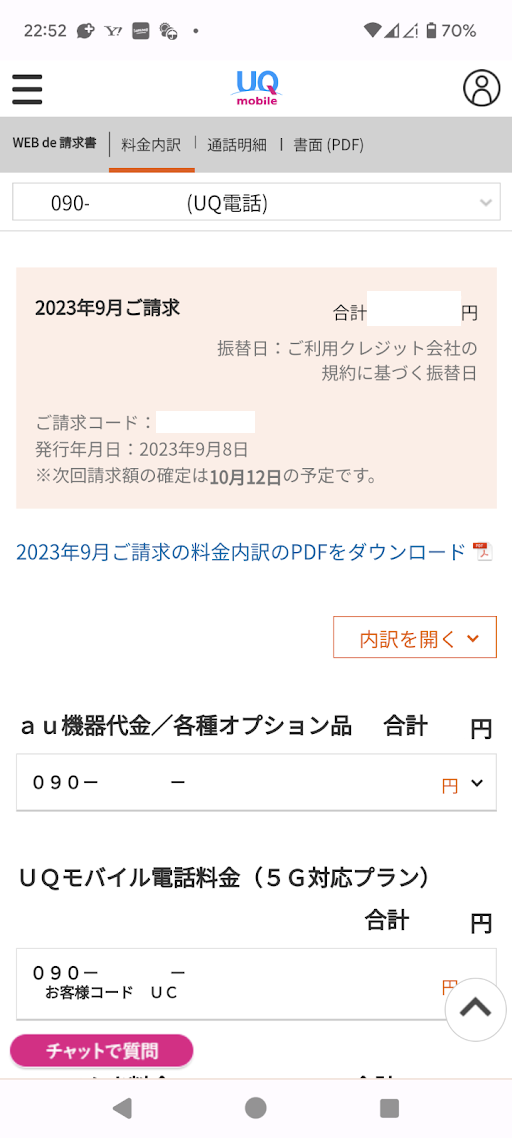
Step 4: The “WEB de Invoice” page will open. Tap “au Device Charges / Various Optional Items.”
 ]
]
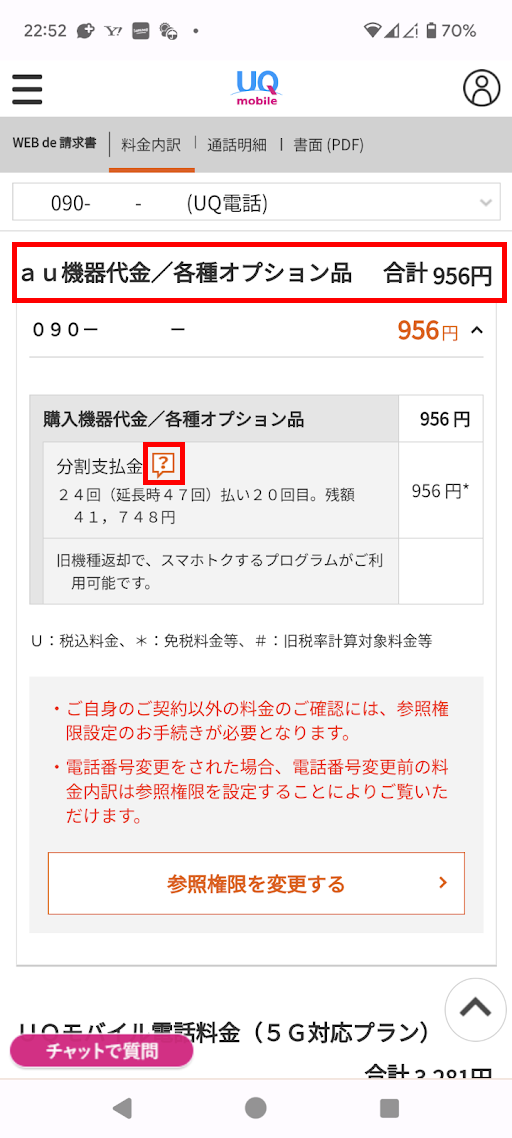
Step 5: The installment payment details will be displayed. Tap the “?” icon next to “Installment Payment.”
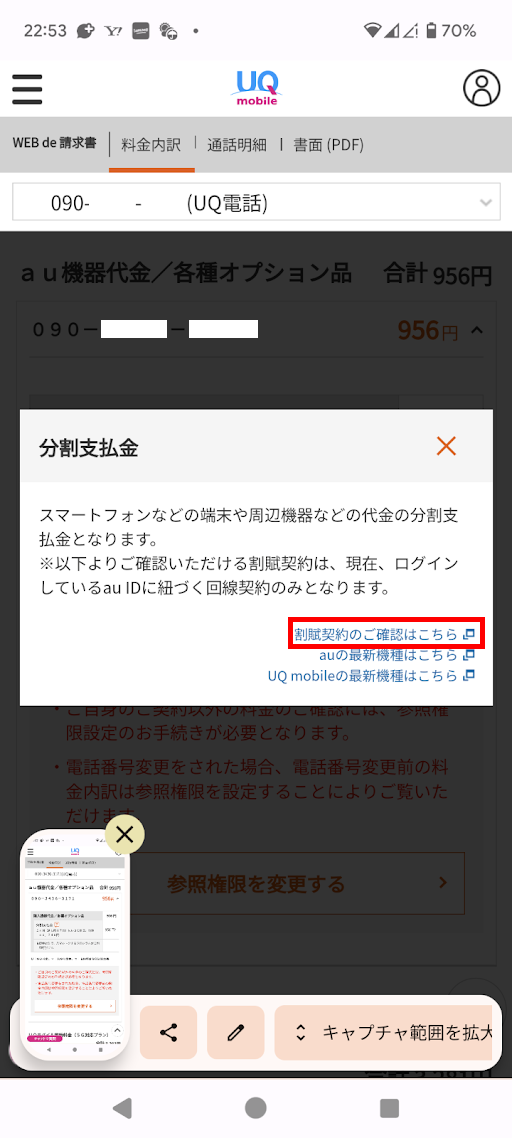
Step 6: The installment payment help will appear. Tap “Click here to check your installment contract.”
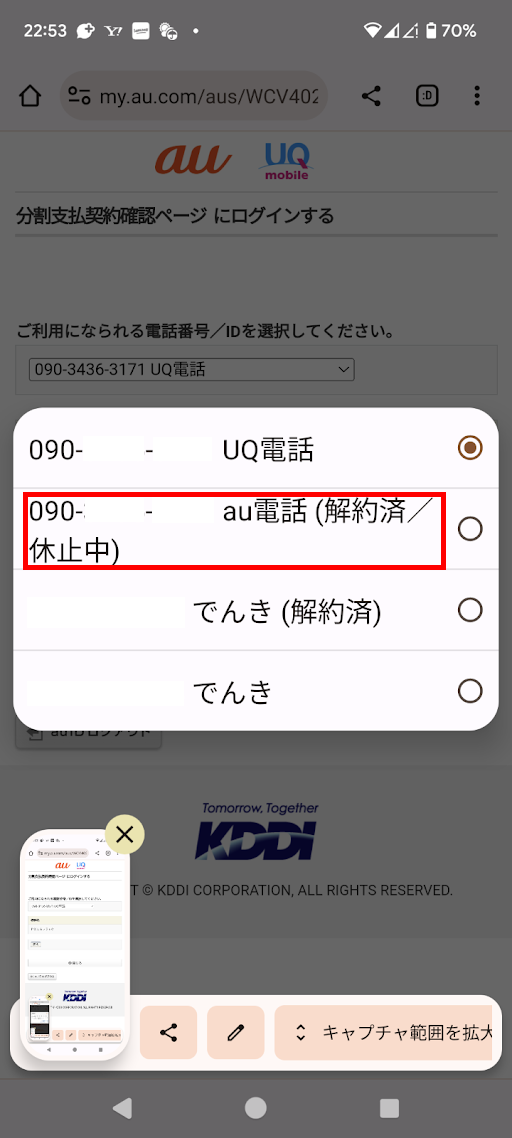
Step 7: A page like the image below will open. Click the select box labeled “Please select the phone number/ID you are using.”
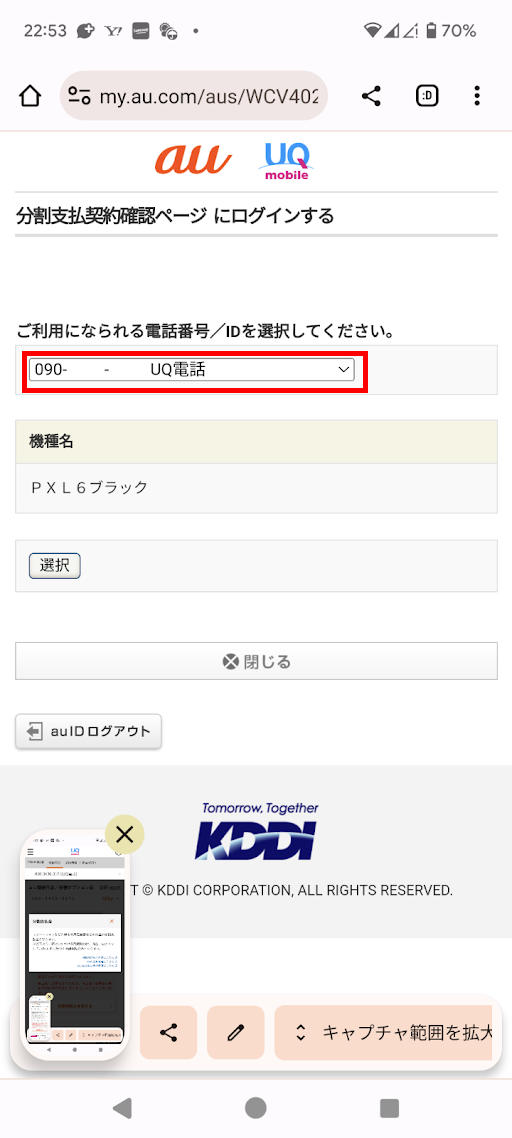
Step 8: Tap “xxx-xxxx-xxxx au Phone (Cancelled/Suspended).”
*Select the relevant phone number.
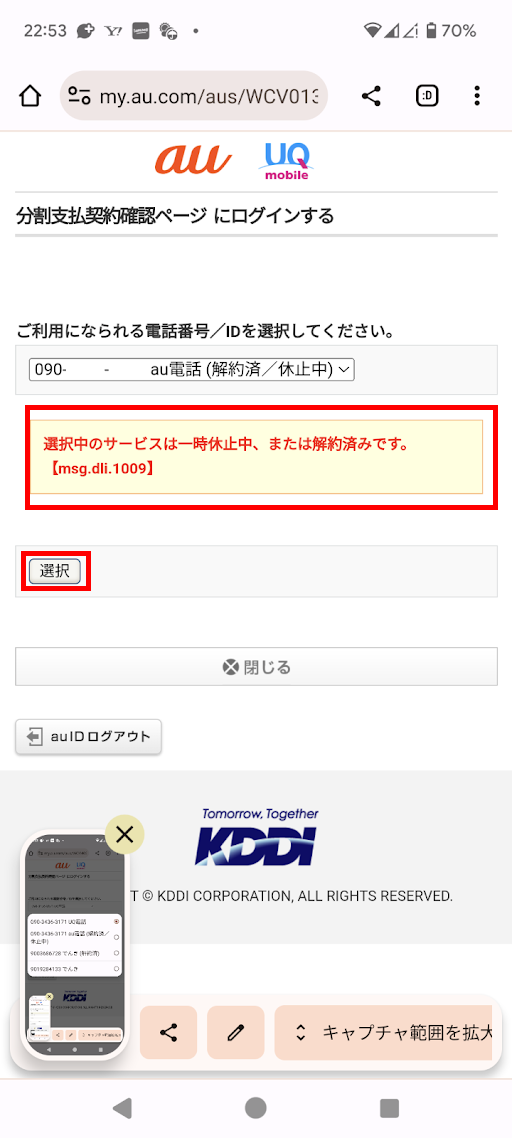
Step 9: After selecting, you’ll see a message saying “The selected service is currently suspended or has been cancelled.”
Don’t worry — just tap “Select” to proceed.
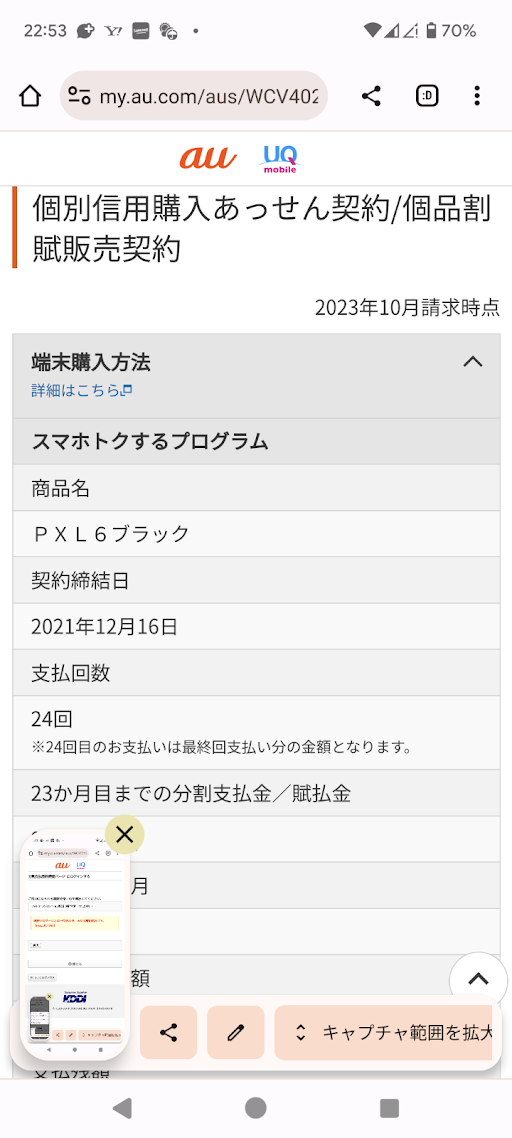
Step 10: The “Individual Credit Purchase Intermediation Contract / Individual Installment Sales Contract” page will open.
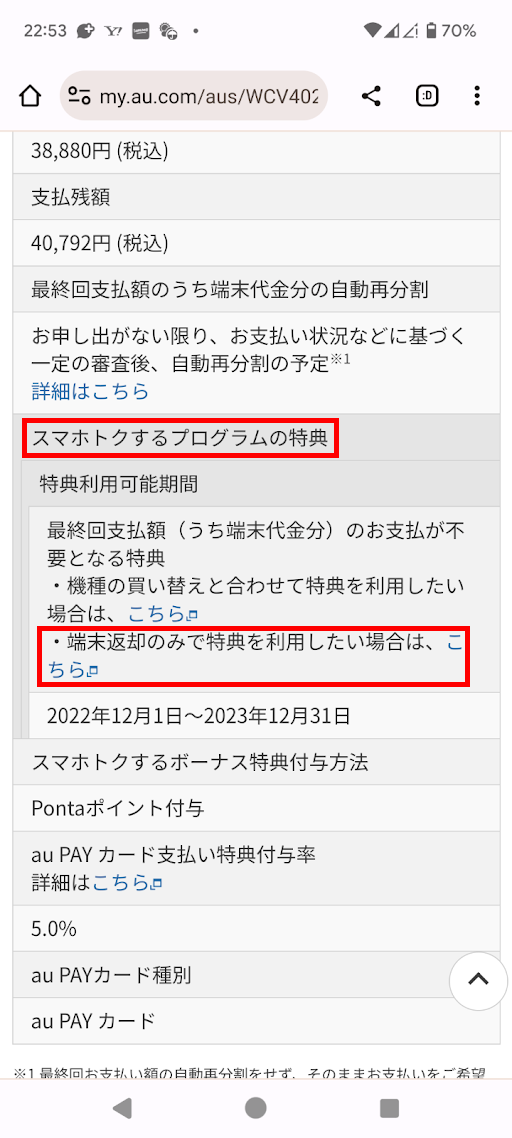
Scroll down and look for “Sumaho Tokusuru Program Benefit.”
Step 11: Tap “If you want to use the benefit by returning the device only, click here.”
This will take you to the device return page.
Step 12: From here, just follow the on-screen instructions to select your return method.
You’re all done!
Final Thoughts
Were you able to reach the return page successfully?
Thanks to regulations by Japan’s Ministry of Internal Affairs and Communications, residual value device plans can now be used even without a carrier contract. However, due to profitability concerns, carriers seem to be making the return process as difficult as possible for users without an active line contract.
Given the overly complex pricing plans and borderline deceptive contract practices of Japan’s major carriers in recent years, it’s hard not to want to avoid them entirely. Hiding the device return page like this is no different from hiding the cancellation page.
The rise of sub-brands, MVNOs, and Rakuten Mobile has improved things somewhat, but as long as carriers continue these practices, they should consider how users really feel about it.
Shameless Plug
The site admin uses a 1-year prepaid SIM to avoid dealing with carrier contracts and overly complex pricing plans.
I recommend calendar-world’s prepaid SIMs, available in 3GB/7GB/30GB monthly plans for a full year. They run on the Rakuten Mobile network, and speeds are comparable to Rakuten Mobile itself.
Since you buy a full year upfront, the one-time cost is higher, but the monthly equivalent is extremely affordable.
3GB: 560 yen/month
|
![CALENDAR 1-Year Prepaid SIM - 3GB/month Plan [Rakuten Network, au Network, International Roaming]](https://hbb.afl.rakuten.co.jp/hgb/36bd6f1e.d59256f5.36bd6f1f.3990a211/?me_id=1269312&item_id=10001944&pc=https%3A%2F%2Fthumbnail.image.rakuten.co.jp%2F%400_mall%2Fcalendar-world%2Fcabinet%2F02554327%2Fimgrc0114846945.jpg%3F_ex%3D100x100&s=100x100&t=picttext)
7GB: 805 yen/month
|
![CALENDAR 1-Year Prepaid SIM - 7GB/month Plan [Rakuten Network, au Network, International Roaming]](https://hbb.afl.rakuten.co.jp/hgb/36bd6f1e.d59256f5.36bd6f1f.3990a211/?me_id=1269312&item_id=10001946&pc=https%3A%2F%2Fthumbnail.image.rakuten.co.jp%2F%400_mall%2Fcalendar-world%2Fcabinet%2F02554327%2Fimgrc0114846946.jpg%3F_ex%3D100x100&s=100x100&t=picttext)
30GB: 1,800 yen/month
|
![CALENDAR 1-Year Prepaid SIM - 30GB/month Plan [Rakuten Network, au Network, International Roaming]](https://hbb.afl.rakuten.co.jp/hgb/36bd6f1e.d59256f5.36bd6f1f.3990a211/?me_id=1269312&item_id=10001948&pc=https%3A%2F%2Fthumbnail.image.rakuten.co.jp%2F%400_mall%2Fcalendar-world%2Fcabinet%2F02554327%2Fimgrc0117564573.jpg%3F_ex%3D100x100&s=100x100&t=picttext)
If dealing with complicated pricing plans sounds like a hassle, why not give prepaid SIMs a try?
Combining a prepaid SIM with povo 2.0 (which gives you a phone number for free) makes for an incredibly cost-effective setup.

Leave a Reply