Disclaimer
This is not a sponsored post.
Let’s get right into it.
I live in a low-rise apartment building, and at a recent residents’ association meeting, something was decided.
That’s right: the introduction of NURO Fiber.
The building was constructed just before in-unit LAN wiring became standard, so unfortunately only phone lines were installed. There had been a proposal to run LAN cables to every unit, but it was abandoned due to issues with in-unit conduit routing. So we’d been stuck with DSL internet over phone lines. That said, since it’s a small low-rise building with few units, we were getting speeds close to the theoretical maximum of 100 Mbps, so it wasn’t a huge problem.
However, for someone like me, 100 Mbps just isn’t enough! My unlimited Google Drive plan was practically unusable, which was quite frustrating.
And then… finally… fiber was coming all the way to our units! It felt like a dream come true, so I signed up at lightning speed.
The Sign-Up Process Was Easy
All I had to do was call the office managing our building, and the sign-up was done. I recall receiving about two documents in the mail. Since I’m not the head of household, I handed them off to my father.
Building-Wide Installation
This phase involved running fiber cables to the MDF (Main Distribution Frame) and connecting cables to the centralized wiring closets on each floor.
This part was completed in about one day.
In-Unit Installation
Next came the work of running cables from those floor-level wiring closets into individual units. This was the critical part.
In our building, the plan was to thread the fiber cable through the existing conduit pipes that carry the phone lines.
The method works like this: a rigid but flexible steel cable is fed in from where the phone line connects, pushed through the conduit toward the exterior junction point. Once the steel cable makes it through, the fiber optic cable is attached to its end and pulled back through.
Sounds simple enough on paper, right….
This Is Where Disaster Struck
The installation crew arrived and began feeding the flexible cable into the conduit from the phone line outlet, trying to route it through to the exterior junction.
However, they could hear the cable emerging on the completely opposite side from where it was supposed to come out.
The technician’s face went pale with an “oh no” expression. He quickly started pulling the cable back out and said:
“I’m sorry, but it looks like the conduit is broken. The cable is coming out into the ceiling cavity, so we can’t complete the installation…”
They tried feeding the cable from the other direction as well, but the same thing happened — the cable was going to the wrong place. It was clear the conduit was completely compromised.
The installation ended right there. So close, yet so far from getting connected.
The Cause
The cause was deteriorated conduit pipes. Since the conduits are primarily made of resin, they degrade over time. The curved sections are especially vulnerable because they’re under constant stress, making them prone to cracking and breaking.
If there had been spare CD conduits installed with future expansion in mind, it would have been a different story. Unfortunately, our building was constructed with zero consideration for future wiring expansion, which is how we ended up in this situation.
(Despite both the real estate brand and the construction company being top-tier…)
With the conduit broken, there was no way to thread a wire through, and no way to run fiber cable through the pipes.
According to the technician, this type of problem is surprisingly common.
Amen. My dream was dead.
But There Was Still Hope
So the dream of bringing fiber to a VDSL apartment seemed impossible. I was about to give up and sign up for au Hikari’s Type G plan, which offers slightly over 100 Mbps.
…But then I learned there was still hope. Enter: NURO Fiber’s Conduit Recovery Service.
This recovery service had apparently just been launched and wasn’t even listed on NURO’s website at the time.
The service is designed for cases where you’ve signed up for NURO Fiber and the installation has progressed to the conduit work phase, but something went wrong with the conduits preventing cable routing. A specialized team that focuses on conduit damage, blockages, and similar issues comes back to attempt the installation again.
Sounds impressive, right? And the best part: it’s completely free. I was moved by how customer-friendly that is.
So it was decided that this specialist team would give it another shot.
The Retry
Two technicians from NURO’s Conduit Recovery Service came to our unit.
They had already been briefed on the situation, so the work started relatively smoothly.
They attached a steel cable to the existing phone line, pulled the phone line out (bringing the steel cable into the conduit), then attached the fiber cable to the steel cable’s end and pulled everything back through.
I was surprised by how hands-on and old-school the method was. Once the fiber cable was through, all that remained was installing the fiber outlet and setting up the router.
Installation Complete!
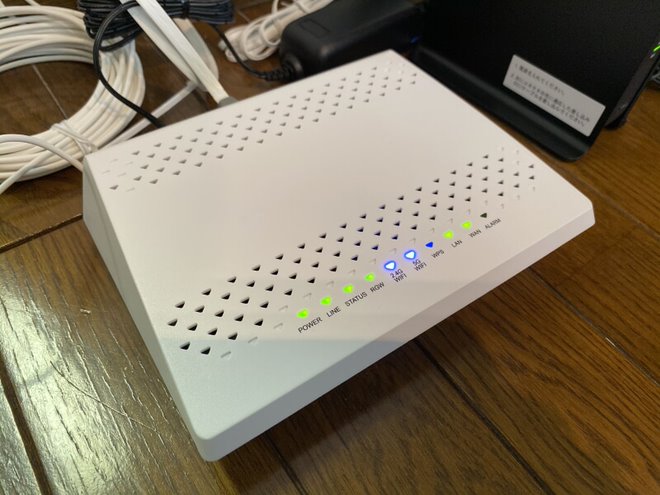
The installation went more smoothly than expected, which was a relief. The previous technician had mentioned they might need to drill a hole in the ceiling, so I was bracing for the worst.
As a backup plan, I was already thinking about running the fiber cable from the entry point to the router location myself.
This turned out to be more of a diary entry than anything, but I hope it serves as a helpful reference for anyone dealing with similar conduit issues when getting NURO Fiber installed.
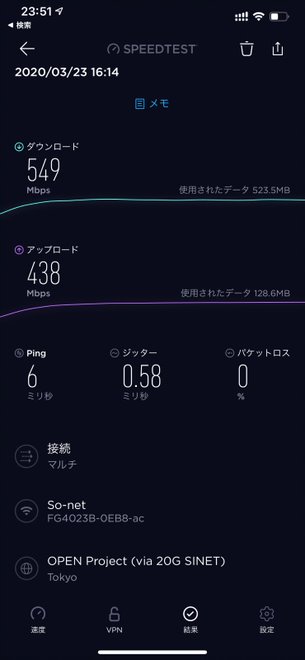
By the way, the Wi-Fi speed test I ran on the spot exceeded 500 Mbps downstream. While the theoretical maximum for 802.11ac is 6.9 Gbps, this is a solid real-world result.
Final Thoughts
So that’s the story of how I finally got connected! According to the installation crew, many in-unit installations hit a wall due to conduit problems, so I figured this experience might be useful to share.
Since the Conduit Recovery Service was recently introduced, even if you applied before and were turned away, it might be worth giving it another try.


Leave a Reply